How to Program:
Product Introduction
Advanced Features of the Remote Control Keypad:
Thank you for choosing our universal remote control. This product features patented technology that allows you to
easily control all air conditioners from the Daikin brand. With its immediate setup and numerous advanced features,
this remote offers much more than traditional universal remotes.
Battery Installation: Completely remove the sliding cover of the remote control, insert two AAA (UM-4, LR03)
batteries, paying attention to the polarity.
Turning On the Air Conditioner: Point the remote control at the air conditioner and press the ON/OFF button. If
the air conditioner does not turn on or does not respond correctly, proceed with the code search. Aim the remote
control at the air conditioner and follow one of the two procedures indicated.
Automatic Code Search:
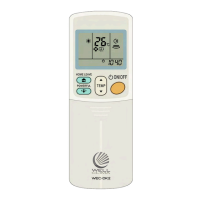
Hold down the ON/OFF (orange) button; after about 5 seconds, codes will appear on the remote's display,
continue holding it down. Each time the code changes, the remote sends a signal to the air conditioner.
Quickly release the button as soon as you see the air conditioner turn on.
1.
Manual Code Search - this procedure allows you to operate with more peace of mind:
Hold down the ON/OFF (orange) button; after 5 seconds, a code or the symbol -- appears on the remote
control's display, then release the button.
1.
Using the temperature arrows (TEMP), advance one code at a time; with each number change, the remote
sends a signal to the air conditioner.
2.
When the air conditioner turns on, press ON/OFF again to confirm and test the buttons.3.
Remote Control Test: Test the various buttons on the remote control to ensure that all functions are operational.
If some functions do not activate, repeat the code search process.
Helpful Tips:
Code Storage. Once the correct code is found, we recommend writing it down and keeping it in a safe place,
for example, under the sliding cover of the remote control. This will ensure that you always have the code
available in case of accidental deletion.
Code Memory. In the event of battery replacement, the code will remain in memory for about 2 hours.
The remote control keypad includes many special keys in addition to the standard operating modes. The
availability of these advanced features may vary depending on the model of the air conditioner and the settings of
the remote control itself. The number of options for adjusting the air speed is also determined by these factors.
Consult the air conditioner manual and check the availability and description of the features available on your
device. If the remote control does not activate a particular function, repeat the search from step 2 and try
another code.
WEC-DK2 Universal Remote Control
for Daikin Air Conditioners
Distribuito da KOOMANDO Srl - Azzano Mella (BS) - Italy
info@wellclima.com
Tutorial video
Find the remote control programming tutorial video on the KOOMANDO YouTube channel.
En
Clock Function
Press the small button with the clock symbol, then set the time using the Timer arrows and press the same
button to confirm. Note: the remote does not have an internal oscillator, and the time may not be accurate; this
does not affect the air conditioner's functions.
To ensure compatibility with all models, the timer can be set in one-hour steps: timer ON when the air
conditioner is off, timer OFF when it is on. To set it, press and hold the button (e.g., ON if the air conditioner is off)
for 3 seconds; the timer symbol will flash. Use the TIMER arrows to select the desired time interval, then press
the same button to confirm. The CANCEL button clears the setting. Attention! Due to an error in a production
batch, the OFF and CANCEL buttons are reversed on some units: CANCEL sets the Timer OFF while the OFF
button clears the setting. We apologize for the inconvenience.
Timer Function


 To Next Page
 Loading...