ATA Web user guide
90 / 114 2015/1/8
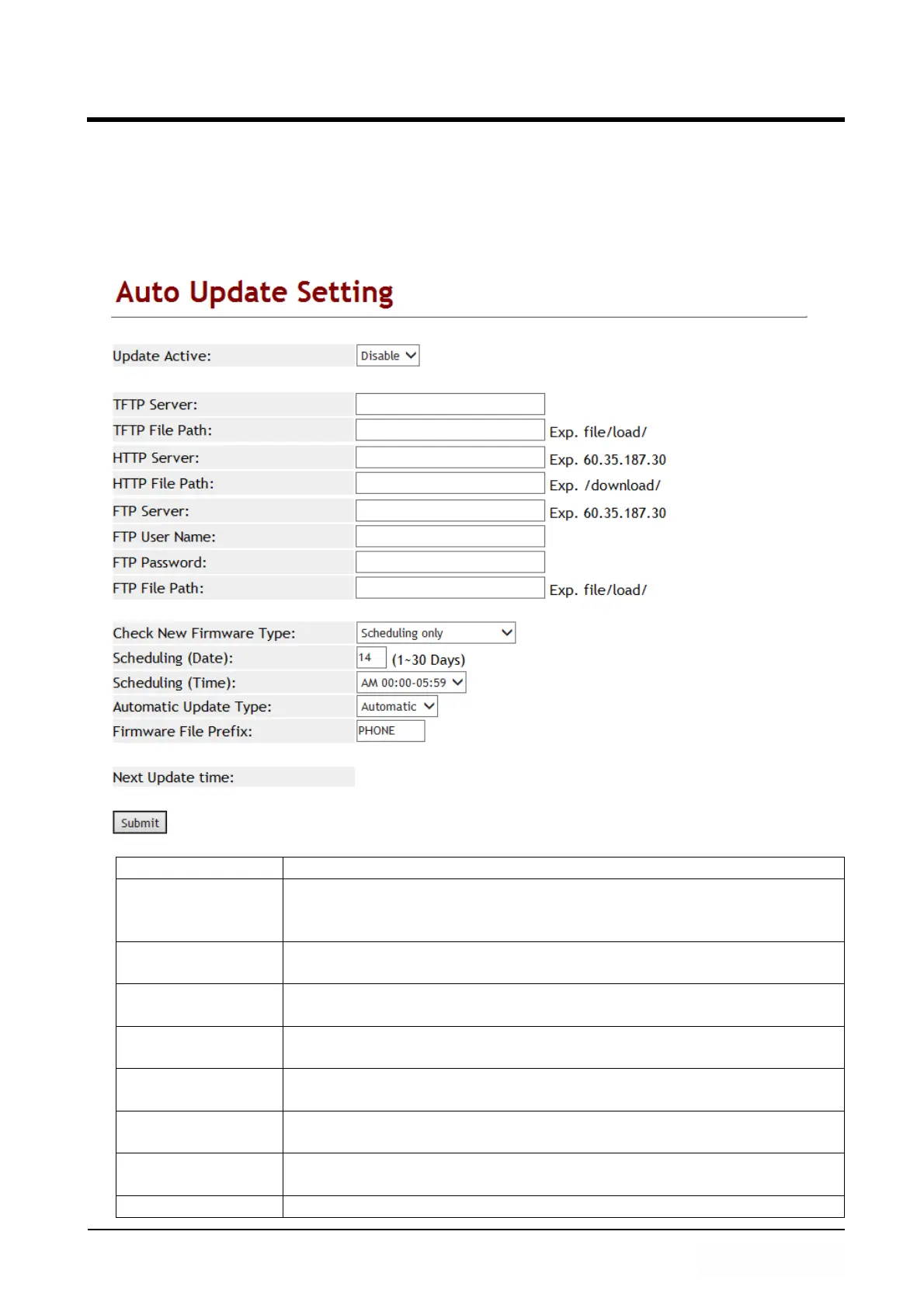
10.3 Auto Update (Firmware Auto Upgrade)
10.3.1 Function
Provide the types of TFTP, FTP, HTTP to update the firmware in ssh type.
10.3.2 Instruction
Item Decription
Update Active Default: Disable; When this function is on, LP399 will update the
firmware from the designate Auto provision Server.
Provide options: Disable, TFTP, FTP and HTTP.
TFTP Server This column can only enter IP with the format of
xxx.xxx.xxx.xxx; maximum length is 15 bytes.
TFTP File Path This column can enter numbers or strings; maximum length is
63 bytes with the “/” in the end, for instance: 123/.
HTTP Server This column can enter IP or Domain Name; maximum length is
63 bytes.
HTTP File Path This column can enter numbers or strings; maximum length is
63 bytes with the “/” in the end, ex: 123/.
FTP Server This column can enter IP or Domain Name; maximum length is
63 bytes.
FTP User Name This column can enter IP or Domain Name; maximum length is
63 bytes.
FTP Password This column can enter IP or Domain Name; maximum length is



 To Next Page