1
2
3
4
5
6
cd
mkdir -p hardware
cd hardware
mkdir esp8266com
cd esp8266com
git clone https://github.com/esp8266/Arduino.git esp8266
download the binary tools:
1
2
cd esp8266/tools
python get.py
and finally install the examples:
1
2
cd
git clone https://github.com/wemos/D1_mini_Examples.git
Later on, you can update the board support files and the samples by running git pull in the two
directories where you ran git clone.
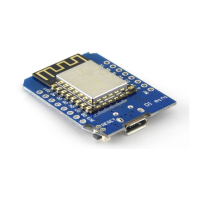
Now connect Wemos D1 mini to a USB port of your computer with a micro USB to USB cable. In Linux,
you should see a new device in the kernel log:
1
2
3
4
5
6
[ 8643.196931] usb 7-3: new full-speed USB device number 4 using ohci-pci
[ 8643.361709] usb 7-3: New USB device found, idVendor=1a86,
idProduct=7523
[ 8643.361717] usb 7-3: New USB device strings: Mfr=0, Product=2,
SerialNumber=0
[ 8643.361722] usb 7-3: Product: USB2.0-Serial
[ 8643.363826] ch341 7-3:1.0: ch341-uart converter detected
[ 8643.387870] usb 7-3: ch341-uart converter now attached to ttyUSB0
Let’s start Arduino 1.6.8 and select WeMos D1 R2 & mini in Tools->Board.


 To Next Page