EasyManua.ls Logo

WEMPE 20804/IP - User Manual

WEMPE 20804/IP
12 pages
Print Icon
To Next Page IconTo Next Page
Loading...
Schiffsuhr CHROM 232mm Mod. 20804/IP ENI v3
Marine clock CHROME 232mm Art.-no. CW850346
V0618
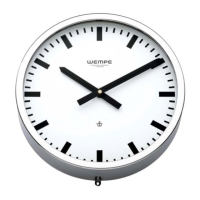
Eine zeitlos schöne Schiffsuhr!
Die elegante Schiffsuhr wird in einem
hochglanzverchromten Messinggehäuse geliefert.
A timeless beauty marine clock!
The elegant marine clock with high-gloss polished brass
case chrome plated and glass frame.
Gehäuse
Housing
Messing hochglanz verchrom
t
brass high-gloss chrome plated
Abmessungen (mm)
Dimension (mm)
Ø 232 / Höhe 65
Ø 232 / height 65
Zifferblatt (mm)
Dial (mm)
Aluminium weiß Ø 230
aluminium white Ø 230
Skala
Scale
Ø 200mm schwarz mit
Strichziffern
Ø 200mm black with markings
Gewicht (kg) ca.
Weight (kg)
1
Maßzeichnung / Dimension drawing (mm)
9
232
227
Ø 3
Ø 3
wall
hanger
wall
fastening
65
32
55
socket
slave clock movement
ENI - Ethernet slave clock interface
slave clock
movement
internal
connection
RJ45 socket
ENIv3

Questions and Answers

Summary

Marine Clock Dimension Drawing

Available Clock Movement Technologies and Spare Parts

Assembly and Commissioning of Secondary Clock Movements Type T

Operation Voltage

Sets the operating voltage for the secondary clock movement using DIP switches.

Clocks with a metal or plastic dial

Instructions for mounting the movement onto metal or plastic dials.

Clocks with transparent dials

Specific mounting instructions for transparent dial clocks.

Assembly of the hands

Procedure for attaching and adjusting the clock hands for proper alignment.

Connection to the power supply

Connecting the movement to the master clock using a 2-pole plug.

Setting of the hands

Method for setting the clock hands manually or via a setting button.

Technical data

Specifications and technical details for the secondary clock movement.

ENI Installation and Configuration

Configuration

Guides through the ENI's web interface setup and IP address configuration.

Ethernet network connection

Details on connecting the ENI via PoE switch or external power supply.

Setting up the Master Clock connection

Steps to connect the ENI to the master clock source (NTP or specific models).

NTP Server

Configuring the ENI to use an NTP server for time synchronization.

Wempe Master Clock 20100 or 20101

Setting up connection to specific Wempe Master Clock models.

Needed Ethernet ports; protocols for your firewall configuration

Required firewall settings for ENI communication.

Operating Controls

Switches

Overview of the switches and their functions on the ENI board.

Lights

Description of LEDs indicating power, network status, and operational state.

LED Status Indicators

Blue LED: Power

Indicates internal power regulation is active.

Yellow LED: Net

Shows Ethernet connection and activity.

Green LED: State

Indicates operational state through blink codes.

Red LED: Error

Shows the ENI's error state through blink codes.

Web Interface

User accounts and passwords

Managing user accounts and changing default passwords for the web interface.

General data

Overview of the ENI's physical, storage, and operating parameters.

Electrical data

Details on power supply options and output currents for the ENI.

Troubleshooting

Blue LED Power is off

Troubleshooting steps when the power LED is not illuminated.

Red LED Error is always on

Diagnosing issues when the error LED is constantly active.

Yellow LED Net is on or flickering, but web interface not reachable

Resolving network connectivity issues preventing web interface access.

Green LED State shows Single flashing

Troubleshooting network speed/flow control issues for the ENI.

Green LED State shows Double flashing

Troubleshooting network speed/flow control issues for the ENI.

Green LED State shows Triple flashing

Resolving issues with DHCP activation and ENI packet routing.

Green LED State blinks continuously (Blink code 4)

Troubleshooting NTP server communication failures.

Movement doesnt step

Diagnosing and fixing movement issues, including wire shorts or coil failures.

Red LED Error blinks continuously

Addressing temperature alarms by checking the ENI's environment.

WEMPE 20804/IP Specifications

General IconGeneral
BrandWEMPE
Model20804/IP
CategoryClock
LanguageEnglish

Related product manuals