INSTRUCTION MANUAL INSTRUCTION MANUAL
SAFETY PRECAUTIONS
Follow the safety precautions below to reduce the risk of damaging your caliper.
• Avoid exposure to any liquids and excessive humidity.
• Avoid exposure to electromagnetic fields.
• Do not expose the instrument to direct sunlight.
• Do not attempt to disassemble the instrument.
CLEANING
After each use, wipe clean the caliper with a soft cloth. DO NOT use any type of solvent. DO NOT immerse the
caliper in liquid.
Water damage may cause the display to fail. Wipe off the liquid and make sure the area between the slider and
the beam has completely dried out. Reset the caliper by removing the battery for 30 seconds. Reinstall the battery
and then turn the tool ON.
If the tool fails to work, please contact our customer service at 1-847-429-9263, M-F 8-5 CST or email us at
techsupport@wenproducts.com
TROUBLESHOOTING GUIDE
PROBLEM SOLUTION
1. No Display. 1. Check battery contacts or replace the battery.
2. Digits do not display correctly.
2. Reset the caliper: Remove the battery for 30 sec-
onds, then reinstall the battery and turn ON the tool.
3. Digits Flashing 3. Battery power is low. Replace with new battery.
BATTERY REPLACEMENT & WARNINGS
Flashing of the digits on the LCD display indicates the battery power is low. Remove the battery cover and
replace with identical battery (positive side facing upward).
WARNING! Follow the safety instructions below for handling and maintaining batteries.
• Do not short circuit batteries.
• Do not keep batteries near fire, sources of heat, or use in direct sunlight.
• Remove batteries from tool when not being used for an extended period of time.
• Never handle leaked batteries. Do not dismantle batteries.
• Recycle used tool and batteries at your local recycling facility.
PLEASE READ THE FOLLOWING CAREFULLY:
1. Remove and immediately recycle or dispose of used batteries according to local regulations and keep
away from children. Do NOT dispose of batteries in household trash or incinerate.
2. Even used batteries may cause severe injury or death.
3. Call a local poison control center for treatment information.
4. The compatible battery type is CR2032 and the nominal battery voltage is 3V.
5. Non-rechargeable batteries are not to be recharged.
6. Do not force discharge, recharge, disassemble, heat above 158ºF, or incinerate. Doing so may result in
injury due to venting, leakage or explosion resulting in chemical burns.
• INGESTION HAZARD: This product contains a button cell or coin battery.
• DEATH or serious injury can occur if ingested.
• A swallowed button cell or coin battery can cause Internal Chemical Burns
in as little as 2 hours.
• KEEP new and used batteries OUT OF THE REACH of CHILDREN.
• Seek immediate medical attention if a battery is suspected to be
swallowed or inserted inside any part of the body.
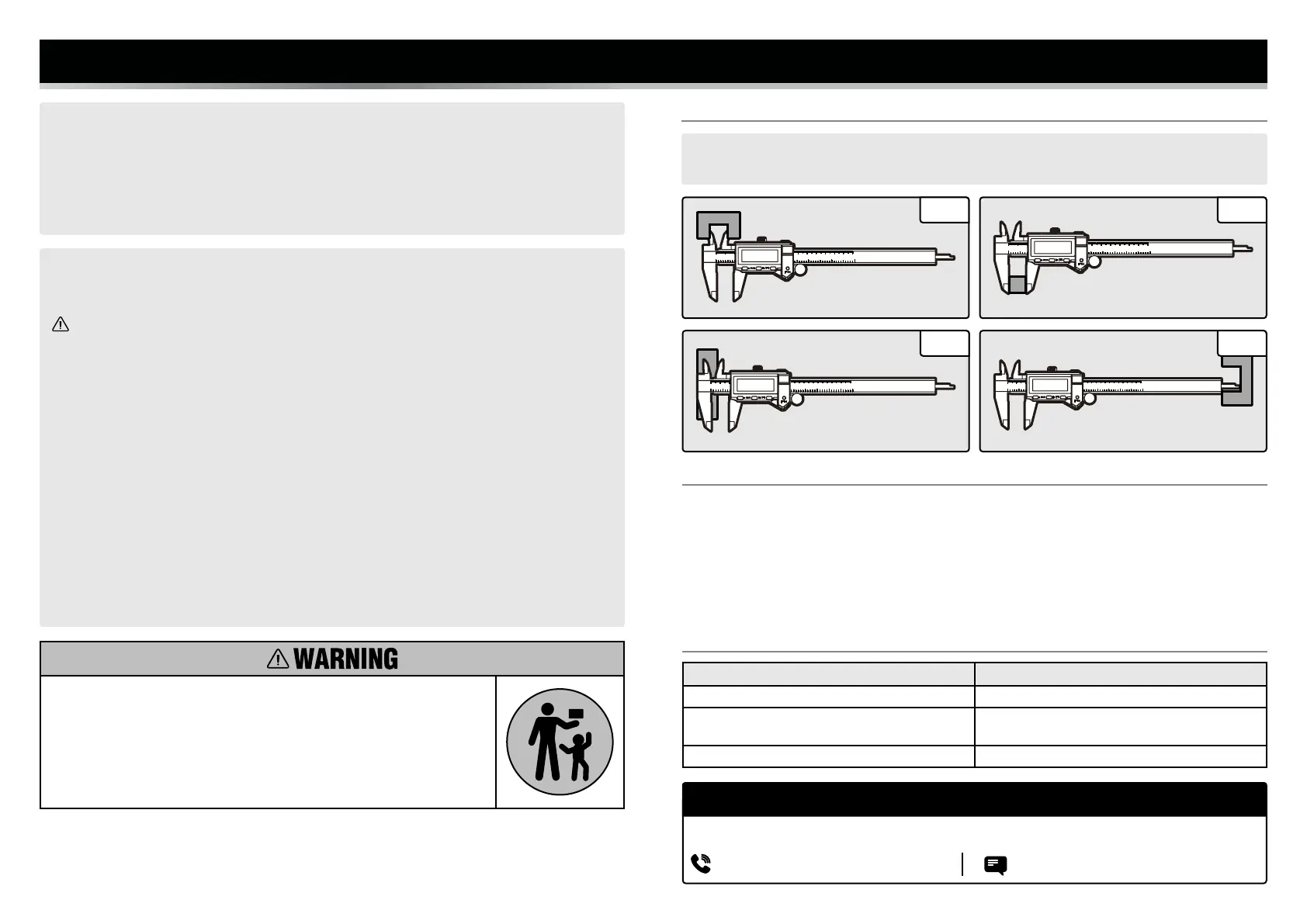
OPERATION - 4 WAY MEASUREMENT
NOTE: When taking measurements, do not touch the measuring faces of the caliper. The small amount of oil
on your hands can affect the accuracy of your readings.
Fig. 1 Fig. 2
Fig. 4
1. INNER DISTANCE MEASUREMENT 2. OUTER DISTANCE MEASUREMENT
3. STEP DISTANCE MEASUREMENT 4. DEPTH MEASUREMENT
Fig. 3
NEED HELP? CONTACT US!
Have product questions? Need technical support? Please feel free to contact us:
TECHSUPPORT@WENPRODUCTS.COM1-847-429-9263 (M-F 8AM-5PM CST)


 To Previous Page
 Loading...