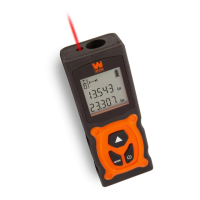
This document is an instruction manual for the WEN Model 10130 130-Foot Laser Distance Measure. It provides detailed information on the device's function, technical specifications, usage, and maintenance.
Function Description
The WEN Laser Distance Measure is designed to accurately measure distances, lengths, heights, clearances, areas, and volumes. It utilizes a laser beam to determine measurements, offering a convenient and efficient alternative to traditional measuring tools. The device is intended for personal use, with a separate warranty period for professional or commercial applications.
Important Technical Specifications
- Model Number: 10130
- Laser Type: 650 nm, <1 mW
- Laser Class: II
- Battery: Requires two (2) AAA batteries (not included). Note that 1.5V rechargeable batteries are recommended over 1.2V for more measurements.
- Operating Temperature: 14°F - 104°F (-10°C - 40°C)
- Measuring Distance: 0.16 ft. - 130 ft. (0.05 m - 40 m)
- Measuring Accuracy: +/- 5mm at 130 feet (+/- 3mm at 65 feet)
- Product Weight: 3.5 oz. (With Batteries)
- Product Dimensions: 1-5/8 in. x 1 in. x 4-3/8 in. (4.1 cm x 2.5 cm x 11.1 cm)
The device features a display with various icons to indicate its status and measurement modes. These include:
- Laser ON/OFF indicator
- Length Measurement mode
- Area/Volume Measurement mode (with sub-indicators for Area and Volume)
- Error/Service Needed indicator
- Battery Level indicator
- Measurement Reference point (Top or Base)
- Previous Measurement Value
- Current Measurement/Area/Volume
- Unit indicator (m/ft/in/' ")
Usage Features
The WEN Laser Distance Measure offers several user-friendly features:
- Turning ON/OFF: The device can be turned ON by pressing either the power button or the measuring button. To turn OFF, hold the power button for 1-2 seconds. It also has an automatic shut-off feature after 3 minutes of inactivity to conserve battery life.
- Measuring Reference Point Selection: Users can choose to measure from either the base or the top of the unit. This setting can be changed by holding the mode button and pressing the power button.
- Unit Selection: The device supports four units of measurement: meters (m), feet (ft), inches (in), and feet/inches (' "). Units can be switched by holding the mode button and pressing the measurement button until the desired unit is displayed.
- Changing Modes: The default mode is distance measurement. Other modes, such as area and volume measurement, can be accessed by pressing the mode button.
- Distance Measurement: This function measures distances, lengths, heights, and clearances. After selecting the distance mode and reference point, activate the laser by pressing the measurement button, aim at the target, and press the measurement button again to take the reading.
- Area Measurement: To calculate the area of a rectangular space, select the area mode. Measure the length and then the width by pressing the measurement button after aiming the laser for each dimension. The device automatically calculates and displays the area.
- Volume Measurement: For measuring the volume of a rectangular prismatic space, select the volume mode. Measure the length, width, and height sequentially. The device will automatically calculate and display the volume after the third measurement.
- Continuous Measuring: This mode allows the device to provide updated measurements every few seconds as it is moved. To activate, hold the measurement button for two seconds in distance measuring mode. Press the measurement button again to exit. Note that measurements are not saved in this mode, and the laser remains on continuously.
Important Safety Precautions for Use:
- Never direct the laser beam at persons or animals.
- Avoid staring into the direct or reflected laser beam, even from a distance, as it can cause eye damage or blindness.
- Hold the device still when taking measurements, except during continuous measurement.
- The measurement value appears after a few seconds, with the duration depending on distance, light conditions, and target surface reflectivity. A tone indicates the end of a measurement.
- The laser beam automatically shuts off after 30 seconds of inactivity in distance, area, and volume measurement modes.
Influences on Measuring Range and Result:
- Measuring Range: The range is affected by light conditions and the reflective properties of the target surface. Outdoor use on sunny days may be difficult. The indoor range is 130 feet, while the outdoor range is 16 feet.
- Measuring Result: Inaccurate measurements may occur on transparent surfaces (water, glass), reflective surfaces (polished metal, mirrors), porous surfaces (insulation materials), and textured surfaces (stone, roughcast).
Maintenance Features
Proper maintenance ensures the longevity and safe operation of the device.
- Routine Inspection: Before each use, check for loose hardware, damaged batteries/electrical wiring, cracked or broken parts, and any other condition that might affect safe operation. Do not use the device if any of these conditions are present until repairs are made.
- Cleaning: Wipe the device surfaces clean with a damp soft cloth. Do not allow water to enter the device, and avoid using solvents or cleaning agents. The reception lens should be maintained with the same care as eyeglasses or camera lenses.
- Storage: Store the device in a dry, frost-free location. To protect the battery, avoid storing it at temperatures below 14°F or above 104°F. Remove batteries if storing for an extended period to prevent corrosion and self-discharge.
- Battery Replacement: Always replace both AAA batteries at the same time. Do not mix different brands or types of batteries.
- Disposal: At the end of its lifetime, the product should not be disposed of with household waste due to hazardous electrical and electronic components. Take it to a local recycling facility for responsible disposal.
- Repairs: Repairs and replacements should only be performed by an authorized technician using identical WEN replacement parts. Any attempt to repair electrical parts by an unqualified individual can be hazardous.
The manual also includes a troubleshooting guide for common error codes and general information to help users understand and resolve issues. For customer service or technical support, users can contact WEN via phone or email.


 To Next Page
 General