User Guide
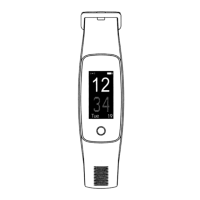
West Watch - Activity Tracker - Model Wave
Features tracker
• 20 mm OLED full touch screen
• Wrist circumference 14 cm – 21 cm (convenient for both teenagers and adults)
• Comfortable portable belt with buckle
• Weight 23 gram
• GPS
• Bluetooth
• Battery life approx. 7 days
• Battery percentage display
• Several options of time display
• Date
• Inactivity alert
• Working with app VeryFitPro
• iOS 7.0 and higher and Android 4.4 and higher
• Rechargeable in a USB charger(5V/ 500 mA)
• Support several languages
• The tracker is splashproof (you cannot swim or take a shower with it)
Possibilities tracker
• Hart rate measurement
• Automatic sleep monitoring
• Registration number of steps, distance, calories and activities duration
• Activities/ workout tracking
• Multi-sport choice
• Mindfulness
• Incoming messages and ring alert
• Weather forecast
• Music control
• Stopwatch
• Remote control function for camera
• Alarm
Instructions
• Use the app “VeryFitPro” on iOS or on an Android phone to connect the Activity tracker
1. DOWNLOAD THE APP “VERYFITPRO”.
1st option: Search on “VeryFitPro” as from the Apple Store or the Android App store and download the app
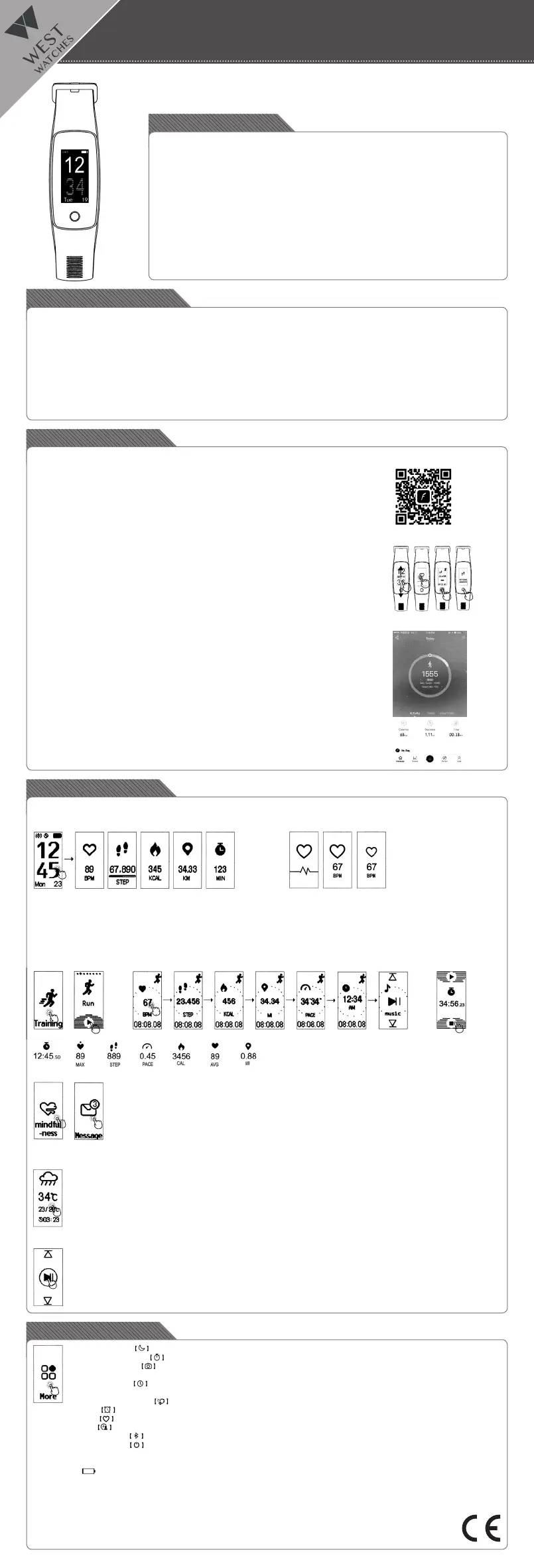
2nd option: Scan the QR code hereunder and download the “VeryFitPro” app
2. ACTIVATE THE DEVICE
• Pull carefully on the watch strap and take out the USB/digital unit
•ChargethedigitalunittoUSBport(nowireneeded),rstchargethedigitalunittotallyfortheuseof
the Activity Tracker
3. TOUCH SCREEN
• Swipe up or down on the screen to see all possibilities
• Click on the screen to switch between the different options
• Click on the bottom of the screen to return to the start screen options
4. OPEN DE “VERYFITPRO” APP TO CONNECT THE DEVICE TO THE MOBILE PHONE
• Make sure the Bluetooth is switched on on the phone. Then connect the device “ID107Plus HR”
• Then Swipe over the device so that the image becomes clear and the connection can be made
5. HOW DOES THE ACTIVITY TRACKER WORK?
• Wear the watch horizontally around your wrist, wear the Activity tracker in the same way as a normal
watch
• To use heart rate measurement, wear the watch on the top position of your wrist and slightly tighter
than normal when exercising
• The automatic heart rate monitor is enabled by default unless you manually disable this switch via
the app
• The battery lasts about 7 days
• Leave the bluetooth active on your mobile when possible. If this is not the case, turn on the bluetooth
atalatertimeandsynchronizethedata.Youcansynchronizeviatheapp,rstgoto“Homepage”
and swipe down to synchronize
Possibilities:
ACTIVITY TRACKING:
1. Click on the screen to measure your heart rate, click one more time to see the number of steps, click further to see the amount of calories,
clickagaintoseethedistanceandnallyclicktoseethedurationoftheworkout
MULTISPORT MODE:
2.FortheMulti-sportmode,clickontraining,andthenpushtheplaybuttonwithyourngerfor3seconds.Clickonthescreentoviewthe
next method (except when the music is on, then you can swipe)
• One click on the screen to pause the time
• Press for 3 seconds at the bottom of the screen to end the movement. After this you will be asked if you want to save the data
• There are various sports to monitor. You can standardize 8 via the app. Click on “Device” and then on “More” and then click on “Activity
display”. Here you can see your 8 standard sports. Click on the “+” in the upper right corner to change a sport
MIND TRAINING:
3. Click on “Mindfulness” to train your thoughts. Breathe in for 3 seconds, hold for 2 seconds, then breathe out in 3
seconds
MESSAGE FUNCTION:
4: Click on “Message” to read your messages. Scroll down and up to read the messages. Only the last 5 messages
are shown. You receive the message by means of a vibration. Messages can only be read and deleted within this
function (not in the main screen). Delete messages by pressing the message for 3 seconds and then deleting it
THE WEATHER:
5. Click on the icon weather to view more information about the weather. The display vibrates when there is no weather
information
• No weather information will appear on the screen when it is disabled in the app
• The weather information is only refreshed when it is switched on weather in the app after the bluetooth is connected. There
will be no weather data on the Activity tracker if there is no further weather information in the app within 24 hours
• The mobile phone needs internet to obtain information about the weather
• In the app you can change Fahrenheit into Celsius. You click on User à System setting à Unit setting. Here you can change
the degrees, but also the measurement values of e.g. weight and length (kg, cm)
MUSIC
6. Click on pause/start knop to turn on music that you have started via your smartphone. In the VeryFitPro app you can, for
example, select the music program Spotify so that you can select the next track on the tracker or switch it on/off
• If you have set the music function to “off” in the app, then you can not control the music through your watch
Optional functions
• Click on the moon to enter the setting do not disturb. In this case no incoming messages are shown
• Click on the stopwatch to turn on this mode
• Click on the camera for remote control for your smartphone camera (note: this is only possible with the camera that you turn
on within the VeryFitPro app, not with the standard camera app on your phone)
• Click on the clock to change the time display. Here you can scroll up and down and choose between 5 different views. Click
onthebottombuttontoconrmthedesireddisplaymodes
• Click on the wrist image to turn on the digital unit by moving your wrist
• Click on the alarm to activate the alarm (max. 10 alarms). You set the alarm times via the VeryFitPro app
• Click on the heart to monitor your heart rate
• Click on this icon forspecicdetails.Checke.g.multi-sportmodewalkingorrunning.
• Click on the bluetooth sign to turn on the bluetooth
• Click on the power-off sign to switch off your device. You can switch it on by plugging the digital unit into a USB charger.
• Via the app you analyze all details about your activities (sleeping hours, heart rate and other details)
•Withtheapp,at“device”youcanturnonnoticationsthatyouwanttoreceiveonyourActivitytracker(whatsapp,messengeretc)
• Via this icon you see how much battery the tracker has left
• Via “User” in the app, you can process your personal information yourself
•ThetrackerhasSmartnderforsearchingyourtrackerincaseofloss
Ifyouhaveanyquestions,youcanndthemintheapp.Forthis,clickon“User”andthenon“Problems”toseethemostcommonquestions
with answers.
Have a good time with West Watches!


 To Previous Page
 Loading...