
 Need help?
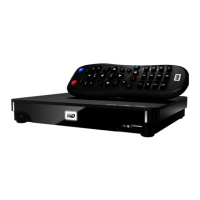
Do you have a question about the Western Digital TV Live HUB and is the answer not in the manual?
Critical guidelines for safe installation, use, and servicing of the media center.
Information on obtaining technical support, product registration, and online resources.
Explains accessing media from various sources and home network via Ethernet.
Describes HDMI, component, composite, and S/PDIF audio/video interfaces.
Lists supported USB devices, file systems, and internet connection types.
Step-by-step guide for connecting the device to power, TV, and network.
Details how to use the remote control for navigating menus and playback.
Details playback operations, controls, and video options like chapters and subtitles.
Covers music playback operations, controls, sorting, filtering, and menu options.
Details photo display modes, slideshow creation, and playback controls.
Guides through setting up a wired network connection using an Ethernet cable.
Details options for setting up wireless network connections, including WPS.
Explains accessing media from My Media Library, Local Storage, Media Servers, and Network Shares.
Settings for video output resolution, aspect ratio, and audio output modes.
Instructions for updating the system firmware automatically or manually to improve performance.
Provides solutions for common problems related to display, files, audio, network, and remote control.
 General
| Model | WDTV Live Hub |
|---|---|
| Category | TV Accessories |
| Type | Media Player |
| Storage Capacity | 1TB |
| Output Resolution | 1080p |
| Weight | 1.5 lbs |
| Video Formats Supported | AVI, MP4, MKV, WMV, MOV |
| Audio Formats Supported | MP3, WAV, WMA, AAC, FLAC, OGG |
| Image Formats Supported | JPEG, BMP, PNG, GIF |
| Video Output | HDMI, Composite |
| Audio Output | HDMI, Optical |
| Connectivity | Ethernet, USB |
| Wireless Connectivity | Optional (via USB adapter) |
| USB Ports | 2 |
| Network Protocols | UPnP |

 To Next Page