SETUP MENUS
27
English
SETUP MENUS
SETUP MENU OPERATION
Use the setup menus to configure the various operational settings of the LED TV.
Displaying the setup menu screen
Press on the remote control or MENU on the control panel to display the setup
menu screen.
Navigating the setup menu screen
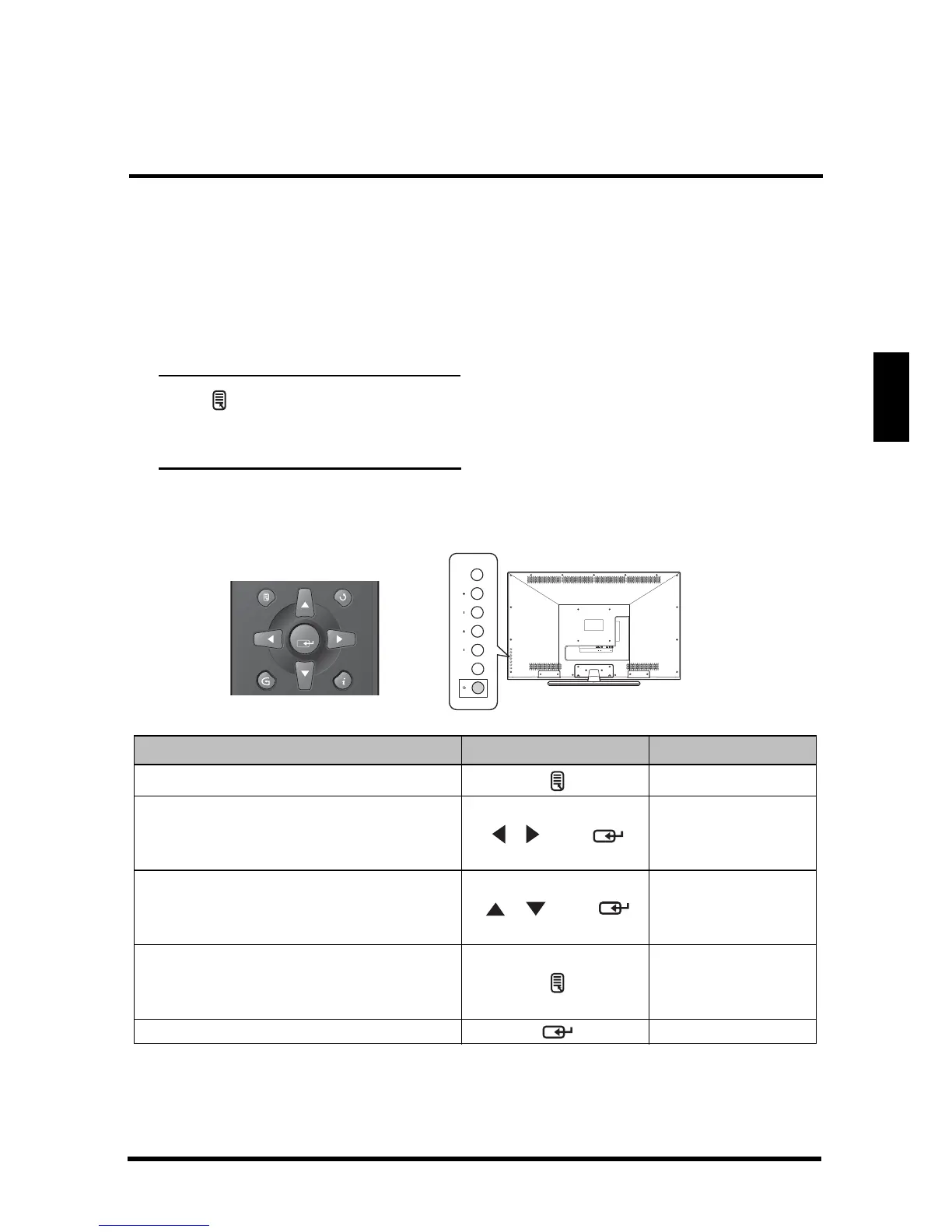
Use the buttons on the remote control or on the control panel to navigate through
the menu screens.
Action Remote Control Control Panel
Displays or closes the menu bar. MENU
• Select and display a primary
menu.
• Adjust sub-menu options.
/ then
Volume +/- then
INPUT
• Select and display a sub-menu.
• Select a sub-menu or a sub-
menu option.
/ then
Channel +/- then
INPUT
• Returns to the primary menu tab
from a sub-menu screen.
• Returns to the previous screen.
MENU
Applies the selected menu setting. INPUT
HDMI 1
USB
HDMI 2
TUNERRLYVGAAUDIO IN
SPDIF
DC IN
RL
MENU VOL CH INPUT



 To Next Page