EasyManua.ls Logo

Westinghouse WHT2401 - User Manual

Westinghouse WHT2401
12 pages
Print Icon
To Next Page IconTo Next Page
Loading...
Page 1
1. READ these instructions carefully before installing and operating the
appliance. Keep them for further reference.
2. Record in the space below the “SERIAL/MODEL NUMBER” found on the back
or bottom of your appliance and retain this information for future reference.
SERIAL NUMBER:
MODEL NUMBER:
DATE OF PURCHASE:
Save and staple your sales receipt to your manual for warranty coverage.
User Manual
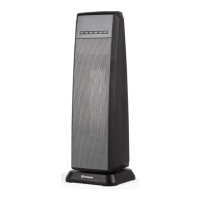
Digital Ceramic
Tower Heater
MODEL: WHT2401
Question and Answer IconNeed help?

Do you have a question about the Westinghouse WHT2401 and is the answer not in the manual?

Summary

Safety Information

Important Safety Instructions

Crucial safety guidelines for operating the appliance to prevent hazards.

Electrical Requirements

Details on the appliance's electrical specifications and proper plug usage.

Safety Features

Describes built-in safety mechanisms like tip-over and overheat protection.

Battery Information

Guidelines for safe handling and disposal of batteries for the remote control.

Set Up & Use

Parts & Features Overview

Identification of the heater's components and their functions.

Control Panel Guide

Explanation of the buttons and indicators on the heater's control panel.

Display Window Explanation

Details on the information shown in the digital display window.

Preparation for Use

Initial steps required before operating the heater for the first time.

Powering and Selecting Work Mode

How to turn the heater on and choose between heat settings (High, Low, ECO).

Setting Desired Temperature

Instructions for adjusting and maintaining the target room temperature.

Auto Shutoff Timer Function

How to set the heater to automatically turn off after a specified time.

Auto On Function

How to schedule the heater to automatically turn on at a later time.

Swing;Oscillation Function

Instructions for activating and deactivating the heater's oscillation feature.

Child Lock Function

How to enable and disable the child lock to prevent unintended operation.

Cleaning & Care

Cleaning Instructions

Steps for cleaning the heater's exterior and maintaining its appearance.

Storage Recommendations

Guidance on storing the heater when not in use to prevent damage.

Product Specifications

Technical details including voltage, power consumption, size, and weight.

Troubleshooting & Warranty

Customer Service & Support

Contact information and procedures for obtaining assistance with the product.

Troubleshooting Common Issues

Guidance on identifying and resolving common problems with the heater.

Limited Warranty Details

Information on warranty coverage, exclusions, and how to obtain service.

Summary

Safety Information

Important Safety Instructions

Crucial safety guidelines for operating the appliance to prevent hazards.

Electrical Requirements

Details on the appliance's electrical specifications and proper plug usage.

Safety Features

Describes built-in safety mechanisms like tip-over and overheat protection.

Battery Information

Guidelines for safe handling and disposal of batteries for the remote control.

Set Up & Use

Parts & Features Overview

Identification of the heater's components and their functions.

Control Panel Guide

Explanation of the buttons and indicators on the heater's control panel.

Display Window Explanation

Details on the information shown in the digital display window.

Preparation for Use

Initial steps required before operating the heater for the first time.

Powering and Selecting Work Mode

How to turn the heater on and choose between heat settings (High, Low, ECO).

Setting Desired Temperature

Instructions for adjusting and maintaining the target room temperature.

Auto Shutoff Timer Function

How to set the heater to automatically turn off after a specified time.

Auto On Function

How to schedule the heater to automatically turn on at a later time.

Swing;Oscillation Function

Instructions for activating and deactivating the heater's oscillation feature.

Child Lock Function

How to enable and disable the child lock to prevent unintended operation.

Cleaning & Care

Cleaning Instructions

Steps for cleaning the heater's exterior and maintaining its appearance.

Storage Recommendations

Guidance on storing the heater when not in use to prevent damage.

Product Specifications

Technical details including voltage, power consumption, size, and weight.

Troubleshooting & Warranty

Customer Service & Support

Contact information and procedures for obtaining assistance with the product.

Troubleshooting Common Issues

Guidance on identifying and resolving common problems with the heater.

Limited Warranty Details

Information on warranty coverage, exclusions, and how to obtain service.

Westinghouse WHT2401 Specifications

General IconGeneral
BrandWestinghouse
ModelWHT2401
CategoryHeater
LanguageEnglish