EasyManua.ls Logo

Westone DEFENDEAR DIGITAL - User Manual

Westone DEFENDEAR DIGITAL
8 pages
Print Icon
To Next Page IconTo Next Page
Loading...
CABLE
USER GUIDE
Question and Answer IconNeed help?

Do you have a question about the Westone DEFENDEAR DIGITAL and is the answer not in the manual?

Summary

Setup

Earpiece Connection

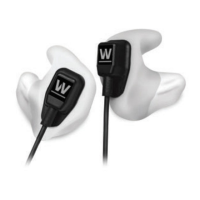
Press the module end into the earpieces until they snap into place for secure fitting.

Bluetooth Headset Functions

Connecting the Bluetooth

Steps to pair the headset with a mobile device, including pairing mode indicators and password entry.

Smartphone Headset Controls

Multi-Function Button Operations

Details on using the multi-function button for music playback, calls, and voice assistants on iPhone and Android.

Summary

Setup

Earpiece Connection

Press the module end into the earpieces until they snap into place for secure fitting.

Bluetooth Headset Functions

Connecting the Bluetooth

Steps to pair the headset with a mobile device, including pairing mode indicators and password entry.

Smartphone Headset Controls

Multi-Function Button Operations

Details on using the multi-function button for music playback, calls, and voice assistants on iPhone and Android.

Overview

The DefendEar Digital Cable User Guide provides instructions and information for a set of in-ear earpieces that can be connected to either a Bluetooth headset cable or a smartphone headset cable. These earpieces are designed to offer both audio playback and communication functionalities, with specific features tailored to each cable type.

Function Description:

The core function of the DefendEar Digital system is to provide audio output and communication capabilities through custom-fit earpieces. The system is modular, allowing users to connect the earpieces to different cable types depending on their needs.

When connected to the Bluetooth Headset cable, the device functions as a wireless headset, enabling users to listen to music, make and receive phone calls, and interact with their mobile device wirelessly. The Bluetooth module includes controls for volume, call management, and music playback. It also features a charging port for the internal battery.

When connected to the Smartphone Headset cable, the device functions as a wired headset, providing audio and communication capabilities directly through a wired connection to a smartphone. This cable includes an in-line remote with a multi-function button and a microphone, allowing for call management, music control, and voice assistant activation.

Important Technical Specifications:

  • Impedance: 32 ohms
  • Sensitivity: 106dB
  • Weight: 10g (earphone model)
  • Color: Black

Usage Features:

Setup:

To set up the device, users need to press the module end of either the Bluetooth or smartphone cable into the earpieces until they snap into place. This ensures a secure connection between the earpieces and the chosen cable.

Bluetooth Headset Features:

  • Charging Port: Located on the Bluetooth module for recharging the headset.
  • Volume Controls: Dedicated buttons on the module to adjust audio volume.
  • Call Button: A central button for managing phone calls and other functions.
    • Answer / End Call: Short press.
    • Ignore Call: Long press.
    • Redial: Double press.
  • Music Play/Pause: Short press of the call button.

Connecting the Bluetooth:

  1. Pairing Mode: With the power off, press and hold the answer button until the LED indicator alternates flashing red and blue.
  2. Device Search: Open Bluetooth on your mobile device and search for "BT".
  3. Language Toggle: While in pairing mode, double-tap the call button to switch between English and Chinese language options.
  4. Connect: Select "connect to this device" from your mobile device. The LED indicator will flash blue upon successful connection.
  • Password: Some devices may require a password, which is "0000".
  • Second Device: To connect a second mobile device, repeat steps 1-3.

Smartphone Headset Features:

  • Volume +/- Slider: An in-line slider to adjust audio volume.
  • Multi-Function Button: A single button for various controls.
  • Microphone: Integrated into the in-line remote for voice communication.

Multi-Function Button (Smartphone Headset) Usage:

  • iPhone:
    • Playing Music:
      • Single Press: Play/Pause
      • Double Press: Skip Track
    • Phone Calls:
      • Single Press: Answer/End Call
    • General:
      • Long Press: Launch Siri
  • Android:
    • Playing Music:
      • Single Press: Play/Pause
      • Double Press: Skip Track
    • Phone Calls:
      • Single Press: Answer/End Call
    • General:
      • Long Press: Launch Google Assist

Maintenance Features:

The manual does not explicitly detail maintenance features beyond the charging of the Bluetooth headset. However, given the modular design, it implies that individual components (earpieces, Bluetooth cable, smartphone cable) can be detached, which might facilitate cleaning or replacement of specific parts. Users should refer to general best practices for earphone care, such as keeping them clean and dry, and storing them properly to prevent damage. The robust "snap into place" connection suggests a durable design for repeated attachment and detachment.
Westone DEFENDEAR DIGITAL Specifications

General IconGeneral
BrandWestone
ModelDEFENDEAR DIGITAL
CategoryHeadsets
LanguageEnglish

Related product manuals