Need help?
Do you have a question about the Wetekom PM-30E and is the answer not in the manual?
Resets the device to its original settings, clearing all stored data and configurations.
Step-by-step instructions to correctly set the current time displayed on the device.
Guide on how to switch between 12-hour (AM/PM) and 24-hour time formats.
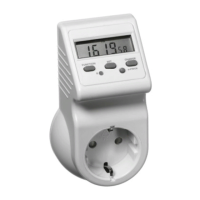
Details the various operational modes of the electricity meter and their displayed functions.
Mode 1: Displays present voltage supply (V) and line frequency (Hz).
Mode 2: Displays current strength (A) and power factor (Cos Ф).
Mode 3: Displays power in Watts (W) and the time of maximum wattage.
Mode 4: Shows the total time the connected appliance has been switched on.
Mode 5: Displays cumulative total electricity consumption in kilowatt-hours (kWh).
Mode 6: Displays the total costs of electricity consumed by the connected appliance.
Mode 7: Allows setting and displaying the electricity price per kWh.
Resets cumulative measured values for ON-time, kWh, and total costs.
Enables setting two different electricity prices based on time of day for cost calculation.
Defines the period for operation at the regular electricity price.
Defines the period for operation at the regular price during off-peak hours.
Sets the electricity price applicable for off-peak periods.
Guidance for troubleshooting abnormal or non-existent meter displays.
 General
| Brand | Wetekom |
|---|---|
| Model | PM-30E |
| Category | Measuring Instruments |
| Language | English |

 To Next Page