EasyManua.ls Logo

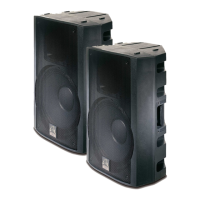
Wharfedale Pro Titan 12 ACTIVE - User Manual

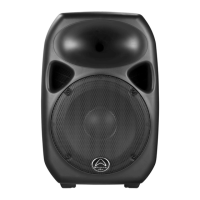
Wharfedale Pro Titan 12 ACTIVE
19 pages
Print Icon
To Next Page IconTo Next Page
Loading...
PROFESSIONAL ACTIVE SPEAKER SYSTEM
Question and Answer IconNeed help?

Do you have a question about the Wharfedale Pro Titan 12 ACTIVE and is the answer not in the manual?

Summary

OWNERS MANUAL

UNPACKING

WARNING AND SAFETY INSTRUCTIONS

INTRODUCTION

WHARFEDALE PRO LIMITED WARRANTY

Titan 12 Active Feature Set

Titan 12 ACTIVE DESCRIPTION

Transducers

Details the custom 12" low frequency driver and 2" titanium compression driver.

Amplifier

Explains the Class D low frequency and Class A/B high frequency amplifier design.

Mixer and Controls

Covers basic mixing functions, input options, and equalization.

Elliptical Wave Guide

Describes the unique EWG™ design for high-frequency pattern control.

Practical Features

Highlights features like the BASS RESPONSE OPTIMIZER (BRO™) for enhanced usability.

OPTIONAL ACCESSORIES

ENCLOSURE FEATURES

Titan 12 ACTIVE - Front Panel Features

High frequency driver and power on indicator

Describes the HF driver and the blue power ON indicator in the horn throat.

Elliptical Wave Guide

Explains the EWG™ waveguide for 90 x 60 degree high frequency coverage.

Ports

Mentions the two reflex-tuned ports for enhanced low frequency response.

Low frequency driver

Details the custom designed, high quality 12" low frequency loudspeaker.

Pole mount socket and bracket attachment

Covers the 35mm pole mount socket and wall mount bracket inserts.

Titan 12 ACTIVE REAR PANEL LAYOUT

Heat Sink

Allows for dissipation of heat build up from the amplifier via air cooling.

HI and LOW EQ controls

Controls the equalization of the overall output signal by +/- 10dB.

POWER ON indicator and LIMIT indicator LEDs

Indicates power status and when the signal limiter is active.

VOLUME controls

Control the volume for each input channel (A and B).

POWER ON; OFF switch

Turns the unit's power on and off.

RCA L; R input jacks

Provide input for a stereo signal, summed to mono.

BRO circuit switch

Engages the Bass Response Optimizer for enhanced low frequencies at lower volumes.

GAIN selection switch

Selects the proper gain structure for Input A (Mic or Line).

Output source “LOOP; MIX” switch

Selects signal routing for the XLR output.

XLR; ¼” COMBO input jacks

Provide balanced input connections for Input A and Input B.

POWER cord jack

Standard IEC connector for AC power input.

XLR line level OUTPUT jack

Provides a balanced line level output for daisy-chaining.

Titan 12 ACTIVE Rear Panel Features

Heat Sink

Dissipates amplifier heat via air cooling at the rear of the enclosure.

HI and LOW EQ controls

Adjust equalization of the overall output signal by +/- 10dB.

POWER ON indicator and LIMIT indicator LEDs

Indicate power status and signal limiting activity.

VOLUME controls

Control the volume for each input channel.

POWER ON; OFF switch

Turns the unit's power on and off.

RCA L; R input jacks

Inputs for stereo signals, summed to mono for the amplifier.

BRO circuit switch

Engages the Bass Response Optimizer for enhanced low frequencies at low volumes.

GAIN selection switch

Sets the gain structure for Input A, suitable for mic or line level.

Output source “LOOP; MIX” switch

Controls signal routing for the XLR output (bypass or mixed).

XLR; ¼” COMBO input jacks

Versatile inputs for XLR or 1/4" balanced connections.

POWER cord jack

Standard IEC connector for AC power connection.

XLR line level OUTPUT jack

Balanced output for connecting to other devices.

Titan 12 ACTIVE Operating Instructions

Connection Suggestions

Provides basic system configurations for connecting microphones, MP3 players, and daisy-chaining.

CONNECTION DIAGRAM #1

CONNECTION DIAGRAM #2

BLOCK DIAGRAM

SPECIFICATIONS

DIMENSIONS

Summary

OWNERS MANUAL

UNPACKING

WARNING AND SAFETY INSTRUCTIONS

INTRODUCTION

WHARFEDALE PRO LIMITED WARRANTY

Titan 12 Active Feature Set

Titan 12 ACTIVE DESCRIPTION

Transducers

Details the custom 12" low frequency driver and 2" titanium compression driver.

Amplifier

Explains the Class D low frequency and Class A/B high frequency amplifier design.

Mixer and Controls

Covers basic mixing functions, input options, and equalization.

Elliptical Wave Guide

Describes the unique EWG™ design for high-frequency pattern control.

Practical Features

Highlights features like the BASS RESPONSE OPTIMIZER (BRO™) for enhanced usability.

OPTIONAL ACCESSORIES

ENCLOSURE FEATURES

Titan 12 ACTIVE - Front Panel Features

High frequency driver and power on indicator

Describes the HF driver and the blue power ON indicator in the horn throat.

Elliptical Wave Guide

Explains the EWG™ waveguide for 90 x 60 degree high frequency coverage.

Ports

Mentions the two reflex-tuned ports for enhanced low frequency response.

Low frequency driver

Details the custom designed, high quality 12" low frequency loudspeaker.

Pole mount socket and bracket attachment

Covers the 35mm pole mount socket and wall mount bracket inserts.

Titan 12 ACTIVE REAR PANEL LAYOUT

Heat Sink

Allows for dissipation of heat build up from the amplifier via air cooling.

HI and LOW EQ controls

Controls the equalization of the overall output signal by +/- 10dB.

POWER ON indicator and LIMIT indicator LEDs

Indicates power status and when the signal limiter is active.

VOLUME controls

Control the volume for each input channel (A and B).

POWER ON; OFF switch

Turns the unit's power on and off.

RCA L; R input jacks

Provide input for a stereo signal, summed to mono.

BRO circuit switch

Engages the Bass Response Optimizer for enhanced low frequencies at lower volumes.

GAIN selection switch

Selects the proper gain structure for Input A (Mic or Line).

Output source “LOOP; MIX” switch

Selects signal routing for the XLR output.

XLR; ¼” COMBO input jacks

Provide balanced input connections for Input A and Input B.

POWER cord jack

Standard IEC connector for AC power input.

XLR line level OUTPUT jack

Provides a balanced line level output for daisy-chaining.

Titan 12 ACTIVE Rear Panel Features

Heat Sink

Dissipates amplifier heat via air cooling at the rear of the enclosure.

HI and LOW EQ controls

Adjust equalization of the overall output signal by +/- 10dB.

POWER ON indicator and LIMIT indicator LEDs

Indicate power status and signal limiting activity.

VOLUME controls

Control the volume for each input channel.

POWER ON; OFF switch

Turns the unit's power on and off.

RCA L; R input jacks

Inputs for stereo signals, summed to mono for the amplifier.

BRO circuit switch

Engages the Bass Response Optimizer for enhanced low frequencies at low volumes.

GAIN selection switch

Sets the gain structure for Input A, suitable for mic or line level.

Output source “LOOP; MIX” switch

Controls signal routing for the XLR output (bypass or mixed).

XLR; ¼” COMBO input jacks

Versatile inputs for XLR or 1/4" balanced connections.

POWER cord jack

Standard IEC connector for AC power connection.

XLR line level OUTPUT jack

Balanced output for connecting to other devices.

Titan 12 ACTIVE Operating Instructions

Connection Suggestions

Provides basic system configurations for connecting microphones, MP3 players, and daisy-chaining.

CONNECTION DIAGRAM #1

CONNECTION DIAGRAM #2

BLOCK DIAGRAM

SPECIFICATIONS

DIMENSIONS

Wharfedale Pro Titan 12 ACTIVE Specifications

General IconGeneral
BrandWharfedale Pro
ModelTitan 12 ACTIVE
CategorySpeaker System
LanguageEnglish

Related product manuals