7
5. CLEANING
Dry cleaning or use of wet fabric (water only) allowed.
6. TROUBLESHOOTING
7. DESIGNED AND ENGINEERED IN SWITZERLAND BY WHAT WATCH AG.
Manufactured by WHAT WATCH HK LIMITED, registered and located in Hong Kong, File Number is
listed as 2099381. Address: 19th Floor, Silver Fortune Plaza, 1 Wellington Street, Central, Hong Kong.
Assembled in China.
Watch band and packaging made in China.
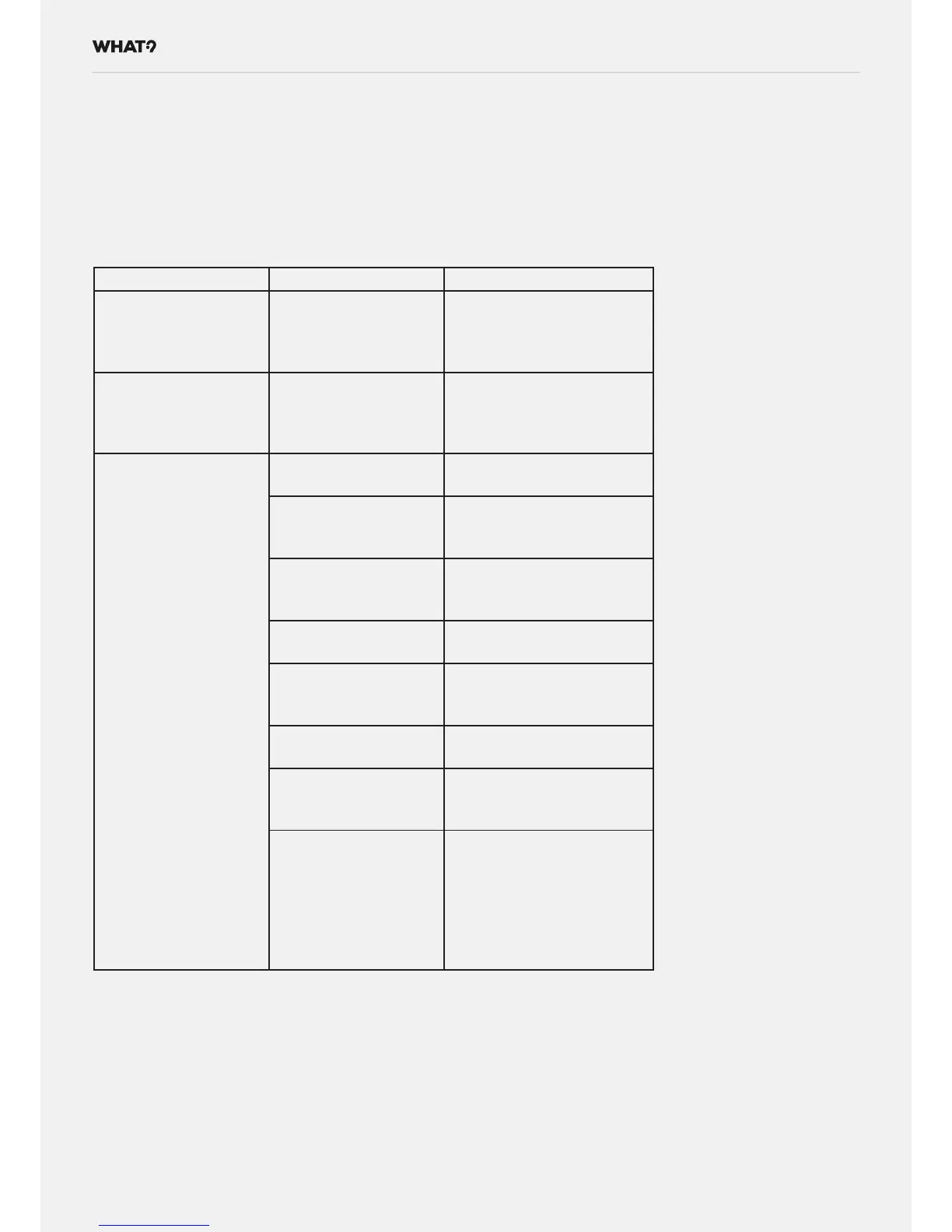
Symptom Cause Action
Watch doesn’t react
on the Red Button
button press
Watch embedded soft-
ware requires reset.
Force Reset the watch with
long press (press and hold)
of the Red Button (more
than 10s, less than 20s).
Quartz watch hands
doesn’t move.
The battery has low
level.
Check the battery level
from your Mobile Applica-
tion. Replace the battery if
the level is low.
Watch display is not
syncronised with the
Mobile Application.
The battery is com-
pletely discharged.
Replace the CR2025
(CR2032) battery.
The watch is non-func-
tional.
Bring the watch for repair
to What Watch authorised
repair shop.
The crown is pulled
out (crown is in time
setting mode).
Push the crown inwards to
start the movement.
The battery is com-
pletely discharged.
Replace the Quartz watch
battery (Battery no.2).
The quartz watch is
non-functional.
Bring the watch for repair
to What Watch authorized
repair shop.
Mobile phone’s Blue-
tooth is switched Off.
Switch On the Mobile
phone’s Bluetooth.
Mobile phone is out of
Bluetooth range.
Bring the Mobile phone
closer to the watch (<3m
distance).
Last Bluetooth syn-
chronization was
unsuccessful.
Initiate Bluetooth on the
watch by pressing and
holding the Red Button
for 2-4s. Make sure your
Mobile Phone’s Bluetooth
function is activate and the
phone is within the range.


 To Next Page