
 Need help?
Do you have a question about the Whirlpool Cabrio WED8000D and is the answer not in the manual?
Guidelines for proper dryer exhaust venting for optimal performance and safety.
Key safety precautions for dryer operation and installation to prevent hazards.
Explanation of buttons, displays, and indicators on the dryer control panel.
Step-by-step guide for connecting the dryer to Wi-Fi using WPS.
Step-by-step guide for cleaning the lint screen, loading, and starting the dryer.
Solutions for common problems with Wi-Fi and app connectivity.
Diagnosing and resolving issues like not running, not heating, or unusual noises.
Understanding and resolving diagnostic codes and airflow restrictions.
Instructions on how to arrange for service or repair and contact support.
This document describes the Whirlpool Smart Electronic Dryer, a gas and electric dryer designed to connect to the internet via Wi-Fi, offering enhanced control and monitoring capabilities through the Whirlpool™ app.
The Whirlpool Smart Electronic Dryer is designed to efficiently dry laundry using either natural gas or electricity, depending on the model. It features Wi-Fi connectivity, allowing users to interact with the dryer remotely via a smartphone or mobile device. This smart functionality provides several benefits, including remote monitoring of cycle progress, managing start times, and receiving notifications. The dryer is equipped with automatic cycles that sense drying air temperature and moisture levels, turning off once the selected dryness level is reached, which helps optimize energy savings and fabric care. Manual Timed Dry cycles are also available for specific drying needs.
The dryer's control panel is designed for intuitive operation with a sensitive surface that responds to light finger touches.
The dryer connects to Wi-Fi via Wi-Fi Protected Setup (WPS) on a home wireless router. The process involves pressing the WPS button on the router, then touching the POWER and CONNECT buttons on the dryer. The Wi-Fi status indicator will blink during connection and remain lit upon success. If connection fails, troubleshooting steps are provided, including checking router status, signal strength, and dryer power. After connecting, users download the Whirlpool™ app, create an account, and register their dryer using the Smart Appliance ID (SAID) found inside the dryer door.
A drying rack can be used for items that should not tumble, such as sweaters and tennis shoes. It is inserted into the dryer, with hooks aligning with holes in the door opening and the rear support resting on the back ledge. The drying rack is compatible only with Manual Dry/Timed Dry cycles.
The area around the dryer should be kept clear of items that could block airflow, including piles of laundry, to ensure proper operation.
The lint screen, located in the door opening, should be cleaned before each load. An indicator light, "Check Lint," reminds users to do this. To clean, pull the screen up, push the tab down to open, and roll lint off with fingers. Do not rinse or wash the screen, as wet lint is difficult to remove. After cleaning, close the screen and push it firmly back into place. If lint falls into the dryer during removal, the exhaust hood should be checked and cleaned. The space where the lint screen is located should also be vacuumed periodically to remove accumulated lint.
Laundry detergent and fabric softener residue can build up on the lint screen, causing longer drying times or premature cycle stops. If lint falls off the screen when dry, it indicates clogging. The lint screen should be washed with a nylon brush, hot water, and liquid detergent every 6 months or more frequently if clogged. After scrubbing, rinse the screen with hot water, dry it thoroughly with a clean towel, and reinstall it.
The dryer drum can be cleaned with a mild hand dish detergent mixed with warm water and a soft cloth, followed by rinsing with a wet sponge or towel. Alternatively, a microfiber cloth and hot water in a spray bottle can be used. Discoloration from unstable dyes (e.g., denim blue jeans) is normal and not harmful to the dryer or future loads. Drying unstable dye items inside out can prevent dye transfer.
The manual provides a comprehensive troubleshooting guide for common issues related to dryer operation, connectivity, and results. It suggests possible causes and solutions, directing users to check the website for additional help. For connectivity issues, it covers scenarios like the dryer not connecting to Wi-Fi, Smart Grid functions not working, or weak signal strength. For dryer operation, it addresses problems like the dryer not running, not turning off, not heating, unusual noises, and long drying times. It also explains diagnostic codes and restricted airflow (AF) warnings.
 General
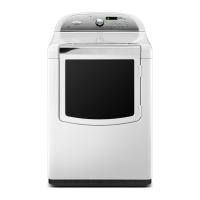
| Brand | Whirlpool |
|---|---|
| Model | WED8000D |
| Type | Electric Dryer |
| Color | White |
| Dryer Venting | Vented |
| Number of Cycles | 11 |
| Number of Temperature Settings | 5 |
| Energy Star Certified | Yes |
| Width | 27 inches |
| Moisture Sensor | Yes |
| Depth | 31.5 inches |
| Weight | 120 lbs |




 To Next Page