!i!!iiii!!!i!!! i i+ill'!!ii!iif! ++i!!!!iilii!!!!i+!+!i+!!!i
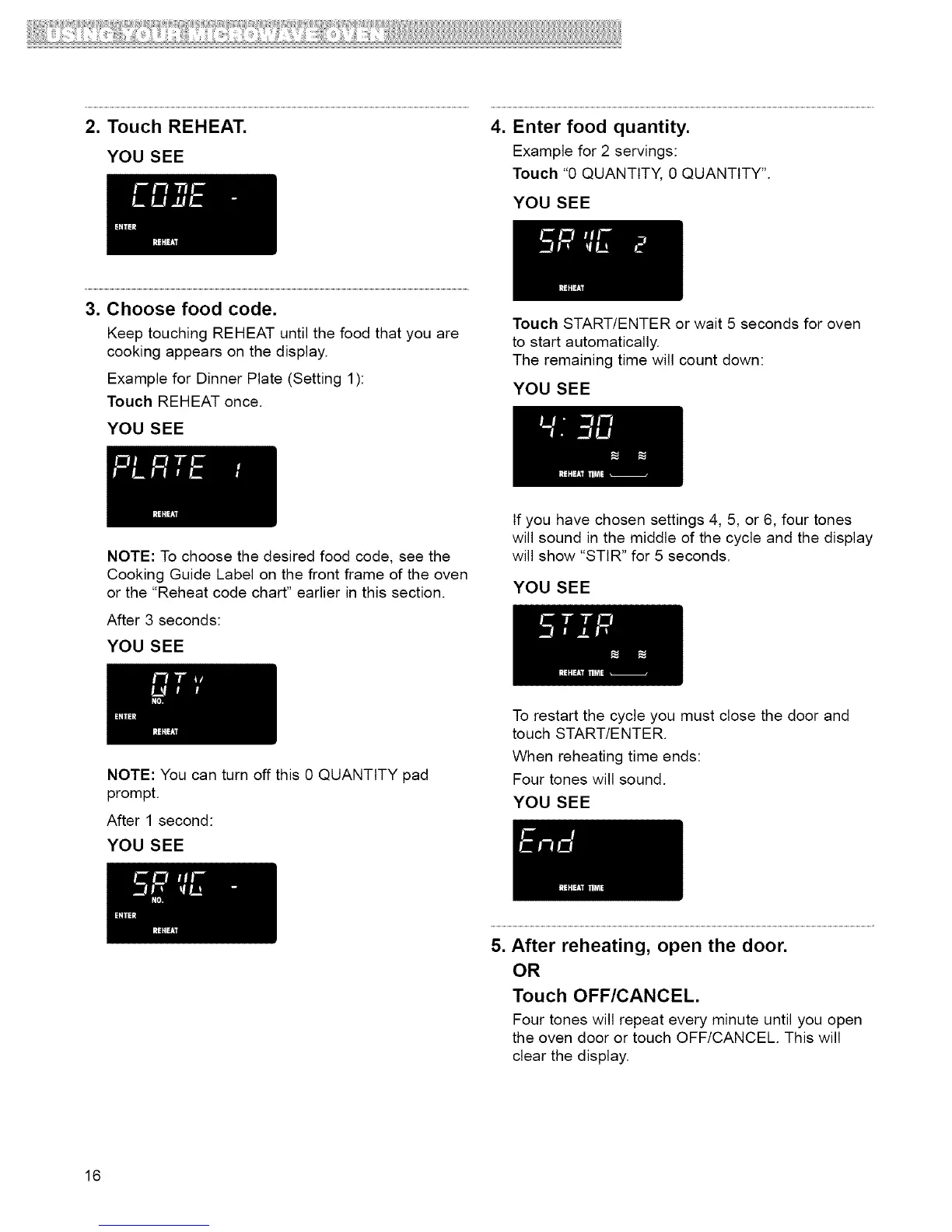
2. Touch REHEAT. 4. Enter food quantity.
YOU SEE Example for 2 servings:
Touch "0 QUANTITY, 0 QUANTITY".
YOU SEE
3. Choose food code.
Keep touching REHEAT until the food that you are
cooking appears on the display.
Example for Dinner Plate (Setting 1):
Touch REHEAT once.
YOU SEE
Touch START/ENTER or wait 5 seconds for oven
to start automatically.
The remaining time will count down:
YOU SEE
NOTE: To choose the desired food code, see the
Cooking Guide Label on the front frame of the oven
or the "Reheat code chart" earlier in this section.
After 3 seconds:
YOU SEE
If you have chosen settings 4, 5, or 6, four tones
will sound in the middle of the cycle and the display
will show "STIR" for 5 seconds.
YOU SEE
NOTE: You can turn off this 0 QUANTITY pad
prompt.
After 1 second:
YOU SEE
To restart the cycle you must close the door and
touch START/ENTER.
When reheating time ends:
Four tones will sound.
YOU SEE
5. After reheating, open the door.
OR
Touch OFF/CANCEL.
Four tones will repeat every minute until you open
the oven door or touch OFF/CANCEL. This will
clear the display.
16



 To Next Page