[f your oven has electronic
controJs:
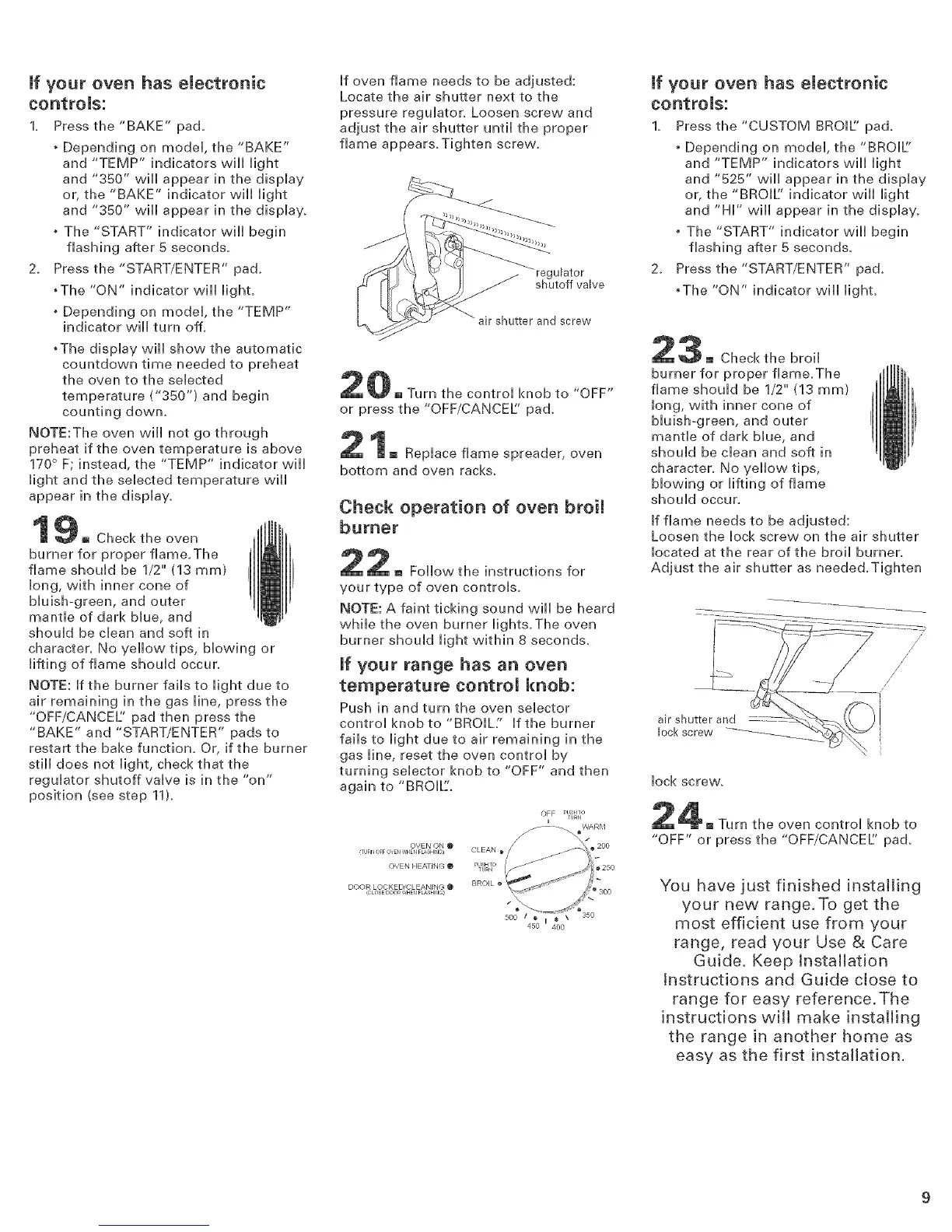
1. Press the "BAKE" pad.
• Depending on model, the "BAKE"
and "TEMP" indicators will light
and "350" will appear in the display
or, the "BAKE" indicator will light
and "350" vvii[ appear in the display.
• The "START" indicator will begin
flashing after 5 seconds.
2. Press the "START/ENTER" pad.
,The "ON" indicator vqll light.
• Depending on model, the "TEMP"
indicator will turn off.
• The display will show the automatic
countdown time needed to preheat
the oven to the selected
temperature ("350") and begin
counting dowm
NOTE:The oven will not go through
preheat if the oven temperature is above
170 ° F; instead, the "TEMP" indicator will
light and the selected temperature will
appear in the display.
_n[Jh
[] Check the oven [[U[I
burner for proper flame.The
!
flame should be 1/2" (13 ram}
i
long, with inner cone of
bluish-green, and outer
mantle of dark blue, and
should be clean and soft in
charactec No yellow tips, blowing or
lifting of flame should occur.
NOTE: If the burner fails to light due to
air remaining in the gas line, press the
"OFF/CANCEL' pad then press the
"BAKE" and "START/ENTER" pads to
restart the bake function. Or, if the burner
still does not light, check that the
regulator shutoff valve is in the "on"
position (see step 11).
If oven flame needs to be adjusted:
Locate the air shutter next to the
pressure regulator. Loosen screw and
adjust the air shutter until the proper
flame appears.Tighten screw.
regulator
shutoff valve
_'_ air shutter and screw
Turn the control knob to "OFF"
or press the "OFF/CANCEL' pa&
[] Replace flame spreader, oven
bottom and oven racks.
Check operation of oven broil
burner
2 [] Follow the instructions for
your type of oven controls.
NOTE: A faint ticking sound will be heard
while the oven burner lights.The oven
burner should light within 8 seconds.
[f your range has an oven
temperature control knob:
Push in and turn the oven selector
control knob to "BROIL:' Iftheburner
fails to light due to air remaining in the
gas line, reset the oven control by
turning selector knob to "OFF" and then
again to "BROIL'.
OFF PlJ HTO
TURU
I
OVEN ON @ _'
,TLIRr4 OFF OcEr] ,_HEr] FLASHINC) CLEAN _/
OVEN HEATING @ PUSHTO /
....... I/
DOOR LOCKED/CLEANING @ BROIL _
,CLOSEDOOR,',HEUFLASHIr_)
_,00"'_t0' too' _'°
If your oven has electronic
controls:
1. Press the "CUSTOM BROIL' pad.
• Depending on model, the "BROIL'
and "TEMP" indicators will light
and "525" will appear in the display
or, the "BROIL' indicator will light
and "Hi" will appear in the display.
• The "START" indicator will begin
flashing after 5 seconds.
2. Press the "START/ENTER" pa&
•The "ON" indicator wiii lighL
3[] Checkthe broil
burner for proper flame.The
flame should be 1/2" (13 ram)
long, with inner cone of
bluish-green, and outer
mantle of dark blue, and
should be clean and soft in
character. No yellow tips,
blowing or lifting of flame
should occuc
If flame needs to be adjusted:
Loosen the lock screw on the air shutter
located at the rear of the broil burner.
Adjust the air shutter as needed.Tighten
air shutter and
lock screw
/
/
/
[
//
/
/
lock screw,
the oven control knob to
"OFF" or press the "OFF/CANCEL' pad.
YOU have just finished installing
your new range.To get the
most efficient use from your
range, read your Use & Care
Guide. Keep installation
Instructions and Guide close to
range for easy reference. The
instructions will make instaJJing
the range in another home as
easy as the first installation.


 To Next Page
 Loading...