
 Need help?
Do you have a question about the Whirlpool GT4175SP and is the answer not in the manual?
Essential safety precautions for operating the microwave oven to prevent hazards.
Guidelines to prevent harmful exposure to microwave energy from the oven.
Steps for unpacking the microwave and checking for any damage upon receipt.
Guidelines for proper placement and electrical connection for safe operation.
Procedures for ensuring the microwave oven is properly grounded to prevent electric shock.
Tips for covering, stirring, arranging, piercing, shielding, and standing time.
Using auto defrost or manual defrost for meat, poultry, and fish.
Solutions for problems with oven operation, display, and turntable.
This document is a Use & Care Guide for a Whirlpool Microwave Oven, Model GT4175SP. It provides comprehensive information on the safe operation, installation, features, usage, maintenance, and troubleshooting of the appliance.
The Whirlpool Microwave Oven operates by producing microwaves that reflect off the metal interior surfaces and pass through the turntable and appropriate cookware to the food. These microwaves are attracted to and absorbed by fat, sugar, and water molecules in the food, causing them to move, producing friction and heat, which cooks the food. The oven is designed for heating, cooking, or drying food and is not intended for industrial or laboratory use, canning, sterilizing, or deep frying. It cannot maintain appropriate temperatures for such tasks.
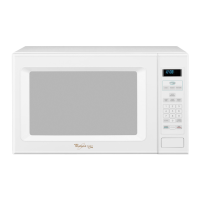
The microwave oven features a control panel with a digital display that shows the time of day or a countdown during operation. When power is first supplied, a colon (":") appears, and if it reappears at any other time, it indicates a power failure, requiring the clock to be reset.
The Start pad initiates any function, and if cooking is interrupted, touching Start will resume the cycle for non-sensor functions. The Off-Cancel pad clears incorrect commands, cancels programs during cooking, and does not erase the time of day. Opening the door also turns off the microwave, and closing it followed by touching Start resumes the cycle.
The JET START™ feature allows for automatic cooking at 100% power for 30 seconds with a single touch. Each additional touch adds 30 seconds, up to 3 minutes, then 1 minute up to 10 minutes. This feature can also add 30 seconds to an ongoing cycle or after a cycle ends.
A Clock function displays the time of day in a 12-hour format, which can be set or turned off via the Options pad. Tones provide audible signals for valid entries, hidden features, end of stages in multistage cooking, invalid entries, end-of-cycle reminders, and end of Timer countdowns. Tones can be disabled through the Options pad.
The Timer can be set for up to 99 minutes and 99 seconds and counts down the set time without starting or stopping the microwave oven itself. The Timer can be canceled at any time, but touching Off-Cancel will turn off the microwave oven.
A Child Lock feature disables the control panel to prevent unintended use. It is activated by touching and holding Off-Cancel for 5 seconds until "LOCKED" appears on the display, and deactivated by repeating the action.
The Demo Mode allows users to learn how to use the oven without actually turning on the magnetron. In this mode, the oven light, fan, and turntable operate, and the display counts down quickly. It is activated by touching and holding Timer Set/Off for 5 seconds.
The Options pad allows users to select functions and change display settings, including turning sounds on/off, turning the clock on/off, adjusting scroll speed (slow, normal, fast), and changing weight units (lbs or kgs).
For cooking, the oven offers Cooking Power settings from 10% (Low) to 100% (High), allowing precise control over heating. Guidelines are provided for various food types, from quick convenience foods to sensitive items like cheese and egg dishes. Cooking in Stages allows programming up to three cooking stages, plus a defrosting stage and a warming stage, in any order, with defrosting as the first and Warm Hold as the last.
Popcorn is a sensor function that automatically determines the appropriate popping time for commercially packaged microwavable popcorn. Users select between "Regular" (for 3.0-3.5 oz bags) and "Snack" (for 1.75 oz bags).
Sensor Cooking and Sensor Reheat functions detect humidity released from food to automatically set cooking or reheating times. Specific instructions are provided for various foods like baked potatoes, frozen and fresh vegetables, frozen entrées, rice, fish, and seafood.
The Defrosting feature includes Auto Defrost with preset programs for Meat, Poultry, and Fish, or manual defrosting at 30% cook power. Users enter the weight, and the oven counts down the defrost time, prompting to check, turn, rearrange, or separate food during the cycle.
Warm Hold keeps hot cooked food warm and can be used independently or programmed to follow a cooking cycle. Opening the door during Warm Hold cancels the function.
The Use & Care Guide provides detailed instructions for cleaning the microwave oven. Before cleaning, all controls should be off, and the oven should be cool. Soap, water, and a soft cloth or sponge are generally recommended.
For the Oven Cavity, soap-filled scouring pads, abrasive cleaners, steel-wool pads, gritty washcloths, or recycled paper towels should not be used to avoid damage. For stainless steel models, rubbing in the direction of the grain is advised. For average soil, mild, nonabrasive soaps and detergents are recommended, followed by rinsing with clean water and drying with a soft, lint-free cloth. For heavy soil, heating 1 cup (250 mL) of water for 2 to 5 minutes creates steam to soften soil, followed by cleaning with mild, nonabrasive soaps and detergents, rinsing, and drying. To remove odors, heating 1 cup (250 mL) of water with 1 tbsp (15 mL) of lemon juice or vinegar for 2 to 5 minutes is suggested. The microwave inlet cover should be kept clean by wiping with a wet cloth to prevent arcing and oven damage.
For the Oven Door and Exterior, the area where the door and frame touch when closed should be kept clean using mild, nonabrasive soaps and detergents, rinsed with clean water, and dried with a soft, lint-free cloth. Glass cleaner applied to a towel (not directly to the surface) or a nonabrasive plastic scrubbing pad can be used for glass surfaces.
The Turntable should be replaced immediately after cleaning, as the oven should not be operated without it. It can be cleaned with mild cleanser and a scouring pad or in a dishwasher.
The guide also includes a Troubleshooting section to address common issues such as the oven not operating, making humming noises, wavy door appearance, turntable malfunction, display messages, slow fan speed, long cooking times, and radio/TV interference. Solutions often involve checking fuses, door closure, control settings, magnetron function, power supply, and cleanliness.
For assistance or service, the guide directs users to contact the Whirlpool Customer Interaction Center, providing a toll-free number and website. It also advises on ordering replacement parts, recommending FSP® parts for proper fit and function. Information on built-in trim kits for countertop models is also provided, along with their respective model numbers and compatible oven models. The document concludes with a one-year limited warranty, outlining what Whirlpool will pay for and what is excluded from coverage.
 General
| Type | Countertop |
|---|---|
| Cooking Power | 1000 Watts |
| Capacity | 1.7 cu. ft. |
| Control Type | Electronic Touch |
| Turntable | Yes |
| Color | Stainless Steel |
| Child Safety Lock | Yes |
| Cooking Modes | Defrost, Reheat, Cook |


 To Next Page