CONTROL P&NEL _ND FEATURES
Not all features and cycles are available on all models.
11=cycle models
NORMAL _ 1_
CASUAL BULKY ITEMS
DELICATE JEANS
Cycles
POWER HEAVY START/PAUSE
Static Reduce
0 TOWELS
Manual Hold to START
TIMED DRY "_ N D
CE Wrinkle Shield
QUICK DRY I QUICK REFRESH
SteQm Cyclesl Select number of Garments
with Steam
@
6_ EcoBoost Damp Dry Drum Light Control Lock
n 1
8=cycle models
POWER
CASUAL
DELICATE
Cycles
NORMAL
Manual
TIMED
QUICK DRY
QUICK REFRESH
BULKY ITEMS
HEAVY DUTY
START/PAUSE
Hold to START
i!i_K iiiiiiiiiiiiiiiiiiiiiiiiiiiiiiii!i!li!_i!_!_ii!i!iiiii_ii!ii!ii!ilili!i!ii!iiiiiiii!ii!ii!ii!ii!iiit!i!i,!i_!i_!i_ii_ii_ii_ii_ii_ii_ii_illiiiiiiiiiiiiiiiiiiii!i!!_i!i!_iill
l_ EcoBoost Wrinkle Drum Light Control Lock
Shield pressand hold
for 3 seconds
6
O
0
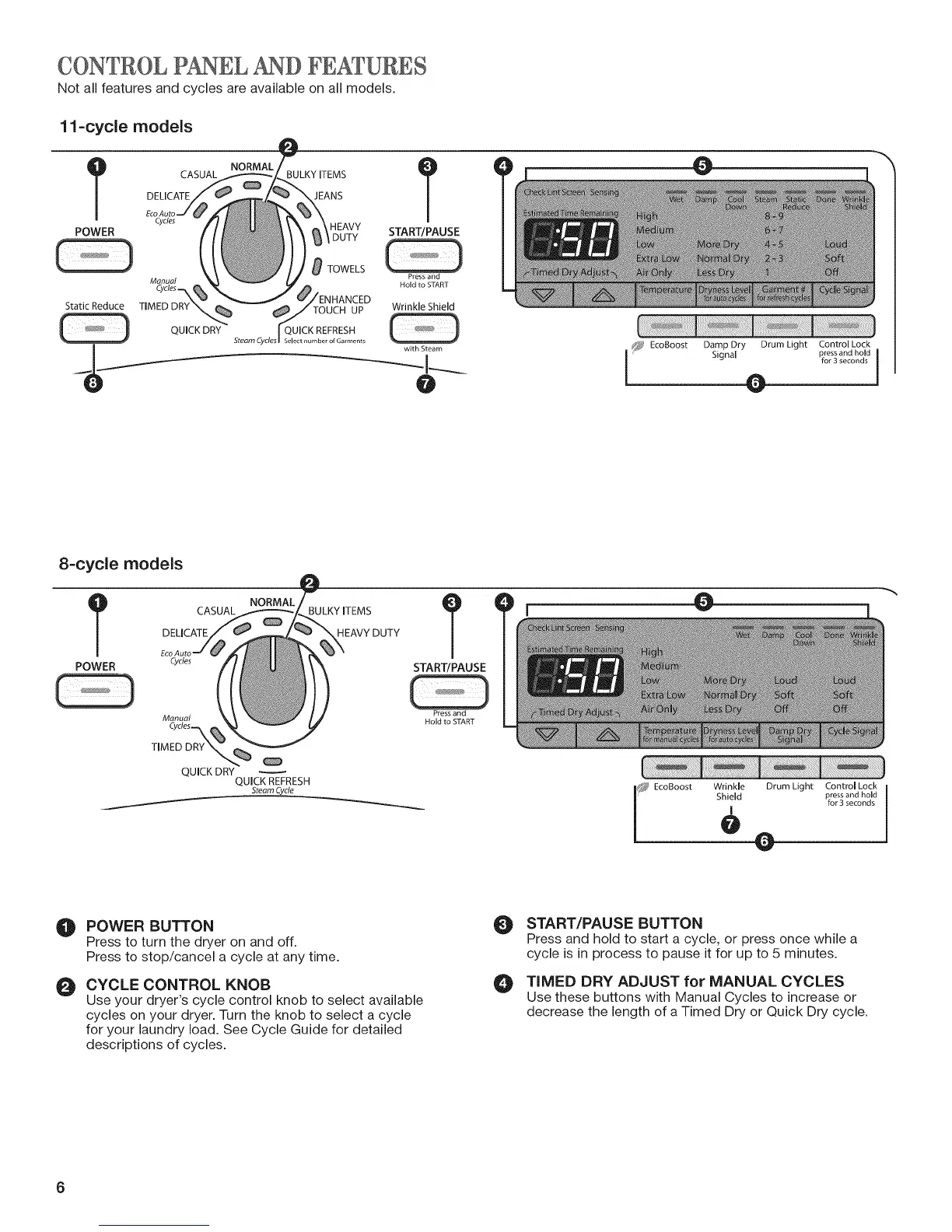
POWER BUTTON
Press to turn the dryer on and off.
Press to stop/cancel a cycle at any time.
CYCLE CONTROL KNOB
Use your dryer's cycle control knob to select available
cycles on your dryer. Turn the knob to select a cycle
for your laundry load. See Cycle Guide for detailed
descriptions of cycles.
O
O
START/PAUSE BUTTON
Press and hold to start a cycle, or press once while a
cycle is in process to pause it for up to 5 minutes.
TIMED DRY ADJUST for MANUAL CYCLES
Use these buttons with Manual Cycles to increase or
decrease the length of a Timed Dry or Quick Dry cycle.
6




 To Next Page