16
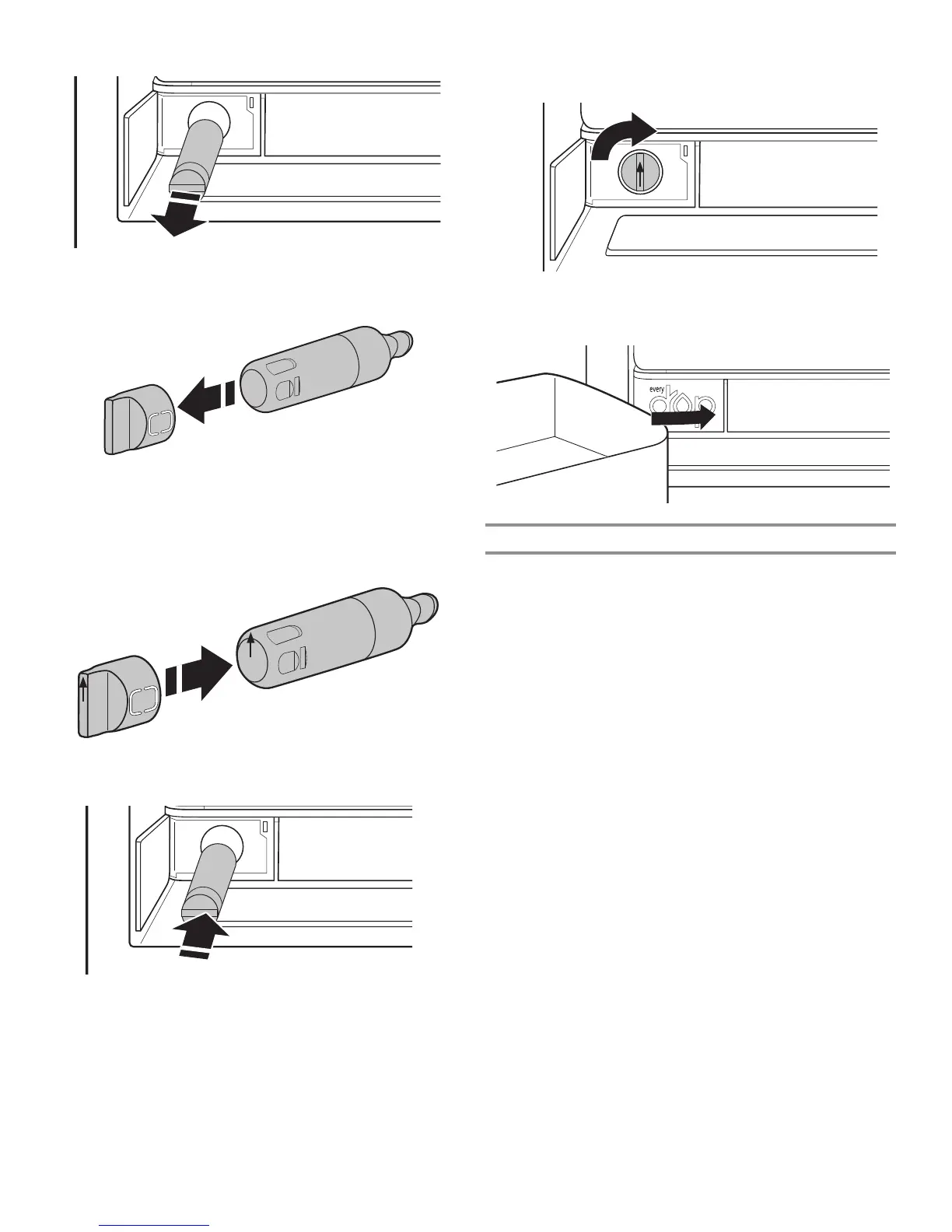
3. Pull the lter out of the housing.
4. Remove the water lter cap from the water lter.
5. Install the water lter cap onto the new lter. Be sure to align
the arrows so the grooves in lter align with ribs in lter cap.
6. Insert the lter into the housing.
7. Twist the water lter and turn 90° clockwise until it locks into
place and that arrows are aligned.
8. Push the water lter door closed.
The Water Filter Status Light
The water lter status lights will help you know when to change
your water lter. The app will also send notications to your
mobile device and tell you the lter life remaining (100% to 0%).
■ ORDER FILTER (yellow) - It is almost time to change the
water lter. “Order Filter” display is on all of the time but off in
Cooling Off and Showroom mode.
■ REPLACE FILTER (red) - Replace the water lter. While you are
dispensing water, “Replace Filter” will blink 7 times and
an alert tone will sound 3 times.
NOTE: “REPLACE FILTER” will remain illuminated if a filter is
not installed or is installed incorrectly.
■ RESET FILTER - Touch FAST COOL and ENERGY SAVER for
3 seconds to reset water lter. The display will do a 3-second
countdown, then ash the icon and play a tone.



 To Next Page