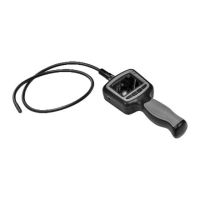
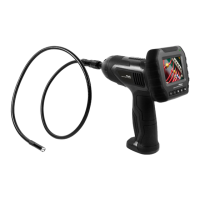
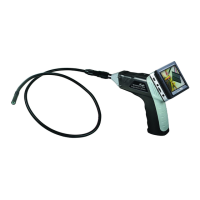
The WIC-1750 Inspection Camera is a multi-purpose device designed for visual inspection in various environments, offering both real-time monitoring and recording capabilities. This user-friendly tool is ideal for exploring hard-to-reach areas, retrieving small objects, and documenting findings with photos and videos.
Function Description:
The core function of the WIC-1750 is to provide visual access to confined or obscured spaces. It achieves this through a flexible tube equipped with a 9mm camera lens and LED illumination at its tip. The camera captures images and video, which are then displayed on a 2.7-inch color LCD monitor on the handheld unit. The device supports both real-time monitoring and the recording of video and still images to a Micro SD card. It also offers connectivity options for external displays and PCs, allowing for broader viewing and data transfer. The flexible tube is designed to be maneuverable, enabling users to navigate it through various pathways to reach the desired inspection area.
Usage Features:
The WIC-1750 offers a range of features to enhance its usability and versatility:
- Power and Display: The device is powered on by pressing and holding the power switch. Once on, the LCD monitor becomes viewable, and a power indicator illuminates. If the image on the LCD is unclear, users can adjust brightness or mirror controls.
- LED Brightness Control: The camera lens is equipped with LEDs to illuminate dark areas. The brightness of these LEDs can be adjusted through 5 levels, providing optimal lighting for different inspection conditions. This control is accessible in both real-time monitoring and video recording modes.
- Image Rotation/Mirror: To ensure correct orientation of the image on the LCD, the device includes an image rotation feature. A quick press (less than 1 second) of the rotate button (which is the same as the Power Switch button) allows users to cycle through four possible image orientations, including a mirrored view. This is particularly useful when the camera tube is maneuvered into positions where the image might appear upside down or reversed.
- Zoom Functionality: In real-time monitoring mode, users can zoom in on the picture using a dedicated button. The zoom levels available are 1.0X, 1.5X, 2.0X, 2.5X, and 3X, allowing for closer examination of details.
- Video Recording: The WIC-1750 can record video in real-time. A dedicated button initiates and stops recording. Videos are automatically saved as individual files every 30 minutes. The device indicates when the SD card memory is full.
- Photo Capture: Still images can be captured in real-time monitoring mode using a specific button. Similar to video recording, the device will indicate if the SD card memory is full.
- Playback Mode: The device features a playback mode for reviewing recorded videos and captured photos. Users can navigate through folders and files, select desired content, and initiate playback. For videos, functions like pause, fast forward, and rewind are available. For images, users can view and exit the image display.
- File Management (Deletion): Both individual video/picture files and entire folders can be deleted from the device. This is done by selecting the desired file or folder in playback mode and confirming the deletion.
- System Settings: The WIC-1750 includes a comprehensive settings menu, accessible via the MENU button. This menu allows users to configure various aspects of the device's operation.
- Language Setting: Users can select their preferred language from the available options within the system settings.
- Video System Setting: The device supports both NTSC and PAL video systems, allowing users to select the appropriate format for their region (NTSC for North America, PAL for Europe and other overseas countries).
- Formatting: The Micro SD card can be formatted directly from the device's settings menu. This is useful for preparing a new card or clearing existing data.
- Default Setup: Users can restore the device to its factory default settings through the menu.
- Version Information: The device provides access to its version details, which can be viewed in the settings menu.
- Date/Time Setting: The current date and time can be set and adjusted within the settings menu.
- Frame Rate Setting: Users can select different frame rates for video recording, optimizing for specific needs or storage considerations.
- Time Stamp Setting: The device allows users to toggle the time stamp display on or off for recorded videos and photos.
- Event Playback: This feature provides a specific mode for reviewing events, with guidance available in the Playback and Deleting sections of the manual.
- Accessories: The WIC-1750 comes with several accessories that attach to the camera tube: a magnet clip, a hook clip, and a mirror clip. These are designed to retrieve small metallic items, hook onto objects, or provide an angled view, respectively. The 9mm waterproof camera assembly is integral to the flexible tube.
- Connectivity: The device includes a USB port for connecting to a PC, allowing for easy transfer of recorded data. It also has a Video Out port, enabling the display of live video and recorded content on an external monitor or TV system.
Maintenance Features:
While the manual primarily focuses on operational features, it also touches upon aspects related to device care and troubleshooting:
- Battery Installation: The device operates on four AA batteries, which are installed in a dedicated compartment. Proper battery orientation is crucial for operation.
- Micro SD Card Insertion: The device requires a Micro SD card for storing photos and videos. Correct insertion is indicated by an icon on the monitor. If the card is not read, the device prompts the user to format it.
- Water Resistance: The camera lens and flexible tube are water-resistant with an IP67 rating, allowing for submersion up to approximately 12 feet (the camera extension limit). However, the monitor unit itself is not waterproof and should not be immersed in water. It should be stored in a dry place to prevent electric shock and damage.
- Troubleshooting Guidance: The manual provides solutions for common issues, such as the monitor not turning on (check charging, reset button), "See User Guide for Troubleshooting" message (check power, camera tube connection), power light on but no screen display (check batteries, camera tube insertion), upside-down picture (use image orientation button), and "scrambled" video (check NTSC/PAL format setting).
- Warranty Information: The product comes with a one-year limited warranty covering defects in materials and workmanship. The warranty is voided by abuse, modification, improper installation, removal of housing, or missing serial numbers. Service under warranty requires a dated store receipt.
- Out-of-Warranty Service: For units outside the warranty period or conditions, repair services are available at a specified fee. Payment methods are outlined, and personal checks are not accepted.
- Return Instructions: Detailed instructions are provided for returning units for service, including packaging requirements, insurance recommendations, and necessary documentation (name, address, phone, email, problem description, copy of receipt, and serial number).
- Customer Service: Contact information (phone and website) is provided for customer support regarding operation or warranty service.
The WIC-1750 is a robust and versatile inspection camera designed to simplify visual inspections and documentation in various professional and personal applications.

 Need help?
 General

 To Next Page