EasyManua.ls Logo

White Sewing 793 - Buttonhole Creation Steps

White Sewing 793
62 pages
Print Icon
To Next Page IconTo Next Page
To Previous Page IconTo Previous Page
Loading...
30
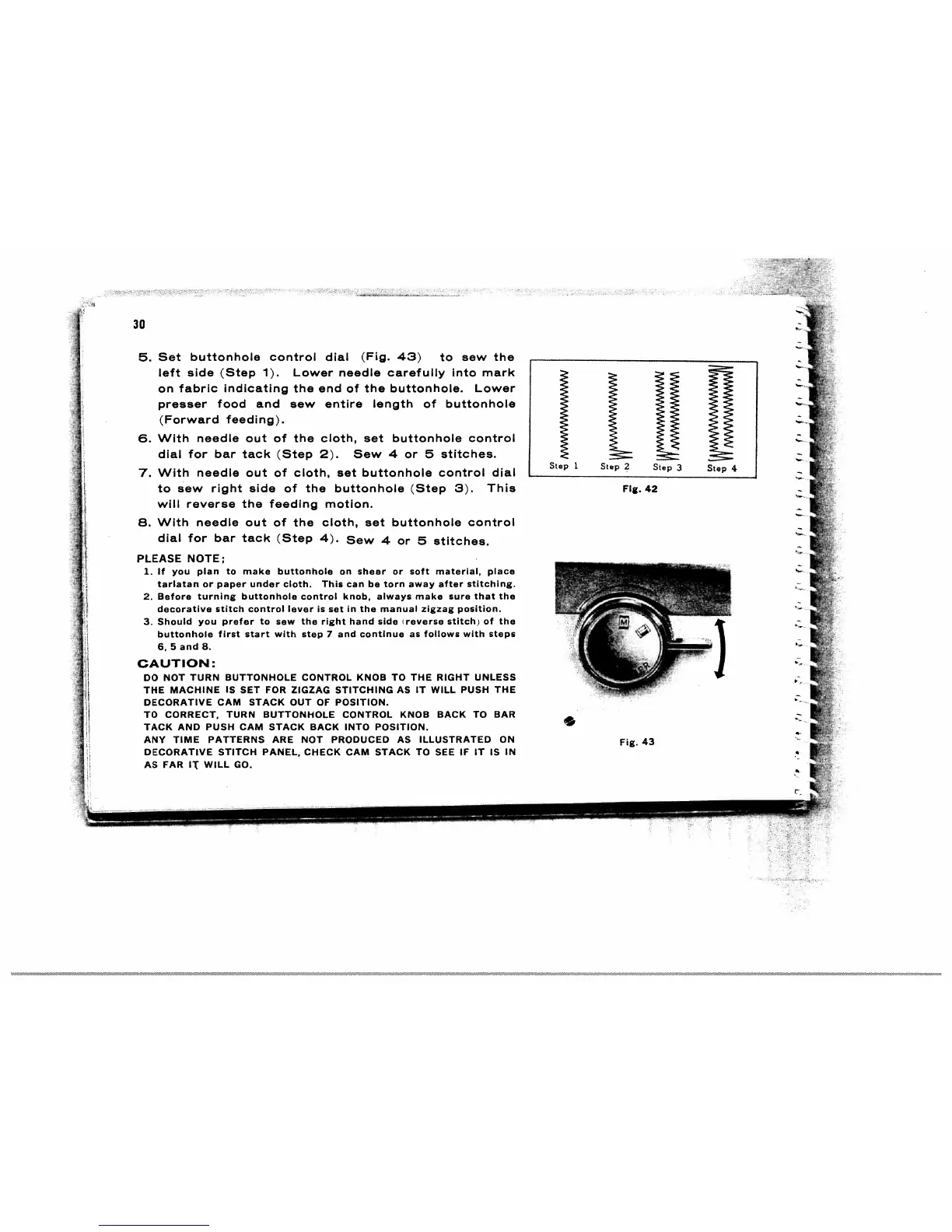
5.
Set
buttonhole control
dial
(Fig.
43)
to
sew
the
_____________________________
left
side
(Step
1).
Lower
needle
carefully
into
mark
on
fabric
indicating
the
end
of
the
buttonhole.
Lower
presser
food
and
sew
entire
length
of
buttonhole
(Forward
feeding).
6.
With
needle
out
of
the
cloth,
set
buttonhole
control
dial
for
bar
tack
(Step 2).
Sew
4
or
5
stitches.
7.
With
needle out
of
cloth,
set
buttonhole
control
dial
______________________________
to
sew
right
side
of
the buttonhole
(Step
3).
This
FIg.
42
will
reverse
the
feeding
motion.
8.
With
needle
out
of
the
cloth,
set
buttonhole
control
dial
for
bar
tack
(Step
4).
Sew
4
or
5
stitches.
PLEASE
NOTE;
1.
If
you
plan
to
make
buttonhole
on
sheer
or
soft material,
place
tarlatan
or
paper
under
cloth.
This
can
be
torn
away
after
stitching.
2.
Before
turning
buttonhole
control
knob,
always
make sure
that
the
decorative
stitch
control lever
is
set
in
the
manual
zigzag position.
3.
Should
you
prefer
to
sew
the
right
hand
side
reverse
stitch)
of
the
buttonhole
first
start
with
step
7
and
continue
as
follows
with
steps
6,5and8.
CAUTION:
DO
NOT
TURN BUTTONHOLE CONTROL
KNOB
TO
THE
RIGHT
UNLESS
THE
MACHINE
IS
SET
FOR
ZIGZAG
STITCHING
AS
IT
WILL
PUSH
THE
DECORATIVE
CAM
STACK
OUT
OF
POSITION.
TO
CORRECT,
TURN
BUTTONHOLE
CONTROL
KNOB
BACK
TO
BAR
TACK
AND
PUSH
CAM
STACK
BACK
INTO
POSITION.
ANY
TIME
PATTERNS
ARE
NOT
PRODUCED
AS
ILLUSTRATED
ON
Fig.
43
DECORATIVE
STITCH
PANEL,
CHECK
CAM
STACK
TO
SEE
IF
IT
IS
IN
AS
FAR
IT
WILL
GO.
tIN
Step
1
Step
2
Step
3
Step
4

Related product manuals