EasyManua.ls Logo

White 140 - Presser Foot Operations; Removing and Attaching Presser Feet

White 140
35 pages
Print Icon
To Next Page IconTo Next Page
To Previous Page IconTo Previous Page
Loading...
02/01/2008
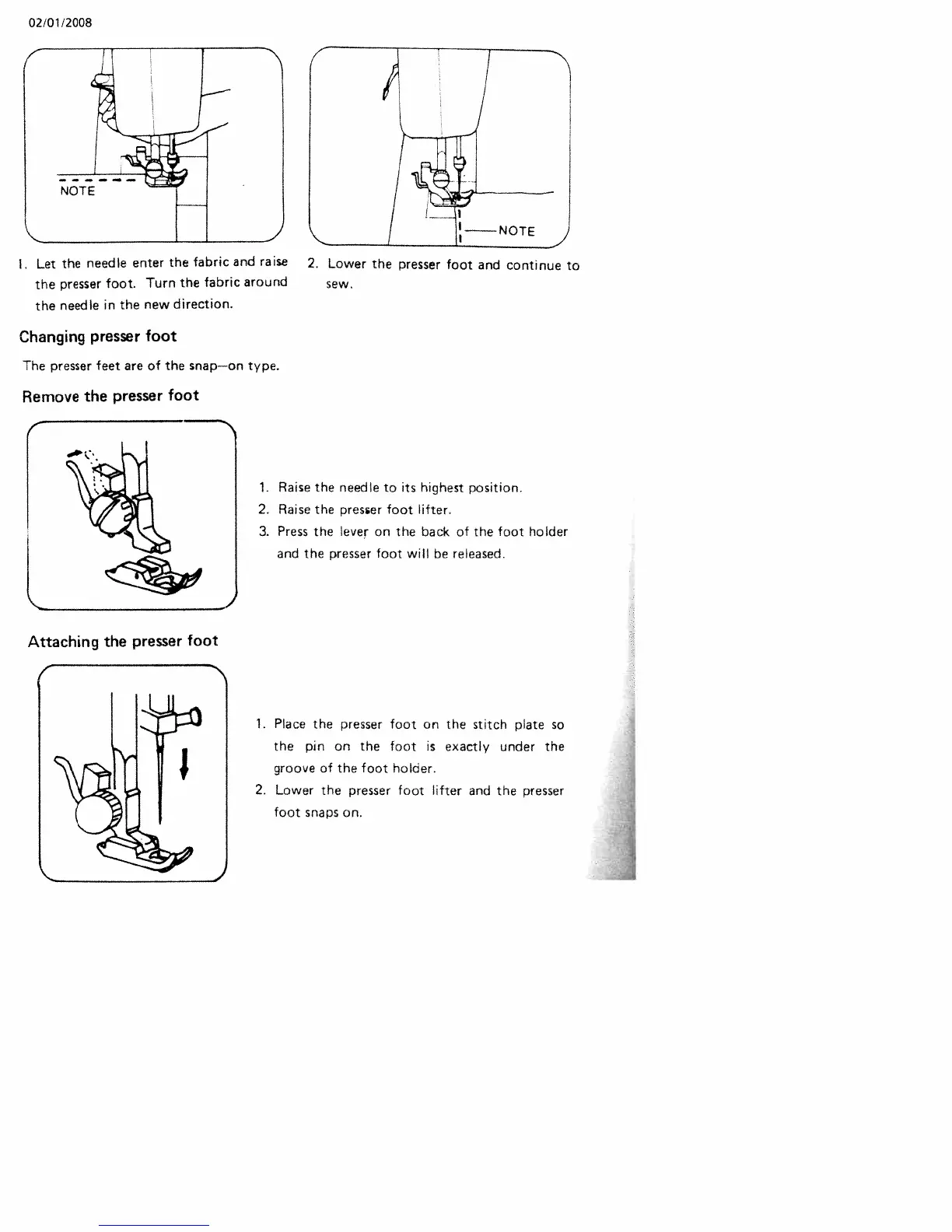
Changing
presser
foot
The
presser
feet
are
of
the
snap—on
type.
Remove
the
presser
foot
1.
Raise
the
needle
to
its
highest
position.
2.
Raise
the
presser
foot
lifter.
3.
Press
the
lever
on
the
back
of
the
foot
holder
and
the
presser
foot
will
be
released.
1.
Place
the
presser
foot
on
the
stitch
plate
so
the
pin
on
the
foot
is
exactly
under
the
groove
of
the
foot
holder.
2.
Lower
the
presser
foot
lifter
and
the
presser
foot
snaps
on.
I.
Let
the
needle
enter
the
fabric
and
raise
2.
Lower
the
presser
foot
and
continue
to
the
presser
foot.
Turn
the
fabric
around
sew.
the
needle
in
the
new
direction.
Attaching
the
presser
foot
-_

Related product manuals