EasyManua.ls Logo

White 140 - Buttonhole Creation

White 140
35 pages
Print Icon
To Next Page IconTo Next Page
To Previous Page IconTo Previous Page
Loading...
02/01/2008
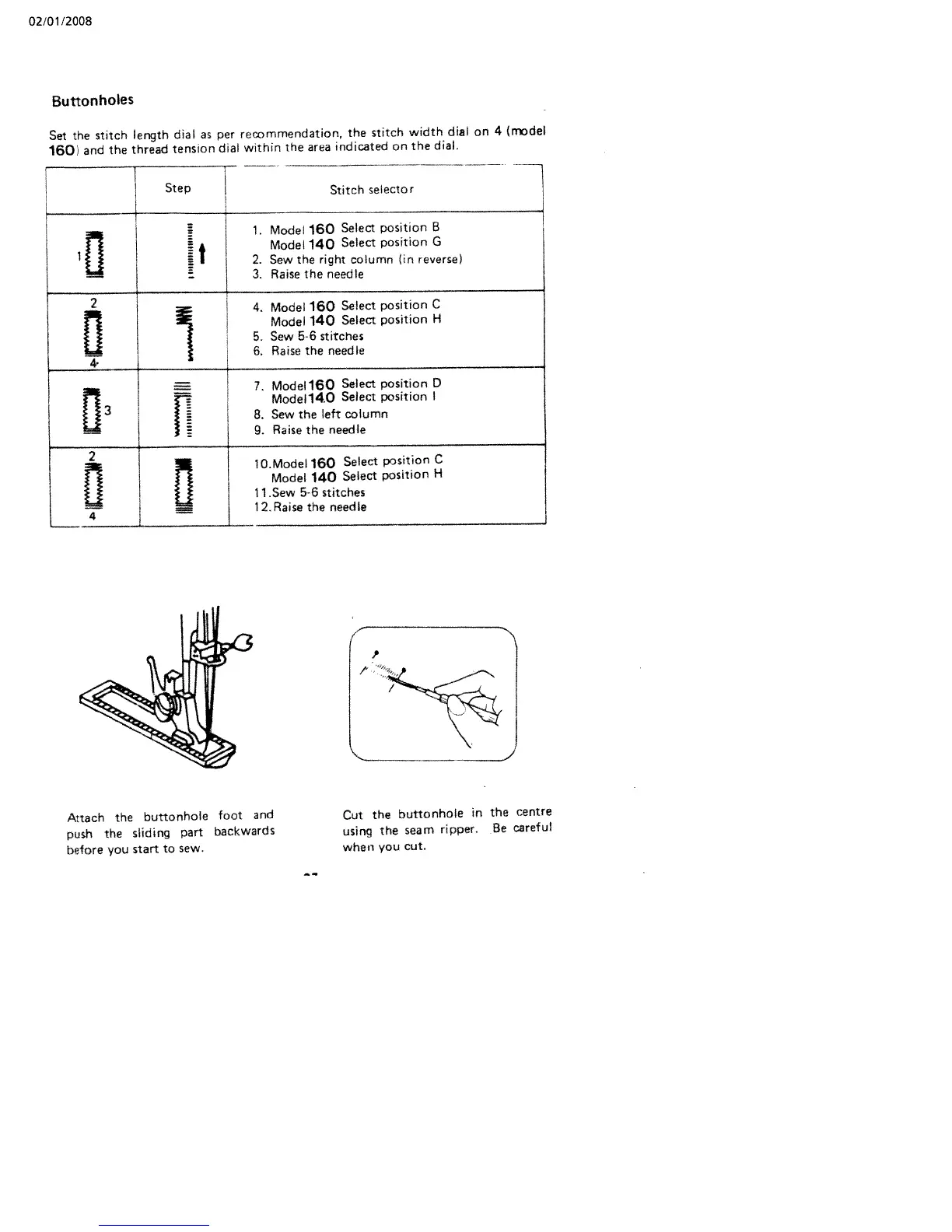
Buttonholes
Set
the
stitch
length
dial
as
per
recommendation,
the
stitch
width
dial
on
4
(rrdel
160>
and
the
thread
tension
dial
within
the
area
indicated
on
the
dial.
Step
Stitch
selector
fl
1.
Model
160
Select
position
B
Model
140
Select
position
G
2.
Sew
the
right
column
(in
reverse>
3.
Raise
the
needle
2
4.
Model
160
Select
position
C
Model
140
Select
position
H
5.
Sew
5-6
stitches
6.
Raise
the
needle
4
11
7,
Modell6O
Select
position
D
j
Modell4O
Select
position
I
8.
Sew
the
left
column
9.
Raise
the
needle
2
10.Modell6O
Select
position
C
Model
140
Select
position
H
LI
11
Sew
56
stitches
12.Raise
the
needle
I
Attach
the
buttonhole
foot
and
push
the
sliding
part
backwards
before
you
start
to
sew.
Cut
the
buttonhole
in
the
centre
using
the
seam
ripper.
Be
careful
when
you
cut.

Related product manuals