EN
WHY-KP
SELF-LEARNING UNIVERSAL WIRELESS KEYPAD
Cod. WHITE 8991007 • BLACK 8991008
Instruction manual and warnings
For your safety, please read manual instruction carefully before beginning installation.
Technical Specifications
Power supply: 1 x CR2450 3V
Storable codes: up to 12
Users: 1 master + up to 11 standard
Frequency: Multy AM/FM
Code types: fixed and rolling code
Working temperature: -20º/+60°C
Size: 98x73x43 mm
USER MANUAL
The PASSWORD MASTER is unique and is necessary to memorize the codes to be transmitted
from the Keypad and to manage the dierent PASSWORD USER. PLEASE NOTE PASSWORD
MASTER is pre-set with code 1111.
HOW TO MODIFY THE PASSWORD MASTER
Digit the valid PASSWORD MASTER and keep pressed the last button (1 in case of first
modification) for at least 6 seconds.
RED and GREEN led will light on with steady light and the buzzer will emit a short sound.
Now press “0” button, RED led remains lighted on while GREEN starts blinking slowly.
At this point digit the new desired PASSWORD MASTER by using between 4 and 8 characters
(note that you can use both numbers between 0-9 than letters A-B).
If the PASSWORD is usable the GREEN led will light on steady while the RED turns o.
Digit the new PASSWORD MASTER a second time as to confirm. The RED led lights on steady
while the GREEN blinks slowly. If the password matches with the first digitated then the RED
led stays the same while the GREEN blinks faster.
PASSWORD USER
Can be set up to 11 PASSWORD USER.
To set or modify a PASSWORD USER digit the PASSWORD MASTER and keep the last button
pressed for at least 6 seconds.
RED and GREEN led will light on with steady light and the buzzer will emit a short sound.
Now press the button with which you want to manage this PASSWORD USER (choose between
1-9 and A-B not 0 as reserved to the PASSWORD MASTER). The RED led lights on steady while
the GREEN blinks slowly.
At this point digit the desired PASSWORD USER by using between 4 and 8 characters (note that
you can use both numbers between 0-9 than letters A-B).
If the PASSWORD is usable RED and GREEN LEDs will light on steady and you can choose radio
codes (previously set) to enable for this PASSWORD USER by pressing one at a time the desired
buttons.
If no buttons is pressed within 10 seconds, all the codes previously set will be enabled
automatically.
Now the RED led is lighted on steady while GREEN blinks quickly at indicate that the procedure
has been successfully concluded.
We strongly recommend to take note of the PASSWORD MASTER and keep it in a safe place in
order to have always access into the system.
GREEN
FLASHES
SLOWLY
RED
FIXED
GREEN
FLASHES
QUICKLY
RED
FIXED
GREEN
FIXED
12 sec.
RED
FIXED
GREEN
FLASHES
SLOWLY
RED
FIXED
GREEN
FIXED
RED
FIXED
GREEN
FLASHES
QUICKLY
12 sec.
RED
FIXED
RED
FIXED
GREEN
FIXED

 Need help?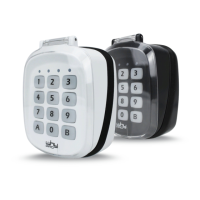

 To Next Page
 General