COMMAND CONTROL
Bat Handle Joystick
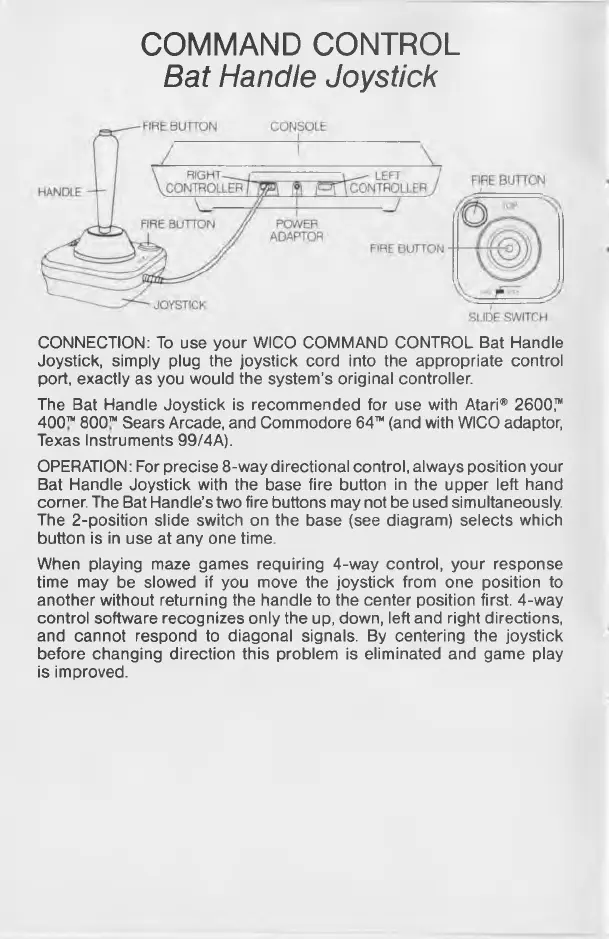
CONNECTION: To use your WICO COMMAND CONTROL Bat Handle
Joystick, simply plug the joystick cord into the appropriate control
port, exactly as you would the system's original controller.
The Bat Handle Joystick is recommended for use with Atari* 2600,™
400™ 800™ Sears Arcade, and Commodore 64™ (and with WICO adaptor,
Texas Instruments 99/4A).
OPERATION: For precise 8-way directional control, always position your
Bat Handle Joystick with the base fire button in the upper left hand
corner. The Bat Handle’s two fire buttons may not be used simultaneously.
The 2-position slide switch on the base (see diagram) selects which
button is in use at any one time.
When playing maze games requiring 4-way control, your response
time may be slowed if you move the joystick from one position to
another without returning the handle to the center position first. 4-way
control software recognizes only the up, down, left and right directions,
and cannot respond to diagonal signals. By centering the joystick
before changing direction this problem is eliminated and game play
is improved.



 To Next Page