COMMAND CONTROL
Joystick/Keypad for
ColecoVision™ and ADAl\ZTM
CONSOLE
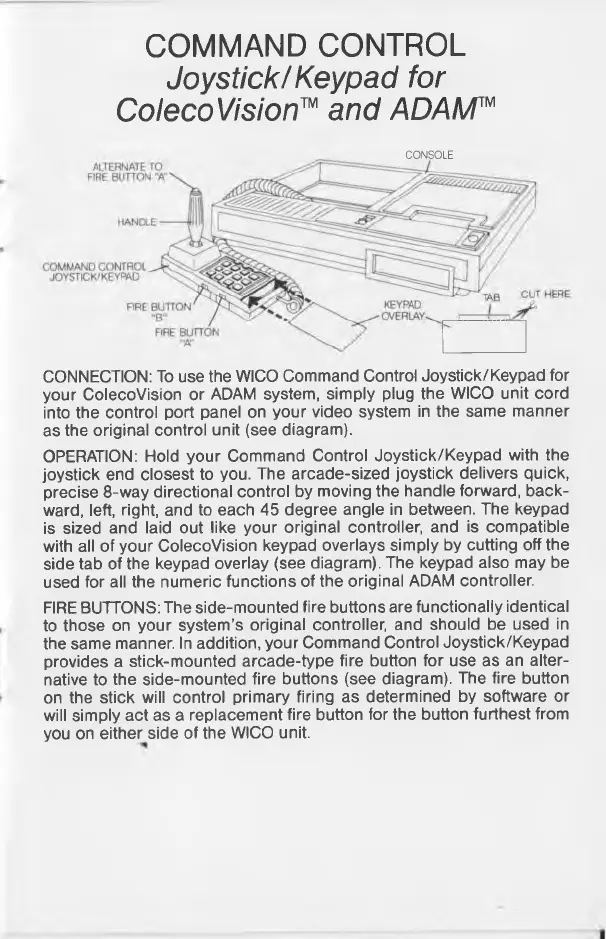
CONNECTION: To use the WICO Command Control Joystick/Keypad for
your ColecoVision or ADAM system, simply plug the WICO unit cord
into the control port panel on your video system in the same manner
as the original control unit (see diagram).
OPERATION: Hold your Command Control Joystick/Keypad with the
joystick end closest to you. The arcade-sized joystick delivers quick,
precise 8-way directional control by moving the handle forward, back
ward, left, right, and to each 45 degree angle in between. The keypad
is sized and laid out like your original controller, and is compatible
with all of your ColecoVision keypad overlays simply by cutting off the
side tab of the keypad overlay (see diagram). The keypad also may be
used for all the numeric functions of the original ADAM controller.
FIRE BUTTONS: The side-mounted fire buttons are functionally identical
to those on your system’s original controller, and should be used in
the same manner. In addition, your Command Control Joystick/Keypad
provides a stick-mounted arcade-type fire button for use as an alter
native to the side-mounted fire buttons (see diagram). The fire button
on the stick will control primary firing as determined by software or
will simply act as a replacement fire button for the button furthest from
you on either side of the WICO unit.



 To Next Page