WIDEX SOUNDCONNECT QUICK GUIDE
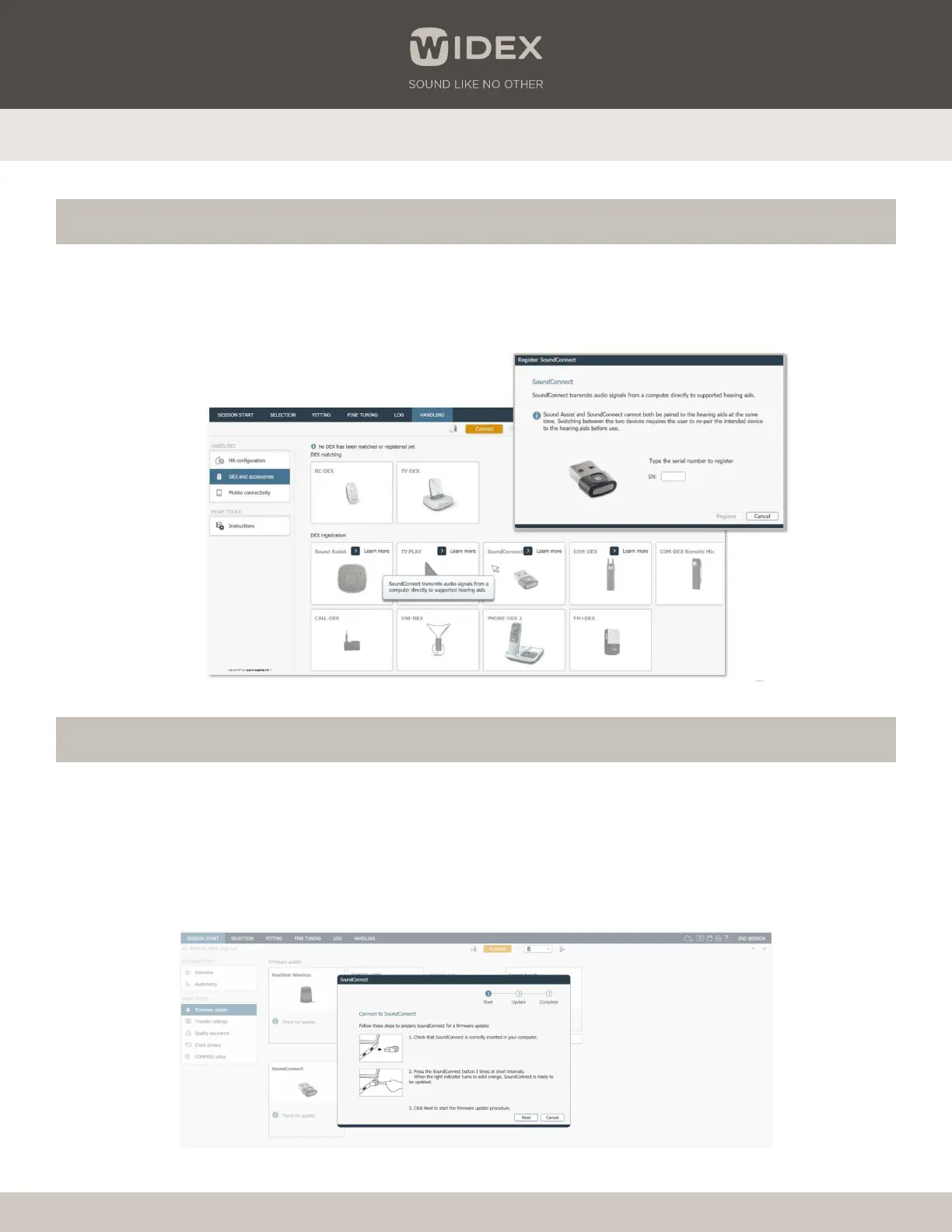
Register the Widex SoundConnect serial number (optional)
Widex SoundConnect firmware update
1
Open Compass™ GPS and connect to the Widex hearing aids. Click on HANDLING in the menu bar at the top of the screen.
2
Open “DEX and accessories” in the sidebar and click on the “SoundConnect” box.
3
Select the SoundConnect box and enter the serial number.
1
Insert the Widex SoundConnect into the USB port of the computer.
2
Open Compass GPS and navigate to Session Start > Firmware update > SoundConnect > Check for update.
3
Press the button three times quickly on the Widex SoundConnect and the light will turn orange. Click Next and follow the
prompts until the update is completed.
Widex is a registered trademark of WSAUD A/S. DRM48A/1123


 To Previous Page
 Loading...