WIIM PRO PLUS USER MANUAL VERSION 1.8 8/19/23
12 | P a g e
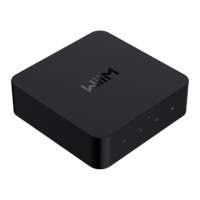
BUTTONS AND INPUT/OUT INTERFACE
USB Type-C power plug, 5V, 2A
Play/Pause, network pairing, and restore to the
factory setting
Start to play the preset content (short press) or
save the favorite content as the preset (long
press)
Digital Optical audio out
SPDIF optical up to 192 kHz/24-bit
Digital coaxial port up to 192 kHz/24 bit
Activated solely for the purpose of automatically
calculating audio latency to ensure seamless
multiroom synchronization. This includes
compatibility with various platforms like AirPlay 2,
Alexa MRM, Chromecast MRM, and Linkplay
MRM. The MIC is engaged only during latency
measurement.
2.5 mm port for cable connection to your amplifier
for automated power control.
Note: Consult your amplifier's user guide for
specifics on utilizing its 12V trigger input.


 To Next Page