
EasyManua.ls Logo

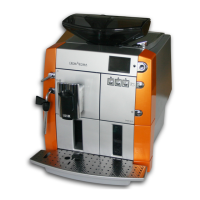
WIK cremaroma cam 52 d - User Manual

WIK cremaroma cam 52 d
158 pages
Go to English
Print Icon
To Next Page IconTo Next Page
Loading...
Mod. 9752 D
Bedienungsanleitung
Instruction Manual
DE
GB
CAM 52 D

Table of Contents

Questions and Answers

  • D
    debbiegallagherAug 12, 2025
    Why is my WIK cremaroma cam 52 d espresso not hot enough?
    • R
      Robin HarperAug 12, 2025
      If your WIK Coffee Maker isn't producing hot enough espresso or coffee, the cups may be too cold. Try preheating your cups with hot water before brewing. Alternatively, you can increase the coffee temperature; refer to the section on setting and saving the coffee temperature.
  • A
    amandacurryAug 16, 2025
    What to do if WIK cremaroma cam 52 d Coffee Maker espresso is too thin?
    • B
      bkaiserAug 16, 2025
      If the espresso or coffee from your WIK Coffee Maker is too thin, it could be due to using too little coffee powder. To resolve this, ensure you measure the coffee powder correctly, using a maximum of 1 measuring spoon. Also, check if the coffee bean container needs refilling. You might also want to set a higher ground coffee quantity or vary the grinding fineness. Finally, consider trying a different type of coffee.
  • E
    Elizabeth BrownAug 20, 2025
    How to fix too little foam during milk foaming with WIK cremaroma cam 52 d?
    • C
      cooktheresaAug 20, 2025
      If you're getting too little foam when using the milk foaming function on your WIK Coffee Maker, there are several possible causes. The milk might be too warm, too old, or have too high a fat content; try using cold, low-fat milk. The steam nozzle could be clogged, so clean it thoroughly. Also, check if the air intake hole of the foaming attachment is clogged and clean the foaming attachment if necessary. Finally, ensure the nozzle is not loose inside the foaming attachment; remove the foaming attachment and tighten the nozzle using the adapter integrated into the measuring spoon supplied.
  • C
    Charlotte PrinceAug 23, 2025
    What to do if WIK Coffee Maker has no water despite full water tank?
    • B
      Brittany ChurchAug 25, 2025
      If your WIK Coffee Maker shows no water despite a full tank, there might be air in the system. To resolve this, draw some hot water. See the chapter on hot water preparation for instructions.
  • B
    Brett JohnsonAug 27, 2025
    Why does my WIK cremaroma cam 52 d Coffee Maker switch off after flushing cycle?
    • F
      Fernando WongAug 27, 2025
      If your WIK Coffee Maker switches off after the flushing cycle or coffee production, it may be due to high pressure in the brewing unit. Try activating hot water preparation by turning the rotary switch "hot water/steam" to the appropriate position. Alternatively, remove and clean the brewing unit; if the brewing unit is closed, open it before cleaning and unscrew it at the black splined journal. Refer to the chapter on cleaning the brewing unit for an illustration of an open brewing unit.
  • J
    Jessica KruegerAug 31, 2025
    Why is my WIK cremaroma cam 52 d making a very loud noise during grinding?
    • C
      Carolyn OwenAug 31, 2025
      If your WIK Coffee Maker is making a very loud noise during grinding, the grinding mechanism may be clogged by foreign matter. In this case, have the appliance inspected by WIK after-sales service. The appliance can continue to be operated with powder coffee.
  • A
    angelaschultzSep 4, 2025
    Why does WIK cremaroma cam 52 d Coffee Maker display 'Empty waste container' too early?
    • S
      Suzanne CaseySep 4, 2025
      If your WIK Coffee Maker displays "Empty waste container" after producing fewer than 16 coffees, it's likely because the waste container was emptied while the appliance was switched off. To correct this, empty the waste container while the appliance is switched on.
  • D
    Dwayne PopeSep 7, 2025
    What to do if WIK cremaroma cam 52 d Coffee Maker brewing unit is blocked?
    • N
      Nicholas AdamsSep 7, 2025
      If the brewing unit of your WIK Coffee Maker is blocked, pull it out and loosen it using the tool function of the measuring spoon.

Summary

Safety Precautions

Fundamental Safety Measures

Essential safety guidelines for safe appliance operation.

Electrical and Physical Hazards

Warnings regarding electric shock, burns, and scalding.

Commissioning and Setup

Installation and Electrical Connection

Requirements for safe placement and electrical hookup.

Design and Function Overview

Operation and Basic Functions

Filling Water and Safety Precautions

Instructions for filling the water tank and operational safety.

Coffee Bean Container and Grinding Settings

Filling the bean container and adjusting coffee grind.

Coffee Preparation and Beverage Options

Advanced Operation Settings

Cleaning and Care

Troubleshooting

Safety and Error Messages

Safety during troubleshooting and understanding display messages.

Common Problems and Solutions

Identifying and resolving typical appliance issues.

WIK cremaroma cam 52 d Specifications

General IconGeneral
BrandWIK
Modelcremaroma cam 52 d
CategoryCoffee Maker
LanguageEnglish