Charging your phone
Your phone is powered by a rechargeable battery.
To attain maximum performance, a new battery needs
to be fully charged and discharged three times. Once
the battery is fully charged, disconnect the charger.
When the charger is connected, a flashing cylindrical
icon indicates the battery level. When the icon stops
flashing, your battery is fully charged. The battery may
heat up when charging.
Note : Only use manufacturer-approved phone bat-
teries, chargers and accessories; the use of other
accessories may damage your phone!
2. Setting up
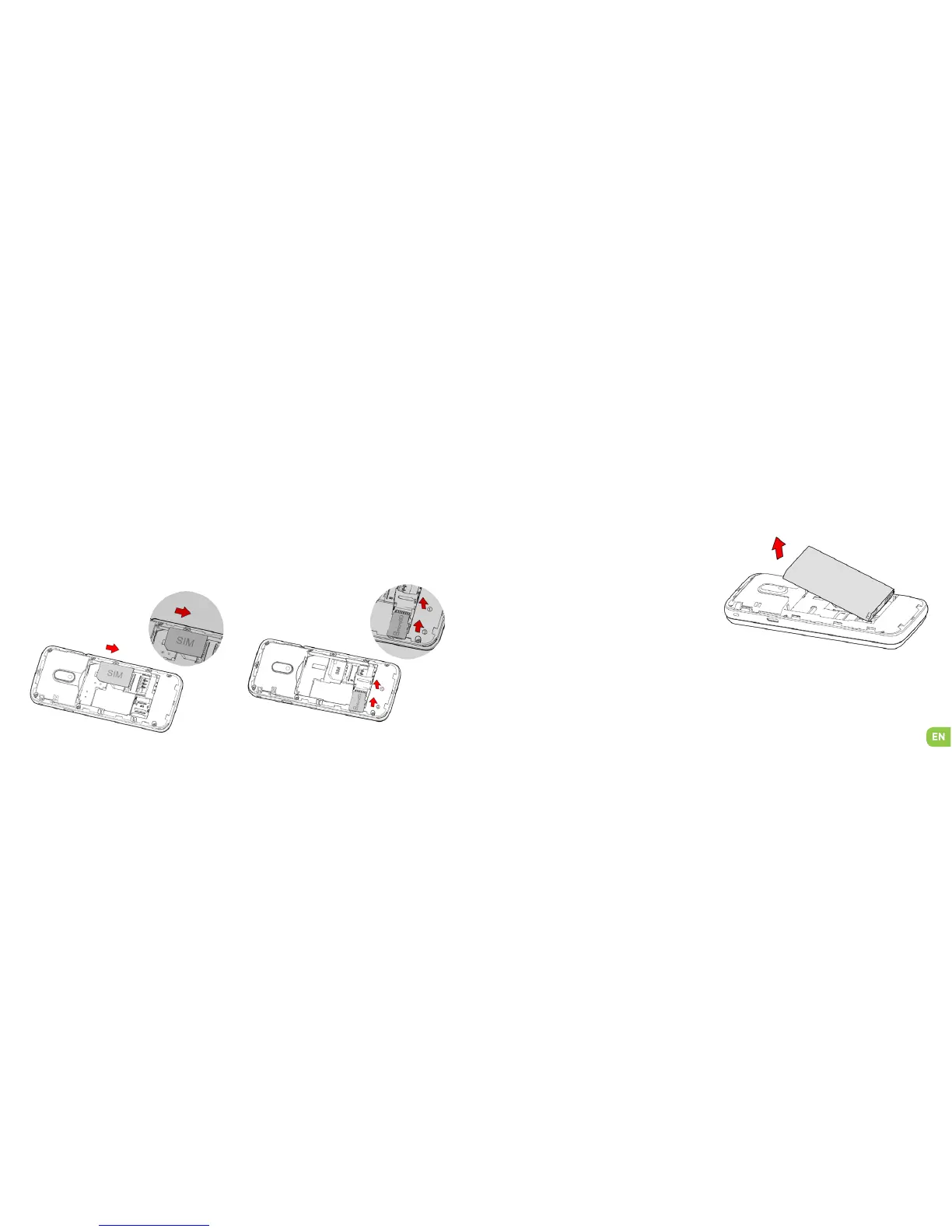
Inserting the SIM card Installing Memory Card
Your phones takes a MicroSD memory card of up to
32 GB.
Insert the microSD memory card following the dia-
gram below.
Inserting the SIM card
In order to use your telephone, you need to insert
your SIM Card. The back cover of the phone is clip-
ped on. Please unclip it using the notch on the cover,
following the contour of the phone. Insert the SIM
card following the diagram below.


 To Next Page