EasyManua.ls Logo

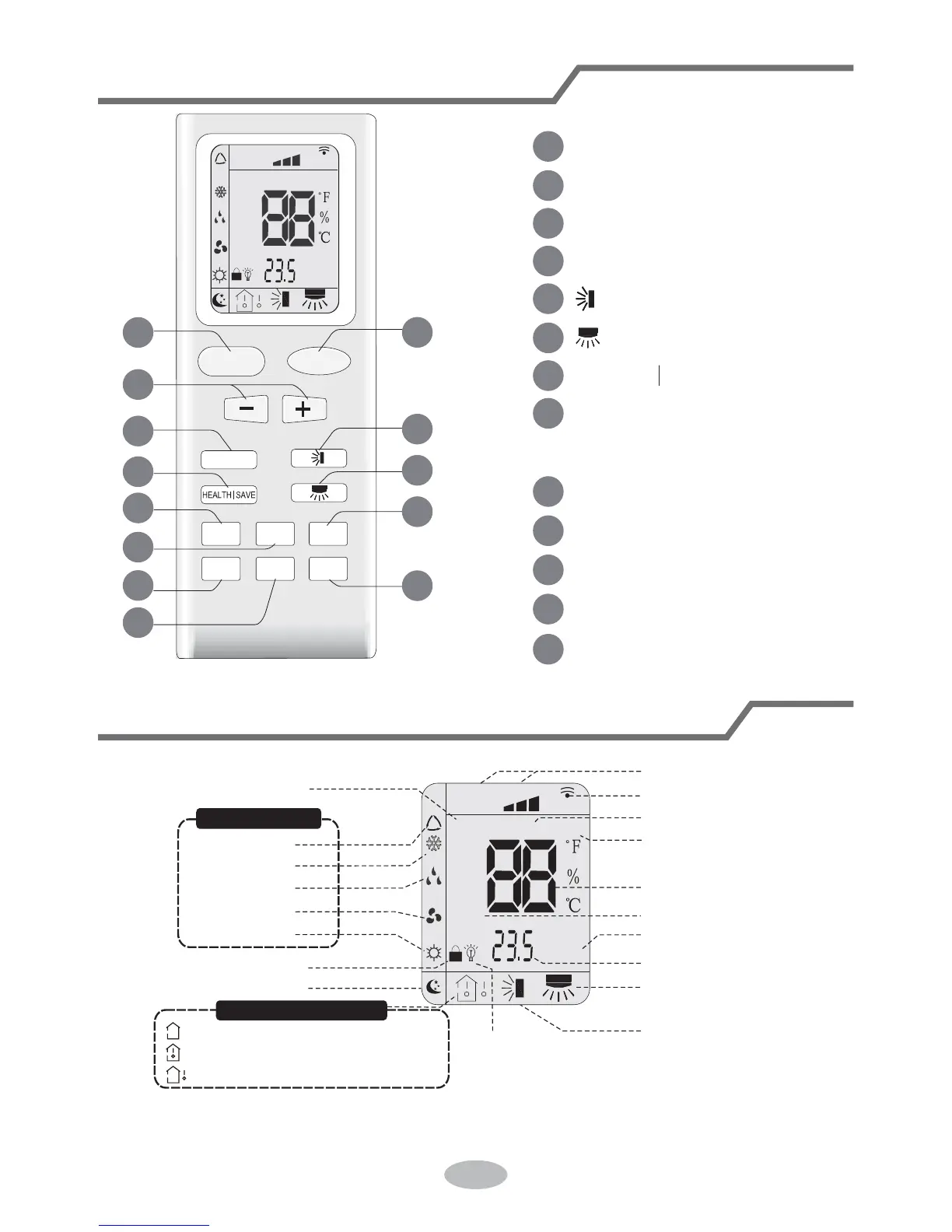
Willis WST12MC16S - Buttons on Remote Controller; Introduction for Icons on Display Screen

Default Icon
36 pages
Print Icon
To Next Page IconTo Next Page
To Previous Page IconTo Previous Page
Loading...
3
Buttons on remote controller
Introduction for icons on display screen
FAN
AUTO
OPER
HEALTH
AIR
FILTER
TURBO
ON/OFF
X-FAN
HOUR
HUMIDITY
ON/OFF
MODE
FAN
X-FAN
TURBO
TEMP
TIMER
SLEEP
LIGHT
2
5
6
10
13
12
11
9
8
3
4
7
1
1 ON/OFF button
2 MODE button
3 +/- button
4 FAN button
5 button
8 X-FAN button
(Note: X-FAN is same with BLOW)
9 TEMP button
10 TIMER button
11 TURBO button
12 SLEEP button
13 LIGHT button
7 HEALTH SAVE button
6 button
FAN
OPER
AUTO
HEALTH
AIR
FILTER
TURBO
ON/OFF
X-FAN
HOUR
HUMIDITY
Up & down swing
left & right swing
set time
TIMER ON/TIMER OFF
turbo mode
set temperature
X-fan
health mode
send signal
set fan speed
light
Temp. display type
:Set temp.
:Outdoor ambient temp.
:Indoor ambient temp.
Sleep mode
Clock
Heat mode
Fan mode
Dry mode
Cool mode
Auto mode
Operation mode
air mode

Other manuals for Willis WST12MC16S

Related product manuals