5
Introduction for buttons on remote controller
"
+
"
or
"
-
"
button
FAN button
3
4
5
Ɣ After each pressing of "+" or "-" button, it can increase or decrease set temper-
ature 1
ć
. Hold
"
+
"
or
"
-
"
button, 2s later, set temperature on remote controller
will change quickly. After reaching to your required time, loosen the button.
Temperature indicator on indoor unit will also change accordingly. (Temperature
can’t be adjusted under auto mode)
Ɣ8QGHU TIMER ON, TIMER OFF or Clock setting, you can press "+" or "-" button to
adjust time. (Refer to TIMER button for details)
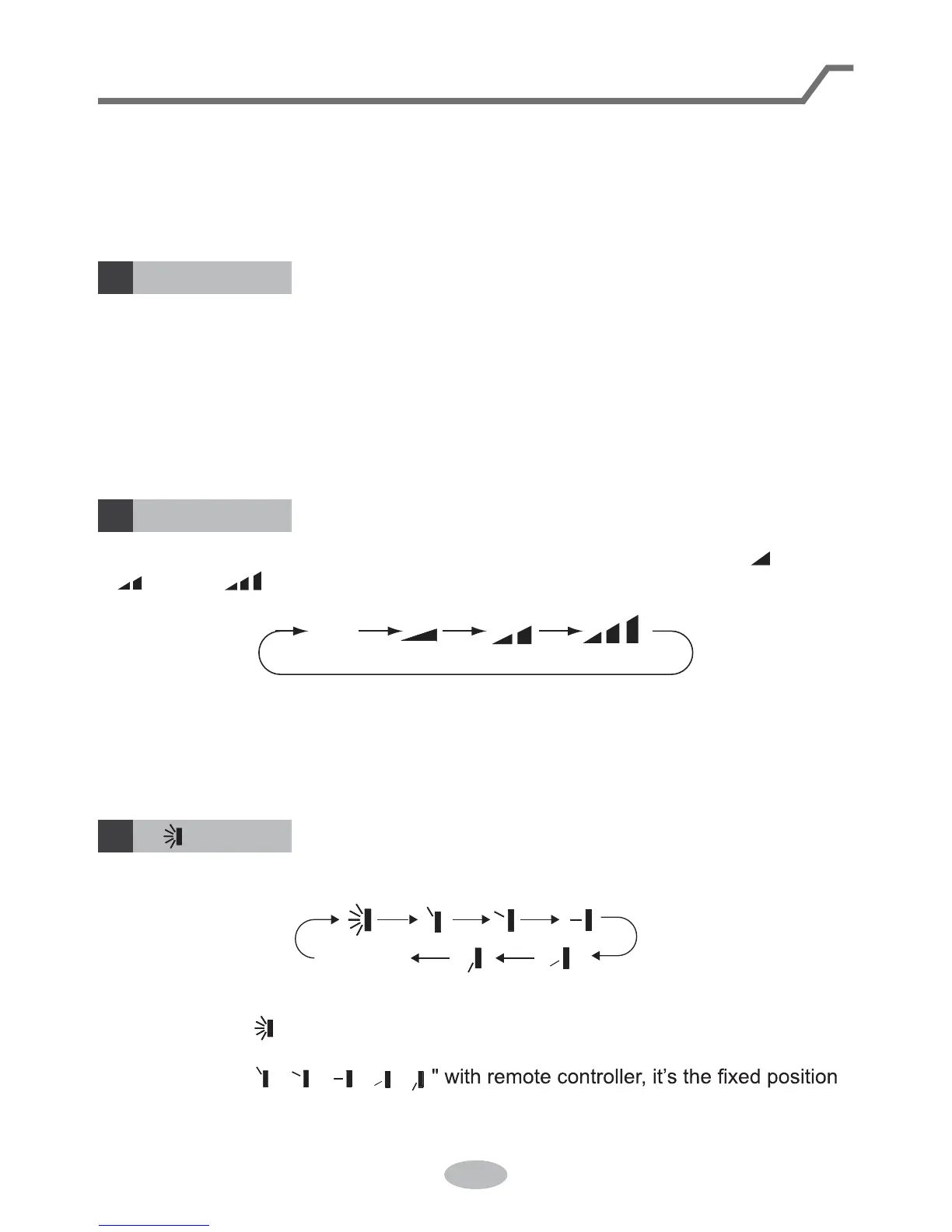
Press this button can select up&down swing. Swing angle can be selected in sequ-
ence as below:
When selecting " " with remote controller, it’s auto swing. Horizontal louver of air
conditioner will swing up&down automatically at the maximum angle.
When selecting "
ǃǃ ǃǃ
swing. Horizontal louver of air conditioner will stop at that position as shown by the
icon to swing.
no display
(horizontal louvers stops
at current position)
button
Note:
For preventing cold wind, after starting up heating mode, indoor fan will blow fan
afterdelaying 1-5min. (Details time is decided by indoor ambient temperature)
Temperature setting range on remote controller: 16
ć
-30
ć
. Fan speed setting
range: auto, low speed, medium speed and high speed.
Pressing this button can set fan speed circXODUO\DVDXWR$872ORZ medium
( ), high( ).
Auto
Note:
Ɣ8QGHU$8726SHHG ,'8IDQPRWRUZLOODGMXVWWKHIDQVSHHGKLJKPHGLXPRUORZ
speed) according to ambient temperature.
Ɣ)DQVSHHGXQGHUGU\PRGHLVORZVSHHd.



 To Next Page