7
Note:
Ɣ2XWGRRUDPELHQWWHPSHUDWXUHGLVSOD\PD\FDQ¶WEHVHOHFWHGIRUVRPHPRGHOV
When indoor unit receives " " signal, it displays indoor set temperature.
Ɣ2QO\IRUWKHPRGHOZKRVHLQGRRUXQLWKDVGXDOGLVSOD\
Note:
Ɣ7LPHVHWWLQJUDQJHKRXUV
Ɣ7LPHLQWHUYDOEHWZHHQWZRRSHUDWLRQVFDQ¶WH[FHHGV2WKHUZLVHUHPRWH
controller will exit the setting status automatically.
Introduction for buttons on remote controller
TEMP button
TIMER button
9
10
to
operate for a while at low speed to dry the residual water inside the indoor unit.
Ɣ:KHQWKHXQLWRSHUDWHVXQGHU;)$1PRGHSUHVV;)$1EXWWRQFDQWXUQRII
X-FAN function. Indoor fan stops operation immediately.
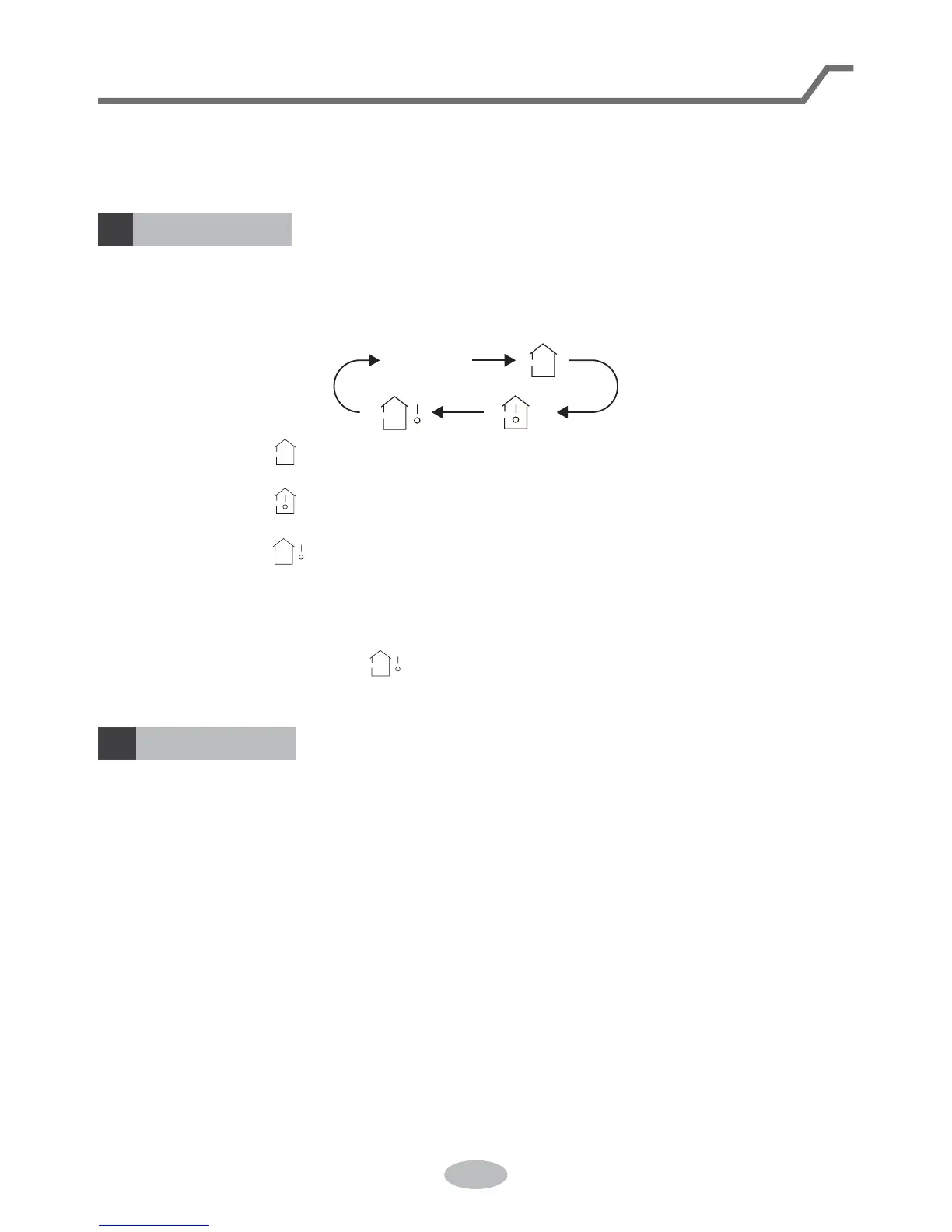
Press this button can see indoor set temperature, indoor ambient temperature or
outdoor ambient temperature on indoor unit’s display. Temperature is set circularly
by remote controller as below:
Ɣ
At ON status, press this button once can set TIMER OFF. The character of HOUR
DQG2))ZLOOÀDVK3UHVVRUEXWWRQZLWKLQVFDQDGMXVWWKHWLPHRI7,0(5
ON. After each pressing of "+" or "-" button, time will increase or decrease half an
hour. When holding "+" or "-" button, 2s later, the time will change quickly until to
UHDFKWR\RXUUHTXLUHGWLPH$IWHUWKDWSUHVV7,0(5EXWWRQWRFRQ¿UPLW7KH
FKDUDFWHURI+285DQG2))ZRQ¶WÀDVKDJDLQ
Cancel TIMER OFF: Press "TIMER" button again under TIMER OFF status.
Ɣ$W2))VWDWXVSUHVVWKLVEXWWRQRQFHFDQVHW7,0(5213OHDVHUHIHUWR7,0(5
off for detailed operation.
Cancel TIMER ON: Press "TIMER" button again under TIMER ON status.
no display
Ɣ:KHQVHOHFWLQJE\UHPRWHFRQWUROOHURUQRGLVSOD\WHPSHUDWXUHLQGLFDWRURQ
indoor unit displays set temperature.
Ɣ:KHQVHOHFWLQJE\UHPRWHFRQWUROOHUWHPSHUDWXUHLQGLFDWRURQLQGRRUXQLW
displays indoor ambient temperature.
Ɣ:KHQVHOHFWLQJE\UHPRWHFRQWUROOHUWHPSHUDWXUHLQGLFDWRURQLQGRRUXQLW
displays outdoor ambient temperature.



 To Next Page