support01@wimius.com
EN25
SIGNAL LINES CONNECTION
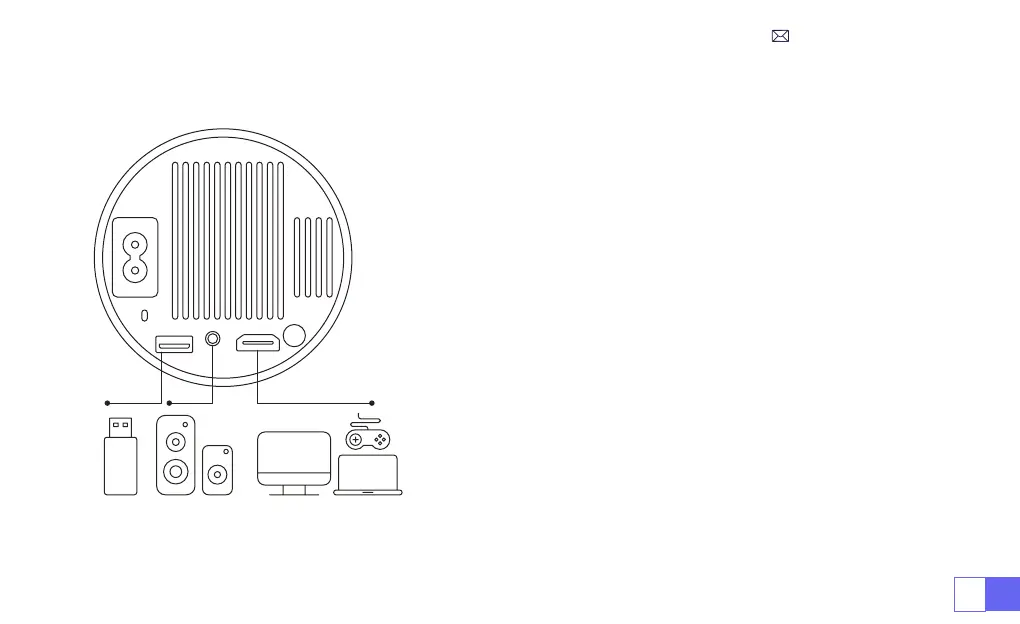
WiMiUS S27 projector has 3 interfaces, HDMI port*1/USB port*1/3.5mm
headphone output*1. Please select the correct connecting port to
connect your device (PC, Phone, DVD Player, USB, PS4,etc.)
1)Insert the USB ash disk into the USB port of the projector.
2)Select “Media” and the press the "OK" key to enter.
3)Depending on the le type, select the option [Movie/Music/Photo/
Book]
4)Select the desired le and then press the [OK] button to play it.
1)Connect your Fire TV stick ( or PC, XBOX, PS4 etc.) to the HDMI port
of the projector.
2)Enter the home page to select the corresponding HDMI as the
signal source.
1.Connect via USB Disk
2.Connect to Devices via HDMI Port



 To Next Page