support01@wimius.com
EN 26
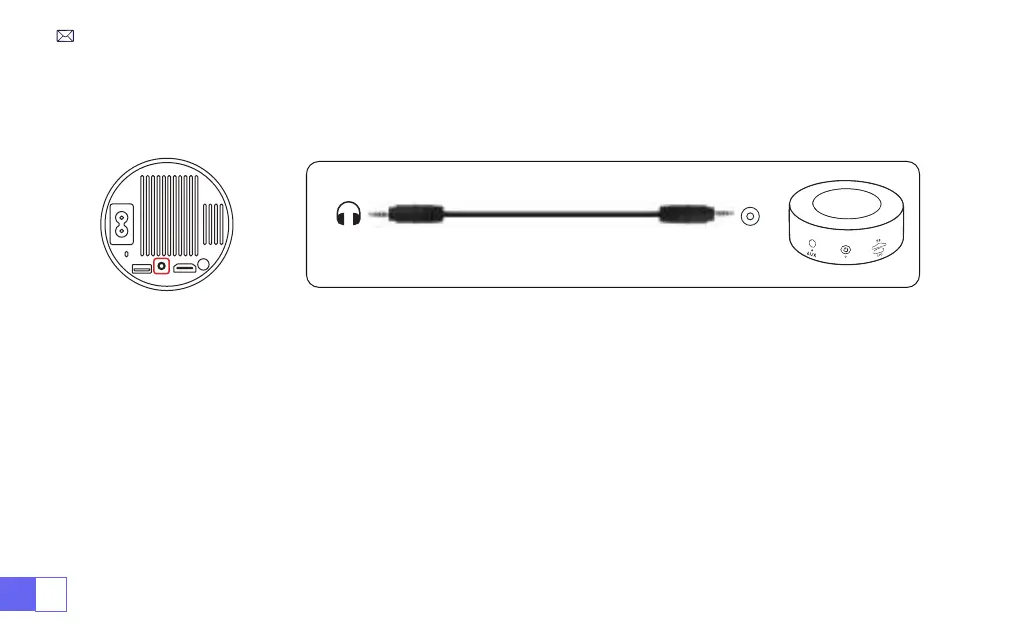
• Use the 3.5mm audio cable to connect with speaker.
• Turn on the projector and the speaker(choose AUX mode).
1)Turn on your DVD player and the projector.
2)Connect to the DVD Player and the projector with the HDMI cable.
3)Enter the home page to select the corresponding HDMI as the signal source.
Note:
When the projector is connected to the DVD player via the HDMI cable, if there is no sound, it may be that the
output signal of the HDMI port of the DVD player is not compatible with HDCP, please try to connect your speaker.
3.Connect to Speaker
4.Connect to DVD Player
Audio
out
AUX
port



 To Next Page