WCC 3x0 Plus
DIP switches
Various wind/rain parameters and operating modes can be set by means of the installed DIP switches.
DIP switch settings for the wind speed
Note
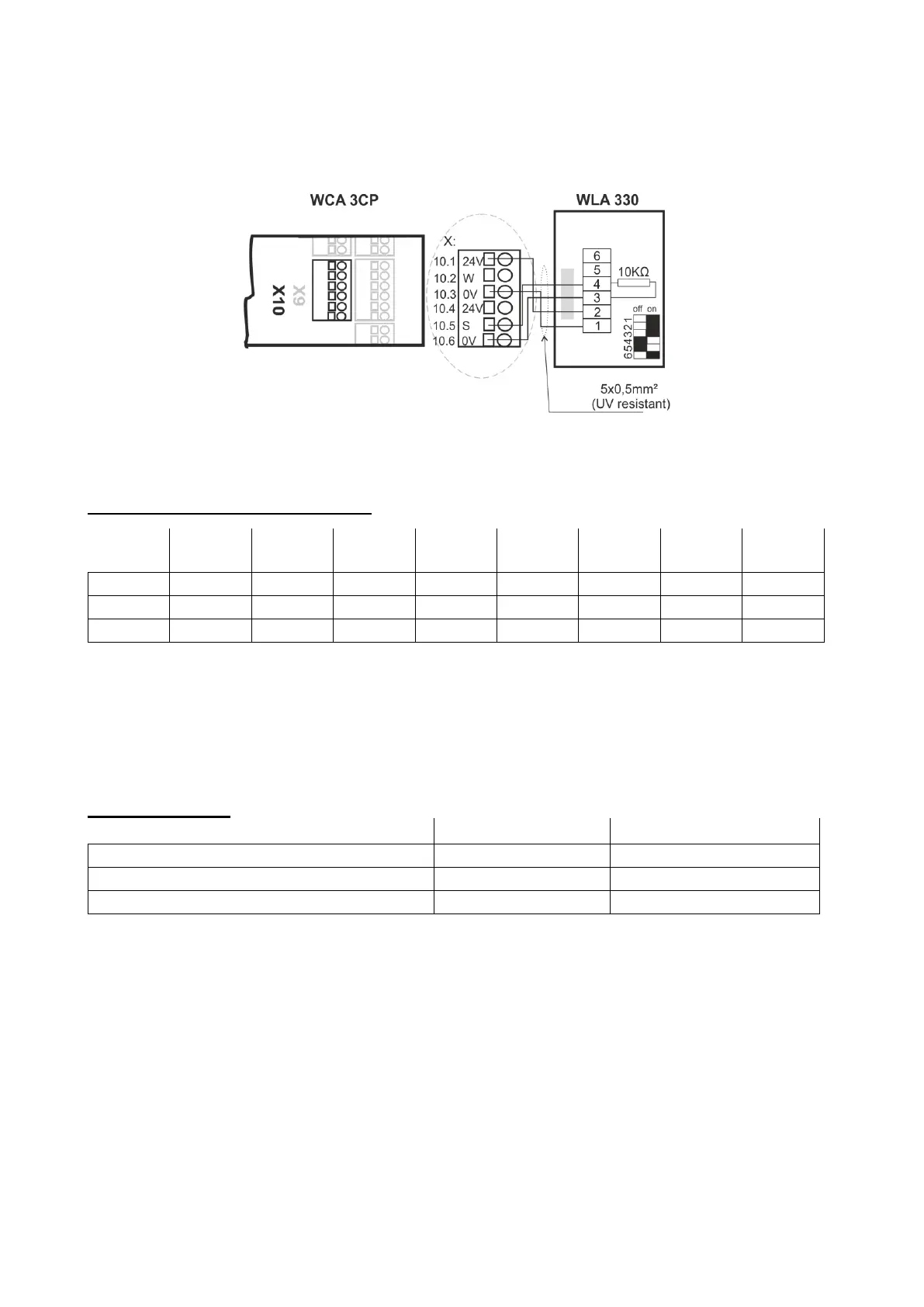
Factory setting = operation, meaning switch 1, 2, 3 and 6 = on and switch 4 and 5 = off.
Should there during installation be the need to disconnect the wind/rain drop out delay, set switch 1+2+3 = off (= Test).
Important! Once installation and star-up are completed, proceed with the wind speed setting required on site, meaning one or more of
the switches 1,2 or 3 MUST be on!
Remark: In the test setting, the activation and drop out delay is deactivated!
DIP switch settings
Switch 4 = Wind activation delay
Switch 5 = Wind/rain drop out delay
Information regarding switch 6:
Only the supply voltage (terminals 1+2) for the sensor is monitored.
The system will trip automatically in the event of a supply voltage failure.
Display: Red steady light in the sensor LED = Sensor tripped by wind or rain.
Connection
Terminal 1 = Operating voltage AC/DC
Terminal 2 = Operating voltage AC/DC
Terminal 3 = Relay (arm)
Terminal 4 = Relay (N/C contact)
Terminal 5 = Relay (N/O contact)


 To Next Page
 Loading...