12
Control Panel
Function Button
1. Continuous Mode
Unit operates continuously on the fan speed selected by user
(Low/Mid/High) regardless of ambient humidity.
2. Sleep Mode
Dims control panel lights and sets the unit to operate at
lowest fan speed.
3. Auto-Mode
Unit runs until ideal humidity level is reached and shuts off
intermittently to save energy (Green “Comfort Zone”).
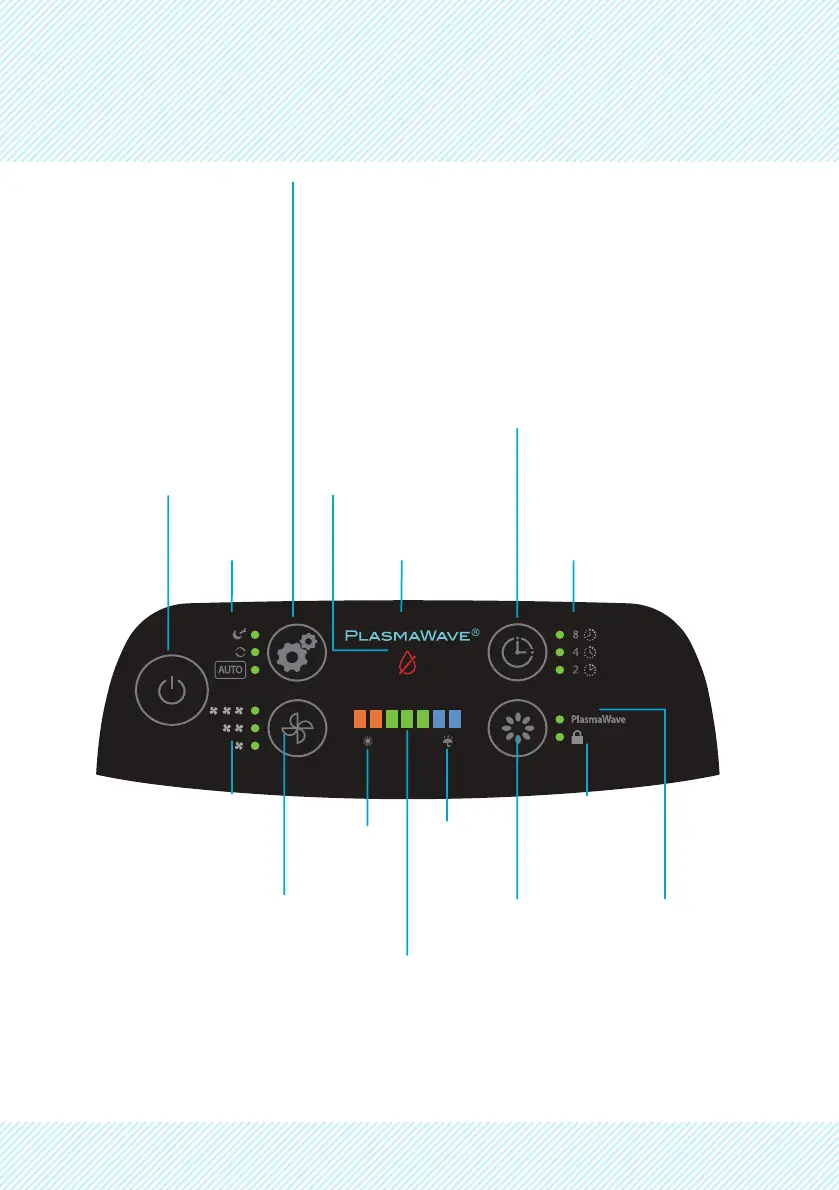
Power
Timer
Indicator
Timer
Setting Button
Low Water
Indicator
Mode
Indicator
PlasmaWave
®
(ON/OFF Indicator)
Control Panel
Lock Indicator
High
Humidity
Indicator
Low
Humidity
Indicator
Fan Speed
Indicator
Fan Speed Button
(Low, Medium, High)
PlasmaWave
®
(ON/OFF Indicator)
PlasmaWave
®
(ON/OFF Button)
Humidity Level Indicator
Displays humidity level, when desirable level of humidity
levels are reached they will be displayed in the green
“Comfort Zone”
Orange -> Low Humidity (Below 30% RH)
Blue -> High Humidity (61-70% RH)
Green -> Ideal Humidity (40-60% RH)


 To Next Page