4
|
L500
English
English
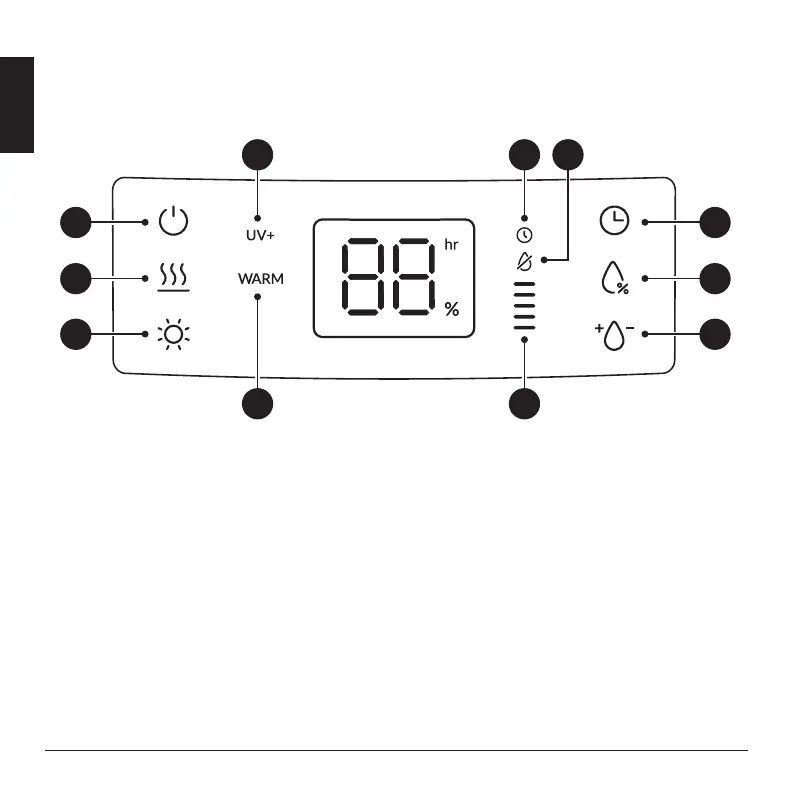
CONTROL PANEL
01. Power Button
•
Plug unit into a AC 220V - 240 V electrical outlet.
Press the power button to turn unit on.
•
If there is no water inside, the power button does not
work.
02. Warm Mist Setting
•
To change the mist temperature from cool to warm
mist, press the warm mist button.
•
Warm humidification mode is always OFF and is
heated only when the user operates the button.
03. Night Mood Light
•
Press the Night Mood Light Display Button once to
turn on the Night Mood Light. The light at the bottom
of the water tank will turn on, illuminating the tank.
•
The brightness of the light should be switched
OFF > 100% > 50% > 20% > OFF > Display light Off.
04. programmable Auto-Off Timer
•
Keeppressingtheprogrammabletimerbuttonuntil
the desired timer setting is lit on the display.
•
The programmable timer button will cycle through the
following settings: 0 hours, 2 hours, 4 hours, 8 hours,
and 12 hours. To cancel the timer at any time, press
the timer button until 0 hours is shown on the display.
07
08 11
09 10
01
02
03
04
05
06


 To Next Page