Notice: The lock does not connect to the Internet, but only to
the smartphone via WLAN.
blueMatic EAV4 / EAV4+ 509555310Quick installation guide
1
EN
Aug. Winkhaus GmbH & Co. KG ∙ Berkeser Straße 6 ∙ 98617 Meiningen
T +49 369 3950 - 0 ∙ www.winkhaus.com ∙ Subject to technical changes
Winkhaus records the following telemetric data for analysis and root cause
research:
• Number of motor cycles
• Under voltage
• Poor operation/movement
• Opening attempts
• Operating system/version + smartphone type
• App/firmware version
• Within the app, only the smartphone functions of the camera are used (to
scan the QR code).
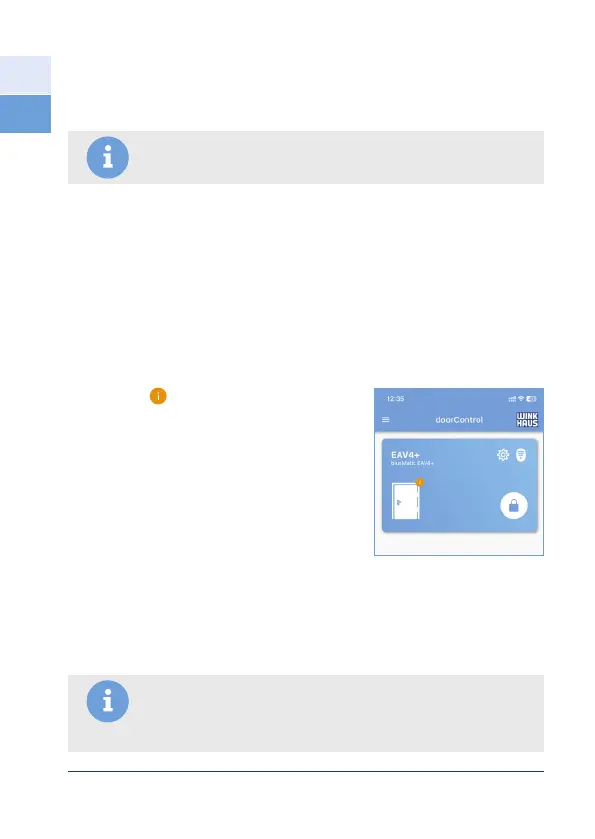
The info icon
• appears on the door icon
• is clickable and opens setting options
• here the current software status is shown
• necessary changes/updates (e.g. firmware
update) can be made
https://www.winkhaus.com/doorControl
Notice: For certain markets with SKG requirements (e.g.
especially the Netherlands), SKG-tested access control systems
must be used (with the appropriate security level, e.g. PIN code
= can only be used as SKG**)!
1.5.5 Safety instructions for access control systems
Various (customer-provided) access control systems can be used in conjunction
with the security door locking system – either in the door element or externally.
Pay attention to the appropriate security level here.


 To Next Page
 Loading...