7
4.1.2 USB Charging Way
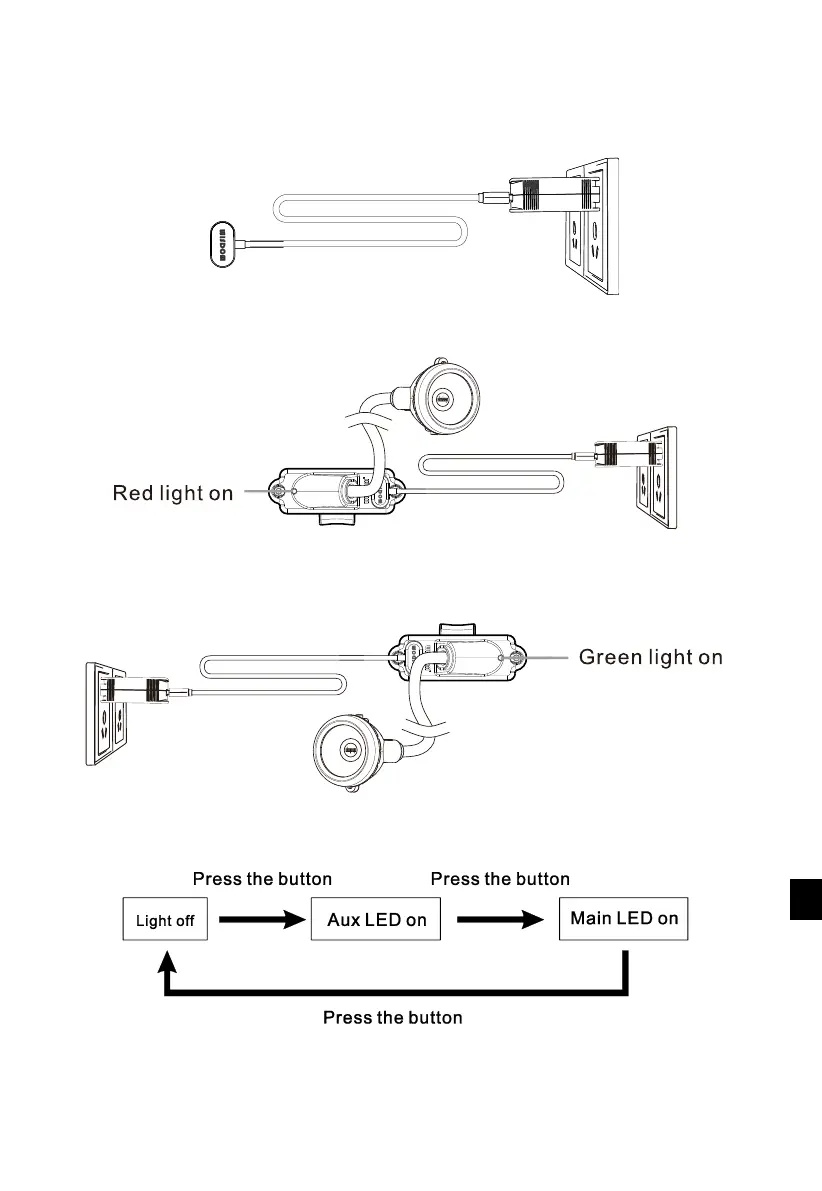
Connect the “5V, 2A” power supply with magnetic USB wire to” AC,100-240V” outlet.
The charger indicator turns green.
Connect the magnetic charging terminal with the USB charging points, make them contact tightly.
The cap lamp’s indicator turns red, which means it’s charging.
The cap lamp’s indicator turns green, which means it finishes charging.
Take away the USB wire from the cap lamp, and then use the cap lamp.
4.2 Switch
The electric switch of KL4MS,KL5MS and KL8MS is waterproof. It works as follows:
4.3 Battery Indication
When the cap lamp is off, press its switch more than 2 seconds. Then the soft light of the
main and auxiliary light source will indicate the remaining battery. The indication information
is as following:



 To Next Page