In system authentication you can specify to clear the cached password that can be used for
system authentication. To clear the list of passwords enable the checkbox and click the apply
button.
Enabling Load Out Frequencies (Lock->Hidden) on Channel Files panel, it is possible to load
frequencies out of the allowed range of the MRK9xx. The locked frequencies out of the range
will be automatically hidden.
The Master/Slave Control panel allows to enable the monitoring from other PCs (available
from Wisycom Manger version 1.1.4.0). In the Master/Slave configuration, only one PC works
as Master and can change the configuration of the receiver, the other PCs work as Slave and
can only monitoring the receiver.
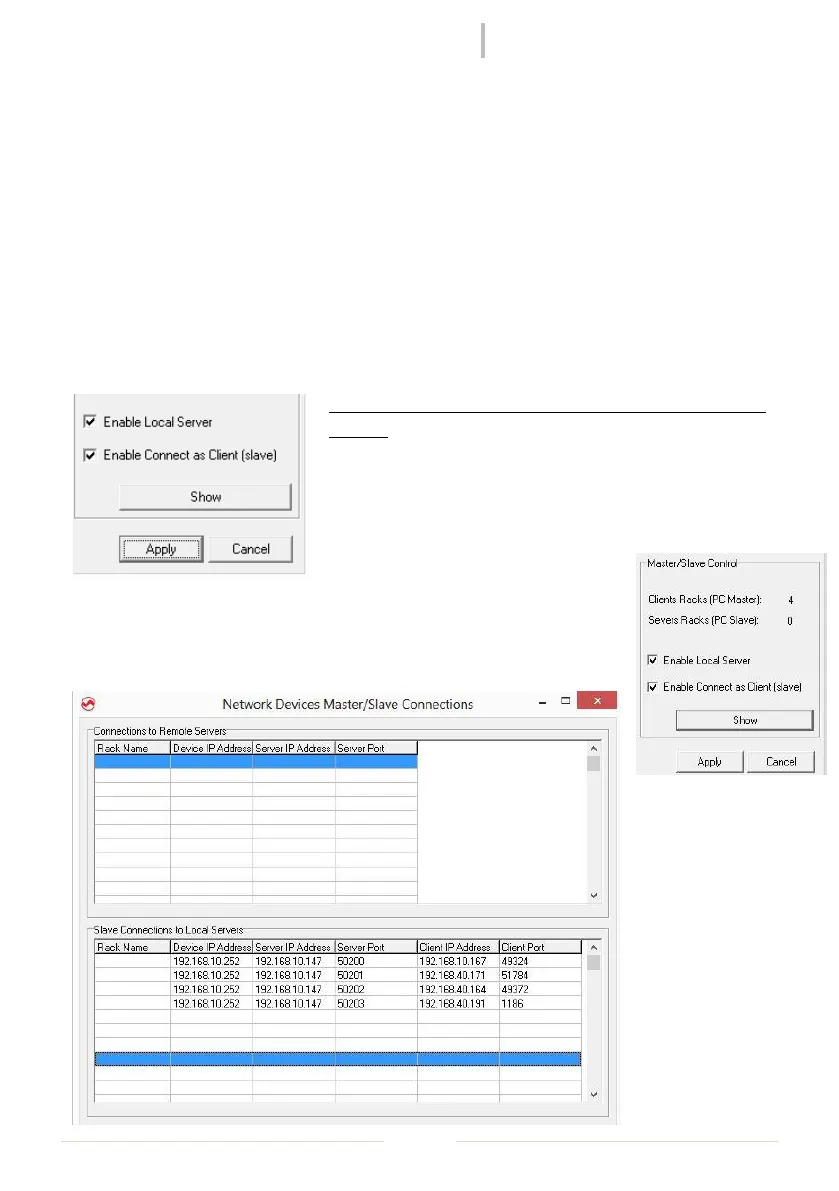
The PC that works as Master is the first PC connected to the
receiver. To enable the monitoring from other PCs is
mandatory to click on Enable Local Server.
The other PC that works as Slave, have to activate the
option Enable Connect as Client (slave).
From the Master PC is possible to show how many PCs is monitoring the
receiver (see the parameter Clients Racks) and pushing the show button is
possible to verify the IPs of all the slave PCs connected.



 To Next Page