Every module reproduce the aspect of the remotely monitored device. The button SETUP on
any module allow the user to access very quickly the related parameters window.
Once a particular disposition of graphical modules is obtained, it is possible to save the
workspace setup using the File->Save Workspace function. This file can be reloaded in a
second time using the File->Load Workspace function after the system components has been
connected; the graphical modules will be replaced automatically in the same disposition.
The status bar on the main window shows the status of command queues of the currently
connected systems. When a massive amount of data requests from the systems is queued, a
certain amount of time (some seconds) is required to have all the requests fulfilled.
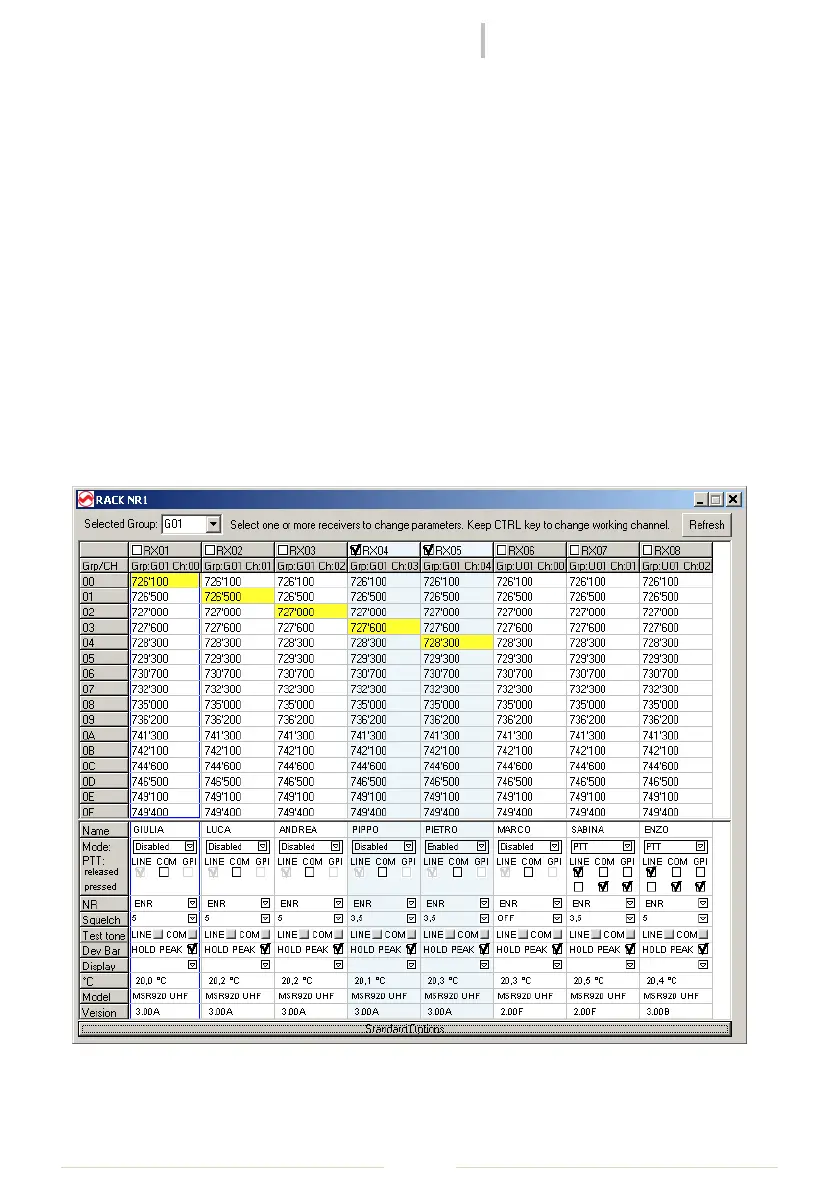
Receiver's parameter window
The receiver's parameters window can be accessed on the popup-menu of a receiver item in
the tree window or directly on the setup button of a receiver graphical module.
Figure 3: Receivers Parameter Window



 To Next Page