Need help?
Do you have a question about the WizarPOS Q3 and is the answer not in the manual?
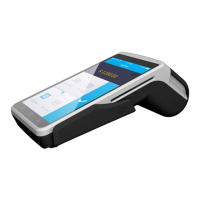
The WIZARPOS Q3 payment terminal device itself.
Accessory cable for charging and data transfer.
Rechargeable power source for the device.
Power indicator, touch screen, buttons, and card readers.
Lanyard hole, volume, power keys, and USB-C port.
Physical layout including lanyard hole and battery cover.
Camera, speaker, MIC, and contactless card reader.
Battery connector, SIM, TF, and SAM card slots.
Initial setup steps for the device, including battery installation and charging.
Procedures for turning the device on, off, and controlling the LCD.
Accessing and performing initial setup via the setup interface.
Instructions for payment processing and handling bank cards.
Processor, memory, display, scanner, and security certifications.
Card readers, communication modules, USB, and SIM/TF/SAM slots.
Dimensions and weight of the POS terminal.
Recommended operating and storage temperature and humidity.
Precautions against unauthorized modification, chemical use, and physical damage.
Guidelines for handling, charging, and replacing the battery to prevent hazards.
Harmful substances list and eco-friendly use period logo explanation.
Details on warranty period, coverage, and service.
Situations and reasons not covered under warranty policies.
Hotline and website for customer support and information.
Device compliance with Part 15 of FCC Rules and potential interference.
Government requirements for radio wave exposure and SAR limits.
Maintaining compliance via accessory use and separation distances.
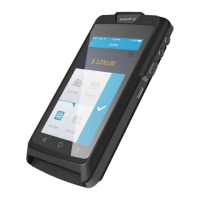
The WizarPOS Q3 is an intelligent and secure point-of-sale (POS) terminal designed for various payment operations. This device integrates multiple functionalities, including card reading, barcode scanning, and secure transaction processing, all within a compact and user-friendly form factor.
The WizarPOS Q3 serves as a versatile payment terminal, supporting a wide range of transaction methods. It features a 4.0-inch capacitive touch screen for intuitive user interaction and a comprehensive set of card readers. For magnetic stripe cards, it includes a bi-directional magnetic card reader (MSR) that supports Tracks 1, 2, and 3. Integrated circuit (IC) cards can be inserted into the dedicated IC card reader, which is EMV Level 1 & Level 2 compliant. Contactless payments are facilitated by the contactless card reader, supporting ISO14443 Type A & B, Mifare, Mastercard Paypass, Visa Paywave, expresspay, and D-PAS. Additionally, the device is equipped with a 1D and 2D barcode scanner, allowing for efficient product scanning and inventory management.
Communication capabilities are robust, including GSM, WCDMA, FDD-LTE, TDD-LTE for cellular connectivity, Wi-Fi for local network access, and Bluetooth 4.0 for peripheral connections. An integrated microphone and speaker enable audio interactions, potentially for voice prompts or customer service. The device runs on a secure Android platform, based on Android 7.1, ensuring a familiar and adaptable operating environment for various payment applications.
The WizarPOS Q3 is designed for ease of use, starting with its simple power-on process by pressing the "power" key for 3 seconds. The device boots into a secure Android desktop, where users can access payment applications and system settings. The 4.0-inch touch screen allows for intuitive navigation and data entry.
For card operations, users can insert IC cards face up into the IC card reader, swipe magnetic stripe cards bi-directionally with the stripe facing the screen, or tap contactless cards near the reader area. The device includes a power indicator, CTLS indicators, and dedicated buttons for menu, home, and return functions, enhancing user experience. Volume up/down keys and a power key are also present for convenient control.
The device's compact and lightweight design (205g) makes it portable, suitable for various retail and service environments. It includes a lanyard hole for secure carrying. The USB Type-C port supports OTG functionality and high-speed data transfer, allowing for connectivity with other devices and efficient charging.
The WizarPOS Q3 incorporates several features and guidelines to ensure its longevity and proper functioning. Users are advised to install the battery and charge the device before first use. The battery is a 3.8V 3000mAh Lithium Battery, and the device supports 5V 2A adapter charging.
For troubleshooting, the manual provides guidance on common issues such as mobile network connectivity (checking data function, APN, SIM service), display instability (disconnecting charger if voltage is unstable), and slow operation (stopping unnecessary active apps).
The device comes with a product warranty policy, offering one year for the POS and charger, and six months for the battery cell. Free repair/replace service is provided for non-artificial product failures within the warranty period. However, the warranty is limited and does not cover unauthorized maintenance, OS changes, third-party app issues, improper use (falling, squeezing, hitting, soaking, burning), lack of a warranty card, or expired guarantee period.
Environmental protection is emphasized, with the device designed to comply with RoHS regulations. The manual includes a list of harmful substances and an environment-friendly use period logo, indicating that the product will not leak harmful substances under normal usage conditions for a specified period (10 years). Users are encouraged to recycle the POS, charger, and battery according to local environmental rules.
Safety precautions include warnings against unauthorized refitting, using third-party apps, exposing the device to heavy sunlight, using sharp objects on the screen, and throwing the device as common household garbage. It is crucial to use the original battery and charger to prevent damage or injury. The battery should not be put into fire, immersed in water, or short-circuited. If the battery is deformed or exhibits abnormal heat, it should be discontinued and replaced.
 General
| Brand | WizarPOS |
|---|---|
| Model | Q3 |
| Category | Touch terminals |
| Language | English |

 To Next Page