11
Using Cooking Modes
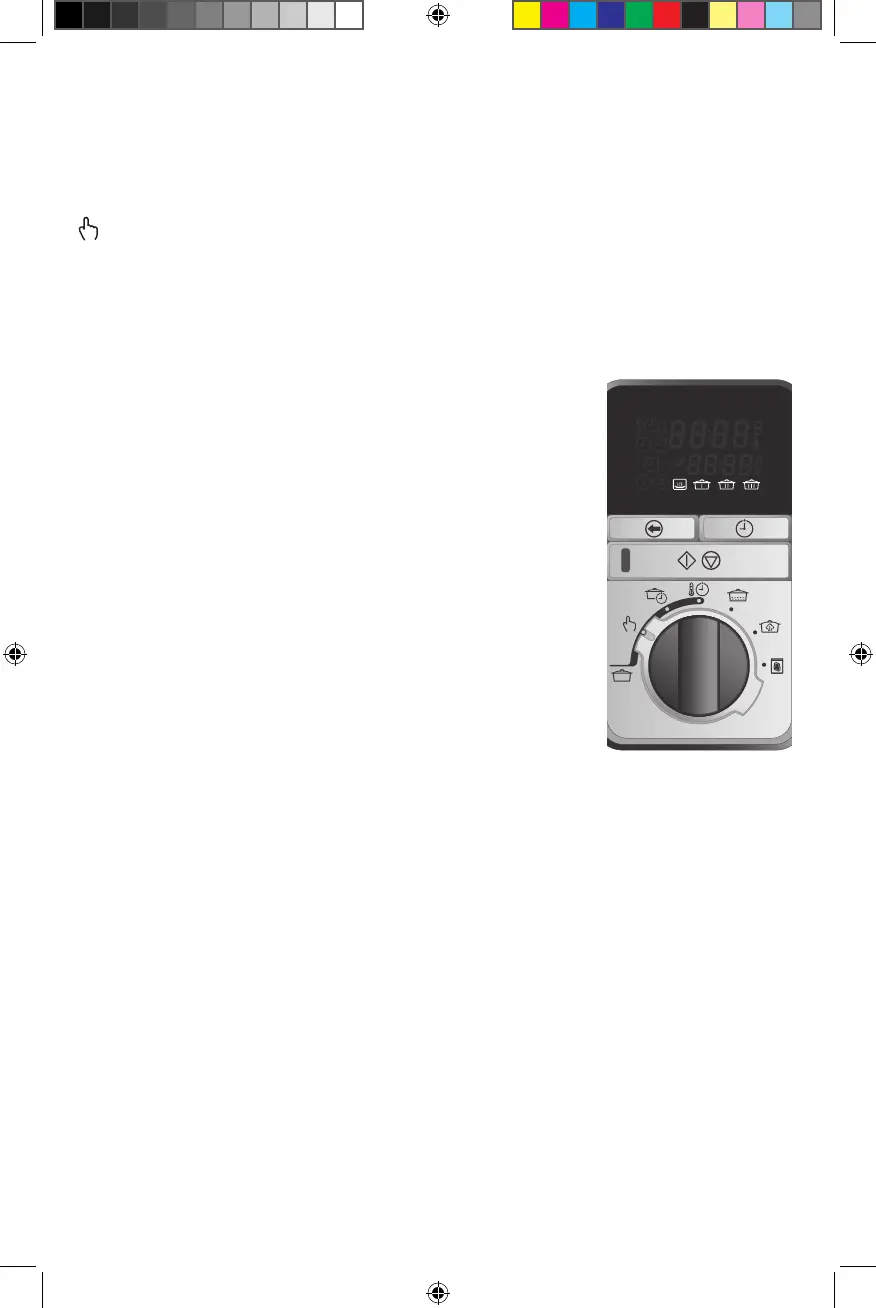
MANUAL
(Manual) mode functions like a standard, non-programmable slow cooker with four
heat settings: WARM, LOW, MEDIUM and HIGH. The timer counts up and the appliance
will stay on until the START/STOP button is pressed, or will turn o automatically after
24 hours.
NOTE: WARM should not be used for cooking. It can be used once cooking is complete
to keep foods warm.
1. Add food to vessel and cover with lid.
2. Turn the selector to MANUAL. The LCD screen displays
the flashing heat settings: WARM LOW MED HIGH.
3. Turn the knob left or right to select a heat setting.
Release the knob when the heat setting is selected. The
setting and START/STOP button will start to flash.
4. Press the START/STOP button to start cooking. A long
chime will sound and the START/STOP button will stay
illuminated. The selected heat setting becomes solid and
the timer will count up.
NOTE: During the cycle, the user can adjust the heat setting at
any time by turning the knob. The newly selected setting will
flash three times before it becomes solid and the temperature
adjusts. There is no need to press the START/STOP button.
5. Press the START/STOP button at any time to end cooking
and turn off the unit. ‘OFF’ will flash in the display and the
appliance will chime three times.


 To Next Page