wolfappliance.com | 15
Favorite
To save favorite drink settings:
1 Touch to select the desired user profile.
2 Touch .
3 Select the desired drink option.
4 Touch + or – to select the desired strength.
5 Touch .
6 For milk drinks, insert the milk container and adjust the
dial to the desired setting.
7 Milk is dispensed. Touch when the desired
amount of milk is dispensed and to save the setting.
8 Coee is dispensed. Touch when the desired
amount of coee is dispensed and to save the setting.
Coffee System Operation
Coee
To use whole beans:
1 Pull the unit forward.
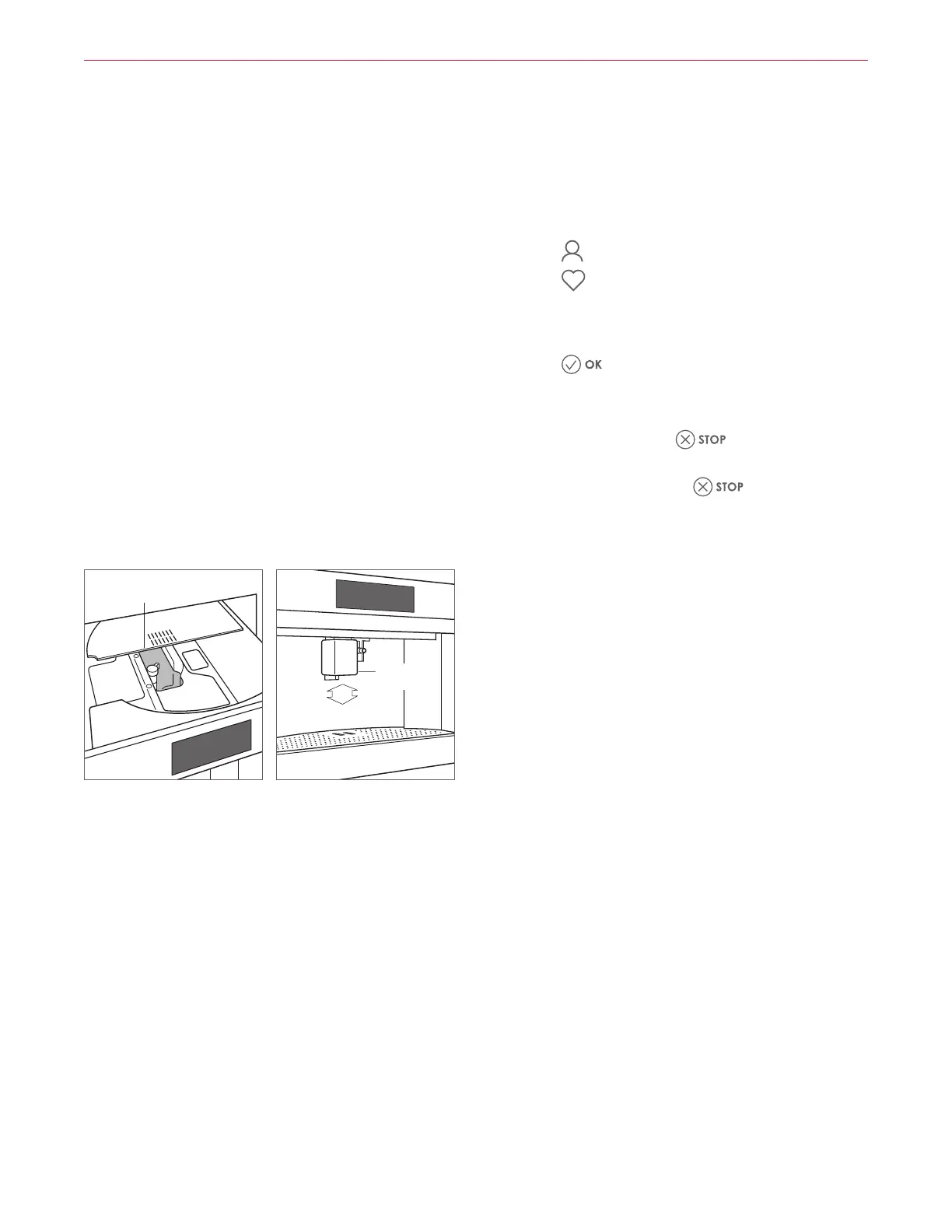
2 Open the whole bean compartment lid. Refer to the
illustration below.
3 Fill the compartment, then slide the unit back in.
4 Place a minimum 4 oz (120 mL) container below the
coee spout.
5 Adjust the height of the coee spout to be as close to
the cup(s) as possible. Refer to the illustration below.
6 The unit automatically rinses upon initial start-up and
before turning o. A small amount of liquid dispenses
from the coee spout during the rinse cycle. Place the
rinse container under the spout, if desired.
WHOLE
BEANS
COFFEE
SPOUT
Whole bean compartment
Adjust coee spout



 To Next Page