10
|
English
COFFEE SYSTEM OPERATION
Latte Macchiato, Caffelatte or Frothed Milk
1 Remove water spout (if installed).
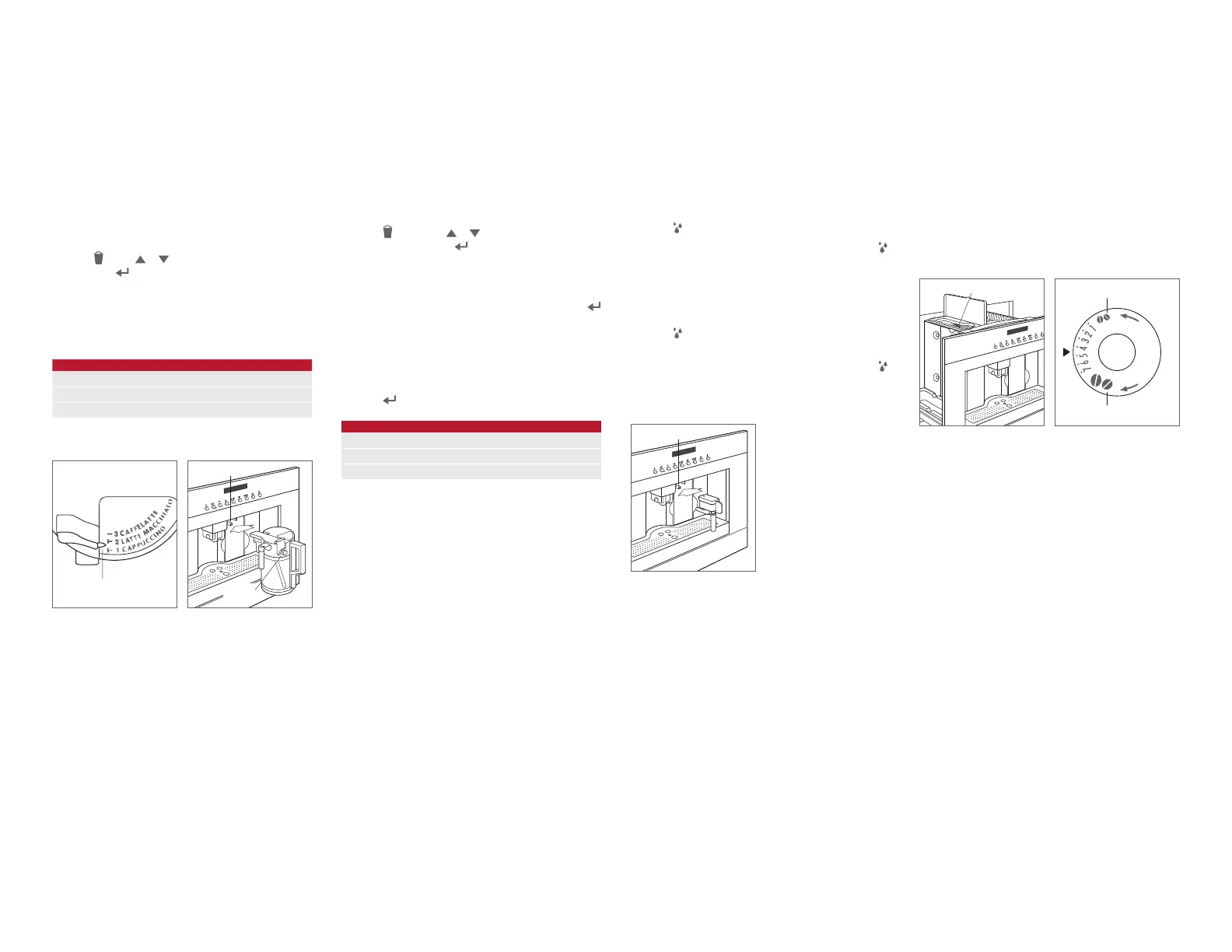
2 Adjust the froth regulator on the milk container to the
desired amount. Refer to the chart and illustration below.
3 Fill with milk and insert the milk container. Refer to the
illustration below.
4 Place a cup under the coffee spout, then verify the milk
spout is positioned over the cup.
5 Press , press or to scroll to desired beverage,
then press
to initiate the cycle.
6 Once the cycle is complete, place a cup under the milk
spout, then press and hold CLEAN on the milk container
until the bar is complete.
7 Remove milk container and place in refrigerator.
FROTH
Caffelatte No Froth
Latte Macchiato Some Froth
Cappuccino Most Froth
ADJUSTING VOLUME
Refer to the chart below for the programmed volume of milk
and coffee for each beverage. The maximum volume of milk
is limited to the volume in the container.
1 Insert the milk container.
2 Press , then press or to scroll to desired bev-
erage. Press and hold
until ‘MILK FOR MACCHIATO
PROGRAM QUANTITY’, ‘MILK FOR CAFFELATTE
PROGRAM QUANTITY’ or ‘FROTHED MILK PROGRAM
QUANTITY’ is displayed, then release.
3 Once the desired volume of milk is dispensed, press .
4 For a Latte Macchiato or Caffelatte, the unit will begin
to dispense coffee and ‘COFFEE FOR MACCHIATO
PROGRAM QUANTITY’ or ‘COFFEE FOR CAFFELATTE
PROGRAM QUANTITY’ appears on the display.
5 Once the desired volume of coffee is dispensed,
press
. The new volume will be maintained until reset.
VOLUME
MILK COFFEE
Latte Macchiato 90 ml 60 ml
Caffelatte 240 ml 60 ml
Frothed Milk 240 ml NA
FROTH
REGULATOR
RECEPTACLE
Froth regulator.
Milk container.
CLEAN
BUTTON
Coffee Mill
GRIND ADJUSTMENT
If coffee delivery is too fast or too slow, the grind can be
adjusted by turning the grind adjustment dial. Refer to the
illustrations below.
Adjustment must be made while the mill is in operation. Turn
the dial clockwise for faster coffee delivery (coarser grind)
and counterclockwise for slower coffee delivery (ner grind).
ADJUSTMENT DIAL
COARSER GRIND
FINER GRIND
Adjustment dial location.
Grind adjustment.
Hot Water
Hot water can be dispensed to make tea or for preheating
cups. Preheating cups will allow beverages to stay hot
longer.
1 Verify the water spout is installed, then place a cup
under the spout. Refer to the illustration below.
2 Press . ‘HOT WATER’ will appear on the display.
3 Once the desired volume has been dispensed, press .
ADJUSTING VOLUME
1 Verify the water spout is installed, then place a cup
under the spout.
2 Press until ‘HOT WATER PROGRAM QUANTITY’ is
displayed, then release.
3 Once the desired volume has been dispensed, press .
The new volume will be maintained until reset.
RECEPTACLE
Water spout.


 To Next Page