wolfappliance.com
|
9
COFFEE SYSTEM OPERATION
Coffee
MY COFFEE
The My Coffee setting allows the user to select any volume
between 30 ml and 207 ml.
1 Press multiple times until ‘MY COFFEE’ is
displayed.
2 Press and hold until ‘MY COFFEE—PROGRAM
QUANTITY’ is displayed, then release.
3 Once the desired amount is reached, press .
NOTE: You can program a single coffee only.
PRE-GROUND COFFEE
1 Press multiple times and select pre-ground.
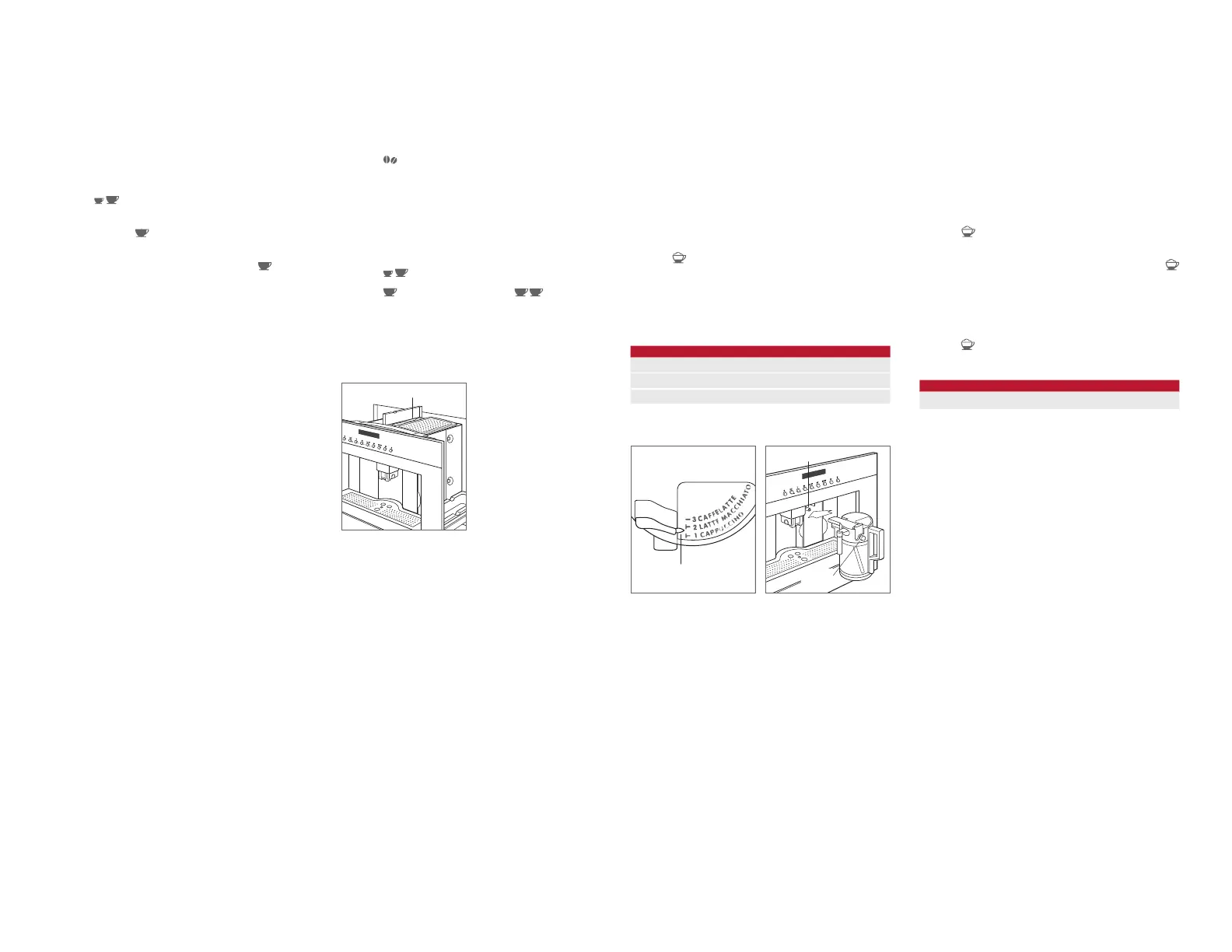
2 Using the handle, slide unit forward and open the pre-
ground coffee lid. Refer to the illustration below.
3 Use the scoop provided to place one scoop of pre-
ground coffee into the funnel, then slide unit back into
position. NOTE: Using more than one scoop will cause
unit to clog.
4 Press multiple times to select the desired volume.
5 Press to initiate the cycle. Press to initiate the
cycle and double the volume.
6 Adjust the height of the coffee spout as close to the cup
as possible.
PRE-GROUND COMPARTMENT
Pre-ground compartment.
Cappuccino
1 Remove water spout (if installed).
2 Adjust the froth regulator on the milk container to the
desired amount. Refer to the chart and illustration below.
3 Fill with milk and insert the milk container. Refer to the
illustration below.
4 Place a cup under the coffee spout, then verify the milk
spout is positioned over the cup.
5 Press to initiate the cycle.
6 Once the cycle is complete, place a cup under the milk
spout, then press and hold CLEAN on the milk container
until the bar is complete.
7 Remove milk container and place in refrigerator.
FROTH
Caffelatte No Froth
Latte Macchiato Some Froth
Cappuccino Most Froth
ADJUSTING VOLUME
Refer to the chart below for the programmed volume of milk
and coffee for cappuccino. The maximum volume of milk is
limited to the volume in the container.
1 Insert the milk container.
2 Press until ‘MILK FOR CAPPUCCINO PROGRAM
QUANTITY’ is displayed, then release.
3 Once the desired volume of milk is dispensed, press .
4 After a few seconds unit will begin to dispense coffee
and ‘COFFEE FOR CAPPUCCINO PROGRAM QUAN-
TITY’ appears on the display.
5 Once the desired volume of coffee is dispensed,
press
. The new volume will be maintained until repro-
grammed or default settings are selected.
VOLUME
MILK COFFEE
Cappuccino 70 ml 80 ml
FROTH
REGULATOR
RECEPTACLE
Froth regulator.
Milk container.
CLEAN
BUTTON


 To Next Page