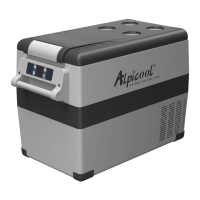
This document is a user manual for the WOLFSTORM K18 and K25 refrigerator models, providing comprehensive information on their function, technical specifications, usage, and maintenance.
Function Description
The WOLFSTORM K18 and K25 refrigerators are designed for cooling and freezing various items, offering a portable solution for keeping food and drinks fresh. They feature a high-efficiency DC compressor and conversion module, ensuring effective cooling performance. The appliances are CFC-free and utilize great heat insulation, contributing to their energy efficiency. They are equipped with an intelligent battery protection system to prevent excessive discharge of the power source. A key feature is the LCD display touch control panel, which allows users to easily set and monitor the temperature.
These refrigerators are versatile in their power supply, capable of operating on DC 12V/24V or AC 100-240V (using the adapter). They offer fast cooling capabilities, reaching temperatures as low as -20°C (-4°F) even in ambient temperatures of 25°C/77°F. The cooling mode can be switched between MAX (fast cooling) and ECO (energy-saving) to suit different needs. The display screen shows the current temperature, temperature unit (°C or °F), power saver mode (H, M, L), current voltage, and a battery indicator.
The devices are suitable for various applications, including household use, staff kitchen areas in shops and offices, camping, farmhouses, and bed and breakfast environments. They are designed to store food and medicine, emphasizing the importance of using suitable packaging or containers for these items.
Important Technical Specifications
The manual provides detailed technical specifications for both the K18 and K25 models:
| Feature |
K18 |
K25 |
| Rated Voltage |
DC12/24V or AC100-240V (using dedicated adapter) |
DC12/24V or AC100-240V (using dedicated adapter) |
| Rated Power |
60W |
60W |
| Capacity |
18L / 0.64Cu.Ft. |
25L / 0.89Cu.Ft. |
| Noise |
≤45dB |
≤45dB |
| Temperature Setting Range |
-20~20°C (-4~68°F) |
-20~20°C (-4~68°F) |
| Climate Class |
T/ST/N/SN |
T/ST/N/SN |
| Dimensions (LWH) |
585335292mm (23 3/813 3/1611 3/8 inch) |
585335352mm (23 3/813 3/1613 3/4 inch) |
| Net Weight |
10.9kg / 24lb |
12.3kg / 27.3lb |
The voltage reference table for the power saver mode indicates the cut-out and cut-in voltages for DC 12V and DC 24V inputs across different settings (L, M, H). For instance, at DC 12V, the cut-out voltage ranges from 8.5V (L) to 11.1V (H), and the cut-in voltage from 10.9V (L) to 12.4V (H). For DC 24V, the cut-out voltage ranges from 21.3V (L) to 24.3V (H), and the cut-in voltage from 22.7V (L) to 25.7V (H). The manual notes that these voltage values are theoretical and may vary. Additionally, the USB output provides +5V DC/1A, suitable for charging small devices like mobile phones and tablets.
Usage Features
The refrigerator's operation is straightforward, controlled via the display screen and several buttons:
- ON/OFF: A long press of the power button switches the device on or off.
- Function Unlock: A long press of the unlock button for three seconds unlocks the controls.
- Temperature Control: The '+' and '-' buttons are used to increase or decrease the temperature. The setting is saved automatically after 4 seconds. The temperature range is -20°C to 20°C (-4°F to 68°F).
- Cooling Mode: When powered on, pressing the gear icon switches between MAX (fast cooling) and ECO (energy-saving) modes. The factory setting is MAX.
- Temperature Unit Setting: To switch between Celsius and Fahrenheit, turn off the fridge, then press the gear icon for three seconds until the display shows E1. Continue pressing the gear icon until E5 is reached, then press '+' or '-' to select the desired unit. The factory setting is °C.
- Power Saver Mode: When powered on, a long press of the gear icon for three seconds until the screen flashes allows selection of H (High), M (Middle), and L (Low) energy use settings by pressing the gear icon again. The factory setting is H. The manual advises setting the battery gear to H if the product is connected to car power, and M or L when connected to a portable battery or other back-up battery. It also states that if a voltage protection code F1 is shown on the panel, the battery gear should be set to H if the product keeps working after turning off the car engine, or the product may drain the battery.
- Reset: To reset the settings, switch off the fridge, then long press the gear icon for three seconds until E1 displays. While in E1 mode, long press '+' and '-' simultaneously for three seconds.
The manual also provides recommended temperatures for common foods:
- Drinks: 5°C/41°F
- Fruits: 5-8°C/41-46°F
- Vegetables: 3-10°C/37-50°F
- Delicatessen: 4°C/39°F
- Wine: 10°C/50°F
- Ice cream: -10°C/14°F
- Meat: -18°C/0°F
Maintenance Features
Proper care and maintenance are crucial for the longevity and optimal performance of the refrigerator.
Cleaning:
- Always unplug the device first to avoid electric shock.
- Use a wet cloth to clean the device and dry it.
- Do not soak the device in water and do not wash it directly.
- Do not use abrasive cleaning agents as these can damage the device.
Storage:
If the device will not be in use for a long time, follow these steps:
- Turn off the power.
- Remove all items stored in the device.
- Wipe off excess water from the fridge with a soft rag.
- Put the device in a cool and dry place.
- Leave the lid slightly open to prevent odors from forming.
Defrosting:
Humidity can cause frost to form inside the cooling device or on the evaporator, which reduces cooling capacity. To defrost:
- Switch off the device.
- Take out the contents of the device.
- Keep the lid open.
- Wipe off the defrosted water.
- WARNING: Never use hard or sharp tools to remove ice or to loosen objects that have frozen in place, as this can damage the device.
Troubleshooting:
The manual includes a troubleshooting guide for common issues:
- Refrigerator does not work: Check if the switch is on, if the plug and socket are connected well, for blown fuses, and if the power supply is malfunctioning. If the fridge frequently causes a start delay of the compressor, switch it on/off.
- Refrigerator compartments are too warm: The door may be opened frequently, a large amount of warm or hot food was stored recently, or the refrigerator has been disconnected for a long time.
- Food is frozen: The temperature was set too low.
- "Water flow" noise inside the refrigerator: This is a normal occurrence caused by the flow of refrigerant.
- Waterdrops around the refrigerator casing or door gap: This is normal; moisture will condense to water when it touches a cold surface of the refrigerator.
- Compressor is slightly noisy when starting: This is normal; the noise will be reduced after the compressor works stably.
- Error Codes (F1-F8):
- Code F1 displayed: Possible cause is low voltage to the fridge. Adjust the power saver from High to Medium or from Medium to Low.
- Code F2 displayed: Possible cause is an overloaded condenser fan. Disconnect power to the fridge for 5 minutes and re-start. If the code shows again, contact the manufacturer for service.
- Code F3 displayed: Possible cause is the compressor starting too frequently. Disconnect power to the fridge for 5 minutes and re-start. If the code shows again, contact the manufacturer for service.
- Code F4 displayed: Possible cause is the compressor not kicking in. Disconnect power to the fridge for 5 minutes and re-start. If the code shows again, contact the manufacturer for service.
- Code F5 displayed: Possible cause is overheating of the compressor & electronics. Disconnect power to the fridge for 5 minutes and re-start. If the code shows again, contact the manufacturer for service.
- Code F6 displayed: Possible cause is no parameter can be detected by the controller. Disconnect power to the fridge for 5 minutes and re-start. If the code shows again, contact the manufacturer for service.
- Code F7 or F8 displayed: Possible cause is a faulty temperature sensor. Contact the manufacturer for service.
Warranty:
A limited warranty is provided for 1 year from the date of purchase, covering product malfunction except in the following situations: accidental damage, damage caused by acts of nature (earthquakes, fires, hurricanes, etc.), damage from inappropriate use or violating instructions, or damage or malfunction caused by disassembly. For any suggestions or questions, customers are advised to contact customer service at service@wolfstorm.com and provide their order number and where they purchased the products.

 Need help?
 General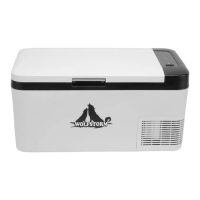

 To Next Page