Need help?
Do you have a question about the WolfVision Cynap Core PRO and is the answer not in the manual?
Details the all-in-one collaboration and presentation solution, supporting up to 4K UHD resolution.
Instructions for connecting the Cynap Core PRO, emphasizing power connection as the final step.
Illustrates input sources, control methods, and output connections for the Cynap Core PRO.
Guide on accessing the GUI via web browser or remote control, and entering the default admin password.
Steps for connecting via Miracast on Windows 8.1+ and Android devices for screen mirroring.
Instructions for using AirPlay to mirror screens from MacBook, iMac, iPhone, and iPad.
Guide to casting content using Chromecast on various platforms and vSolution Cast on Windows.
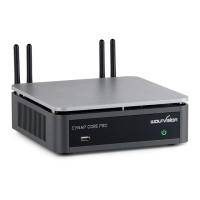
The WolfVision Cynap Core PRO is an all-in-one collaboration and presentation solution designed to facilitate seamless knowledge sharing and interaction in various professional environments. This device is engineered to support a wide range of input sources and output destinations, making it a versatile hub for meetings, presentations, and educational settings. Its primary function is to enable users to share content from their personal devices, stream information, and display documents and media with support for high-resolution 4K UHD.
At its core, the Cynap Core PRO acts as a central processing unit for managing and distributing digital content. It integrates multiple functionalities into a single device, eliminating the need for separate components for different tasks.
Input Management: The device is capable of handling a diverse array of input sources simultaneously. It supports up to four simultaneous BYOD (Bring Your Own Device) wireless connections, allowing multiple users to share content from their laptops, tablets, or smartphones without the hassle of cables. This wireless capability is crucial for dynamic and interactive sessions where participants need to contribute content quickly and efficiently. In addition to wireless inputs, the Cynap Core PRO features USB drive connectivity, enabling users to access and display files directly from external storage devices. It also includes a 1x HDMI input, providing a reliable wired connection for devices that require it, such as traditional laptops or media players. For networked environments, the device supports IP-Streams and can access content from Cloud services and Network drives, expanding its reach to virtually any digital content source. A built-in web browser further enhances its input capabilities, allowing direct access to online resources.
Control and Interaction: The Cynap Core PRO offers multiple methods for control and interaction, ensuring flexibility for different user preferences and room setups. The primary control interface is a touch display, which allows for intuitive navigation and content manipulation. For more traditional control, users can connect a USB mouse and keyboard. Additionally, the device can be controlled via a dedicated app or through a web browser on a connected PC or tablet, providing remote management capabilities. This multi-faceted control system ensures that users can easily manage presentations, switch between sources, and interact with content regardless of their proximity to the device. The system's graphical user interface (GUI) is designed for ease of use, with password-protected settings to maintain security and prevent unauthorized changes.
Output and Collaboration: The device excels in its output capabilities, designed to facilitate effective collaboration and content display. It provides both audio and HDMI outputs, allowing connection to a variety of display devices, including projectors, monitors, and sound systems, with support for 4K resolution. A key feature of the Cynap Core PRO is its integration with popular web conferencing platforms such as Zoom, Teams, and WebRTC. This enables seamless participation in virtual meetings, allowing users to share their content with remote participants directly through the device. Furthermore, it supports streaming to other vSolution Cynap systems, creating a cohesive ecosystem for larger installations or multi-room environments. The device also integrates with vSolution MATRIX networked AV solutions, providing advanced capabilities for managing and distributing AV signals across an entire network.
The Cynap Core PRO is designed with a strong emphasis on user-friendliness and versatility, offering a range of features that enhance the collaboration experience.
Wireless Content Sharing: The device supports various wireless content sharing protocols, making it compatible with a wide array of personal devices.
Intuitive Control Interface: The device's GUI is designed for ease of navigation. Accessing the GUI via a web browser on a connected PC or tablet, or through a connected USB mouse and keyboard, allows users to manage all settings. The "Control center," accessible via a dedicated button, provides quick access to frequently used functions and system settings (represented by a cogwheel icon).
Security: The settings within the GUI are password-protected, ensuring that only authorized personnel can make changes to the system configuration. The initial default admin password is "Password," which users are advised to change for enhanced security.
Multi-Source Display: The ability to handle multiple simultaneous inputs means that content from different sources can be displayed side-by-side or switched between seamlessly, fostering dynamic discussions and comparisons.
Integrated Help: The system includes integrated help documentation, providing users with detailed information and guidance on various features and functionalities, which is particularly useful for first-time users or when troubleshooting.
While the manual primarily focuses on setup and usage, some aspects touch upon maintenance implicitly.
Firmware Updates: Although not explicitly detailed in this quick start guide, devices like the Cynap Core PRO typically receive firmware updates to improve performance, add new features, and address security vulnerabilities. Regular updates are crucial for maintaining optimal functionality and compatibility with evolving technologies.
Network Configuration: The ability to connect to various network types (WLAN, LAN) and access network drives implies that network settings can be configured and managed, which is a form of maintenance to ensure stable connectivity. The device's IP address is displayed, allowing for easy identification and network management.
Troubleshooting: The integrated help documentation serves as a primary resource for troubleshooting common issues, guiding users through potential solutions without requiring external support.
Physical Connections: The hardware connection instructions emphasize making all necessary connections correctly and plugging in the power cord as the last step. This systematic approach helps prevent damage during setup and ensures proper operation, which is a fundamental aspect of device maintenance. The robust design of the device, as suggested by the image, implies durability and reliability, reducing the need for frequent physical maintenance.
In summary, the WolfVision Cynap Core PRO is a comprehensive and user-friendly solution for modern collaboration and presentation needs, offering extensive input and output capabilities, flexible control options, and robust support for various wireless sharing protocols, all designed to facilitate efficient knowledge creation and sharing.
 General
| Power Supply | 100-240 V, 50/60 Hz |
|---|---|
| Number of HDMI Inputs | 2 |
| Number of HDMI Outputs | 1 |
| Simultaneous Windows/Sources | 4 |
| Annotation | Yes |
| Streaming | Yes |
| Recording | Yes |
| BYOD | Yes |
| Touchscreen Compatible | Yes |
| Video Outputs | HDMI |
| Audio Outputs | 3.5 mm Jack, HDMI |
| Wireless Presentation | Yes |
| Connectivity | HDMI, USB, Ethernet |
| Processor | Quad-Core |
| Video Inputs | HDMI, USB |
| Audio Inputs | 3.5 mm jack |
| Supported Resolutions | Up to 4K UHD |
| Operating System | Linux-based |

 To Next Page